


The UCM provides a new API interface to query, edit PBX settings and implement multiple call functions on another server connected to it via API. UCM will actively send system reports and call reports to this other server. Additionally, legacy CDR API, REC API and PMS API in addition to QUEUE API are included and supported by default when enabling API.
The UCM6xxx series includes the UCM620x, UCM630x, and UCM630xA series as well as the UCM6510.
API Basics
To get started with UCM’s API feature, users must configure the HTTPS API settings and get familiar with the feature’s communication method, request structure, response messages, and event reports. WebSocket is supported to ensure a bi-directional communication between the IPPBX and the client for immediate notifications and reports.
Configuring the API
Enabling PBX API Interface
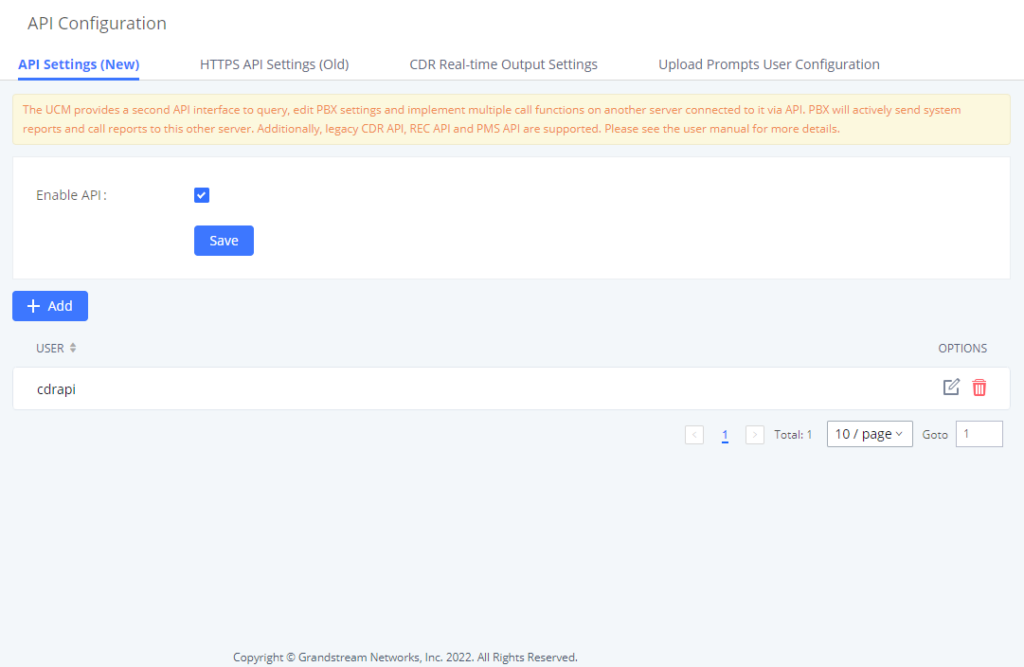
- Log into the UCM web UI and navigate to Integrations > API Configuration > HTTPS API Settings (New).
- Check the Enable option and configure a username and password. These credentials will be used when connecting to the API.
Enable | Enable/Disable API. The default setting is disabled. |
Username | Configure the username for API Authentication. |
Password | Configure the password for API Authentication. |
Call Control | If enabled, 3rd party applications will be able to manage inbound calls via API actions. |
New API Configuration Parameters
Login Restrictions
When several failed login attempts have been made from a specific IP address, that IP address will be added to the UCM’s blacklist and will be unable to access the UCM. To ensure this doesn’t happen to trusted IP addresses, consider enabling and adding its IP address to the whitelist as shown on the same page as the server configuration.
Communication
Communication Protocol
The API uses HTTPS protocol and the same certificate used for UCM web portal. If the UCM is using HTTP, the API feature cannot be used.
JSON data into HTTP request
Below is a JSON example of challenge action and how the JSON script will be encapsulated in HTTPS Post request:
curl -H "Content-Type: application/json;charset=UTF-8" -H "Connection: close" -X POST -d '{
"request": {
"action": "challenge",
"user": "cdrapi",
"version": "1.0"
}
}' -k "https://192.168.5.153:8089/api" --insecure
As a response to the sent request, the UCM will return a challenge string which will be used to generate the token as mentioned above and with the same structure the login action needs to be sent to have the cookie id as response.
Communication Method
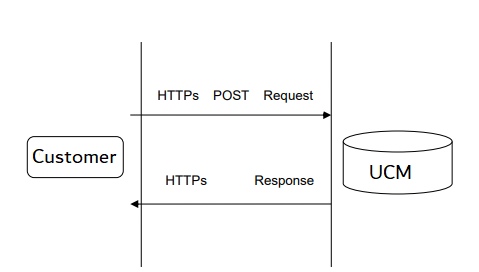
The communication between the UCM and 3rd party applications is like the following:
- 3rd party application server sends request to UCM:
- 3rd party application initiates the request.
- 3rd party application is the client, and UCM is the server.
- Scenario: 3rd party application initiates calls and sends query to UCM.
Version Control
“Challenge” requests must contain the API version number. If version is not specified, requests will be parsed based on the latest version of the API, and this may result in information being processed incorrectly. Thus, it is highly recommended to include version number in the challenge request.
Example: If the latest API version is 1.2, and the 3rd party interface was developed using version 1.0, version 1.0 must be included when sending the challenge request.
{"request": {"action": "challenge", "version": "1.0", "user": "api"}}
Operation Log
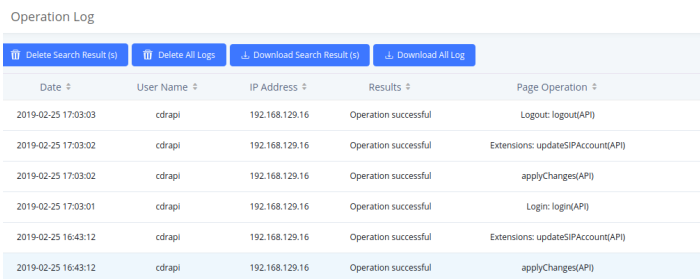
UCM’s Operation Log feature is able to display API activity history. API actions will be labeled with “(API)” at the end of each entry. Operation Log entries can be filtered and deleted.
Establishing Connection and User Authentication
To use HTTPS API users need to connect to the UCM’s IP address with HTTPS/HTTP port which is by default 8089 then authenticate using the configured Username and Password.
Challenge
The HTTP authentication is based on challenge/response authentication protocol. The client sends a request for a challenge.
{
"request":{
"action":"challenge",
"user":"cdrapi",
"version":"1.0"
}
}{
"response":{
"challenge":"0000001652831717"
},
"status":0
}Key word | Value | Mandatory | Type | Note |
Request Parameter | ||||
user | Yes | string | API username | |
Version | No | string | API protocol version. New versions will be available for future interfaces. Different versions will be compatible with one another. This keyword is not mandatory. By default, the latest version will be used. If the requested version cannot be matched, the latest version is used | |
Successful response | ||||
status | 0 | Yes | int | Successful response |
challenge | 16-digit Random number | Yes | string | Random string returned by the API used to generate secret key for logging in. |
Failed response | ||||
status | Yes | Please see the error code list for more details. | ||
remain_num | No | int | When obtaining parameter failed, the number of remaining attempts will be returned. After exceeding the remaining number of attempts, this IP and username will be added to UCM login blacklist. On UCM web page, the banned IP can be removed. | |
remain_time | No | int | When an IP address or username has been banned, the ban period will be returned. | |
HTTP Challenge
Login
Upon obtaining the challenge string, the client then creates an MD5 hash consisting of the challenge and the user password. By sending a login command with the username and MD5 hash, the client will be able to log in. User information will be returned upon successful login.
{
"request": {
"action": "login",
"token": "0faa24433e3c7a9bcfa8000f735305d5",
"url": "http://192.168.5.199:8070",
"user": "cdrapi"
}
}{
"response": {
"cookie": "sid1652831717-1574421057"
},
"status": 0
}Key word | Value | Mandatory | Type | Note |
Request Parameter | ||||
user | Yes | string | API username | |
token | No | string | Verification code MD5(${challenge}${password}) | |
url | No | string | The URL used by the 3rd party application to obtain API reports. For example: ${ip}:${port}/${path} Note: If this parameter is not included, no API report can be sent. Note: This feature is not supported yet. | |
Successful response | ||||
status | 0 | Yes | int | Successful response |
Cookie | Yes | string | Cookie is generated after the 3rd party application successfully connects to the UCM. Excluding challenge and login requests, other API requests need to include the cookie returned by API authentication. Cookie times out in 10 minutes. | |
Failed response | ||||
status | Yes | Please see the error code list for more details. | ||
remain_num | No | int | When obtaining parameter failed, the number of remaining attempts will be returned. After exceeding the remaining number of attempts, this IP and username will be added to UCM login blacklist. On UCM web page, the banned IP can be removed. | |
remain_time | No | int | When an IP address or username has been banned, the ban period will be returned. | |
HTTPS API Login
Logout
The user can send a logout request to log out of the API session.
- Request
{
"request":{
"action":"logout",
"cookie":"sid930353464-1670323942"
}
}- Response
{
"response":{},
"status":0
}
Key word | Value | Mandatory | Type | Note |
Request Parameter | ||||
cookie | No | string | Verification code MD5(${challenge}${password}) | |
Successful response | ||||
status | 0 | Yes | int | Successful response |
Failed response | ||||
status | Yes | Please see the error code list for more details. | ||
Session Lifetime and Keepalive Mechanisms
The IPPBX HTTPS API and WebSocket (WSS) API use different session models and keepalive mechanisms. Integrators must handle each independently to prevent unintended session expiration.
HTTPS API Session Lifetime
After a successful HTTPS API login, the system issues a session cookie. This cookie represents an authenticated HTTPS session.
The HTTPS API session expires after 5 minutes of inactivity, meaning no HTTPS API requests received within this period.
Once expired, all subsequent HTTPS API requests using the expired cookie will fail and the client must perform a new challenge and login.
HTTPS Session Keepalive
To prevent HTTPS session expiration, the API provides a ping action that refreshes the session inactivity timer. Since ping is counted as HTTPS activity, clients must send a ping request at least once every five minutes with a valid session cookie to maintain the session.
- Ping Request Example
{
"request": {
"action": "ping",
"cookie": "sid1652831717-1574421057"
}
}- Ping Successful Response Example
{
"response": {},
"status": 0
}
- Ping Failed Response Example (Expired Session)
{
"response": {},
"status": -8
}
Data Definition
Request Data
Action: Define the action needed to be executed on the UCM.
Cookie: Session identifier.
Parameters: Parameters of the defined action.
{
"request":{
"action":"",
"cookie":"",
"options":"" #This field is optional to include parameters
}
}
Response Data
Status: Please refer to the return code table. [Error Return Codes]
Applying Configuration (applyChanges)
Many HTTPS API operations modify the running configuration of the IPPBX. For these changes to take effect, the API client must explicitly invoke the applyChanges action.
Failure to call applyChanges after a configuration-changing operation will result in the change being stored but not activated.
The applyChanges action must be called after any HTTPS API request that modifies system configuration. Read-only and call-control operations do not require applyChanges.
- Request Example
{
"request": {
"action": "applyChanges",
"cookie": "sid1652831717-1574421057"
}
}
- Successful Response Example:
{
"response": {
"settings": "0"
},
"status": 0
}
- Failure Response Example (Apply in Progress)
If applyChanges is called while a previous configuration apply operation is still in progress, the API returns the following response:
{
"response": {},
"status": -45
}Key Word | Value | Mandatory | Type | Note |
Request parameter | ||||
cookie | yes | string | Returned value after login. All requests must include this value. If no cookie is included, error code -6 will be returned. | |
Successful response | ||||
status | 0 | yes | int | Successful response, status is 0 |
Failed response | ||||
status | yes | int | Please see the error code list for more details. | |
applyChanges
The following HTTPS API categories do not modify persistent configuration and therefore do not require applyChanges:
- Authentication and session control:
challenge,login,logout,ping - Query / list operations:
listAccount,getSIPAccount,listTrunkGroup,getQueue, etc. - Call control operations:
dialExtension,dialOutbound,hangup,hold,callTransfer - CDR and recording retrieval:
cdrapi,recapi,getRecordInfosByCall
The following table defines when applyChanges is required.
Configuration Category | APIs List |
Extensions / Users | addSIPAccountAndUser, updateSIPAccount, deleteUser, updateUser |
SIP Trunks | addSIPTrunk, updateSIPTrunk, deleteSIPTrunk |
Analog Trunks | addAnalogTrunk, updateAnalogTrunk, deleteAnalogTrunk |
Trunk Groups | addSIPTrunkGroup, updateTrunkGroup, deleteSIPTrunkGroup |
DOD Rules | addDODVoIPTrunk, updateDODVoIPTrunk, deleteDODVoIPTrunk |
Inbound Routes | addInboundRoute, updateInboundRoute, deleteInboundRoute |
Outbound Routes | addOutboundRoute, updateOutboundRoute, deleteOutboundRoute |
Call Queues | addQueue, updateQueue, deleteQueue |
IVR | addIVR, updateIVR, deleteIVR |
Paging / Intercom | addPaginggroup, updatePaginggroup, deletePaginggroup |
PIN Sets | addPinSets, updatePinSets, deletePinSets |
Operation Methods
Get System Configuration
getSystemStatus
The “getSystemStatus” action will return the system information.
- Request
{
"request":{
"action":"getSystemStatus",
"cookie":"sid877877-1574437822"
}
}
- Response
{
"response":{
"idle-time":"14:32:44",
"part-number":"9660002815A",
"serial-number":"21AWMJPH70BCA783",
"system-time":"2019-11-22 17:50:26 UTC+02:00",
"up-time":"07:33:15"
},
"status":0
}
Key Word | Value | Mandatory | Type | Note |
Request Parameter | ||||
cookie | Yes | string | Returned value after login. All requests must include this value. If no cookie is included, error code -6 will be returned. | |
Successful response | ||||
status | 0 | Yes | int | Return successful, status is 0 |
part-number | No | string | Product part number | |
up-time | No | string | System uptime since bootup | |
idle-time | No | string | System idle time | |
system-time | No | string | System time | |
Failed response | ||||
status | yes | int | Please see the error code list for more details. | |
getSystemStatus
getSystemGeneralStatus
The “getSystemGeneralStatus” action will return the version information.
- Request
{
"request":{
"action":"getSystemGeneralStatus",
"cookie":"sid877877-1574437822"
}
}
- Response
{
"response":{
"base-version":"1.0.20.13",
"boot-version":"1.0.20.8",
"core-version":"1.0.20.8",
"gswave-version":"1.0.20.13",
"lang-version":"1.0.20.13",
"product-model":"UCM6202 V1.5A",
"prog-version":"1.0.20.13",
"rcvr-version":"1.0.20.8"
},
"status":0
}
Key Word | Value | Mandatory | Type | Note |
Request Parameter | ||||
cookie | yes | string | Returned value after login. All requests must include this value. If no cookie is included, error code -6 will be returned. | |
Successful response | ||||
status | 0 | yes | int | Successful response, status is 0 |
product-model | no | string | Product model | |
base-version | no | string | Base version | |
prog-version | no | string | Program version | |
boot-version | no | string | Boot version | |
core-version | no | string | Core version | |
rcvr-version | no | string | Recovery version | |
lang-version | no | string | Lang version | |
gswave-version | no | string | GSWave version | |
Failed response | ||||
status | yes | int | Please see the error code list for more details. | |
getSystemGeneralStatus
Extension
Add SIPAccountAndUser
Creates a new SIP extension. The addSIPAccountAndUser’s supported parameters and values are the same as the existing updateSIPAccount command.
- Request
{
"request": {
"action": "addSIPAccountAndUser",
"cookie": "sid343971159-1551949394",
"extension": "1001",
"max_contacts": "3",
"permission": "internal",
"language": "ch",
"secret": "Abc123456!",
"vmsecret": "Abc123456!",
"user_password": "Abc123456!",
"wave_privilege_id": "0",
"presence_settings":
[{
"presence_status": "available",
"cfu_destination_type": "1",
"cfb_destination_type": "0",
"cfn_destination_type": "5",
"cfu_timetype": "0",
"cfb_timetype": "0",
"cfn_timetype": "0",
"cfu": "6000",
"cfn": "6500",
"cfb": ""
}, {
"presence_status": "away",
"cfu_destination_type": "5",
"cfb_destination_type": "0",
"cfn_destination_type": "0",
"cfu_timetype": "0",
"cfb_timetype": "0",
"cfn_timetype": "0",
"cfu": "6500",
"cfn": "",
"cfb": ""
}, {
"presence_status": "chat",
"cfb": null,
"cfn": null,
"cfu": null,
"cfb_timetype": 0,
"cfn_timetype": 0,
"cfu_timetype": 0,
"cfb_destination_type": "0",
"cfn_destination_type": "0",
"cfu_destination_type": "0"
}, {
"presence_status": "userdef",
"cfu_destination_type": "0",
"cfb_destination_type": "0",
"cfn_destination_type": "0",
"cfu_timetype": "0",
"cfb_timetype": "0",
"cfn_timetype": "0",
"cfu": "",
"cfn": "",
"cfb": ""
}, {
"presence_status": "unavailable",
"cfb": null,
"cfn": null,
"cfu": null,
"cfb_timetype": 0,
"cfn_timetype": 0,
"cfu_timetype": 0,
"cfb_destination_type": "0",
"cfn_destination_type": "0",
"cfu_destination_type": "0"
}]
}
}
- Response
{
"response": {
"need_apply": "yes"
},
"status": 0
}
deleteUser
Delete an existing SIP extension.
Supported parameters:
Key Word | Value | Mandatory | Type | Note |
Request Parameters | ||||
cookie | yes | string | Returned value after login. All requests must include this value. If no cookie is included, error code -6 will be returned. | |
user_name | yes | string | The extension number | |
- Request
{
"request":{
"action":"deleteUser",
"cookie":"sid1466367100-1946280676",
"user_name":"1003"
}
}
- Response
{
"response": {
"need_apply": "yes"
},
"status": 0
}
listAccount
The “listAccount” action will return information about the extensions created on the UCM, such as the extension’s number, its name etc.
- Request
{
"request":{
"action":"listAccount",
"cookie":"sid877877-1574437822",
"item_num":"30",
"options":"extension,account_type,fullname,status,addr",
"page":"1",
"sidx":"extension",
"sord":"asc"
#If only the action and the cookie were defined, this will return all the available account
}
}
- Response
{
"response":{
"account":[
{
"account_type":"SIP(WebRTC)",
"addr":"-",
"extension":"1000",
"fullname":null,
"status":"Unavailable"
},
{
"account_type":"SIP(WebRTC)",
"addr":"192.168.5.95:62144",
"extension":"1102",
"fullname":null,
"status":"Idle"
},
],
"page":1,
"total_item":2,
"total_page":1
},
"status":0
}
Key Word | Value | Mandatory | Type | Note |
Request Parameter | ||||
cookie | yes | string | Returned value after login. All requests must include this value. If no cookie is included, error code -6 will be returned. | |
page | no | int | Retrieves the extensions on the specified page. This page is based on the value for the item_num parameter. If item_num is unspecified, all items will be on page 1. | |
item_num | no | int | Maximum number of extensions to retrieve for the query. If unspecified, all extensions will be returned. This also indicates the number of items per page for the page parameter | |
sord | acs, desc | no | string | Sorting method. acs stands for ascending, and desc stands for descending. |
sidx | no | string | Sort according to the index. | |
options | extension, account_type, fullname, out_of_service, status, addr, urgemsg, newms, oldmsg | no | string | Specify the extension details to retrieve and display. Multiple items can be entered and must be separated by commas. If unspecified, all details will be returned. |
Successful response: | ||||
status | 0 | yes | int | Successful response, status is 0 |
account | yes | Json array | Account List | |
total_item | yes | int | Total number of items on the list | |
total_page | yes | int | Total number of items on the list | |
page | yes | int | Page the extensions are on. | |
extension | yes | string | Extension number. | |
account_type | SIP, IAX, FXS, SIP(Web RTC) | no | string | Extension type. |
fullname | no | string | Caller ID Name, which consists of first_name, space, and last name. | |
out_of_service | Yes, no | no | string | Indicates whether the extension is out of service |
status | Idle, InUse, Busy, Unavailable, Ringing | no | string | Just “Extension status” is fine. |
addr | no | string | IP address and port number of registered extensions. If there are multiple devices under the same account, they will be separated by commas. | |
urgmsg | no | int | Number of urgent messages. | |
newmsg | no | int | Number of new messages. | |
oldmsg | no | int | Number of old messages. | |
presence_status | unavailable, available, away, chat, dnd, userdef | no | string | Presence status. Only SIP extensions support presence status. |
presence_def_script | Custom presence status. If presence_status is userdef, this parameter’s value will be used. | |||
user_name | no | string | Typically the same as extension number. | |
email_to_user | no | string | Indicates whether or not to send email notifications to an extension’s configured email address if the extension gets updated. | |
Failed response: | ||||
status | yes | int | Please see the error code list for more details. | |
listAccount
getSIPAccount
The “getSIPAccount” action will return information about specific extension.
- Request
{
"request":{
"action":"getSIPAccount",
"cookie":"sid877877-1574437822",
"extension":"1000"
}
}
- Response
{
"response":{
"cti_feature_privilege":{
"active_call":"no",
"callbarge":"no",
"extension_status":"no",
"hangup":"no"
},
"extension":{
"account_type":"SIP(WebRTC)",
"alertinfo":null,
"allow":"ulaw,alaw,gsm,g726,g722,g729,h264,ilbc",
"authid":null,
"auto_record":"off",
"bypass_outrt_auth":"no",
"call_waiting":"yes",
"callbarging_monitor":"",
"cc_agent_policy":"never",
"cc_max_agents":1,
"cc_max_monitors":2,
"cc_monitor_policy":"never",
"cidnumber":"1000",
"custom_autoanswer":"no",
"directmedia":"no",
"dnd":"no",
"dnd_timetype":0,
"dndwhitelist":"",
"dtmfmode":"rfc2833",
"emergcidnumber":null,
"en_ringboth":"no",
"enable_ldap":"yes",
"enable_qualify":"no",
"enable_webrtc":"yes",
"enablehotdesk":"no",
"encryption":"no",
"extension":"1000",
"external_number":null,
"fax_gateway":"no",
"faxdetect":"no",
"fullname":null,
"fwdwhitelist":null,
"hasvoicemail":"yes",
"ice_support":"yes",
"intranet_ip_filter":"no",
"limitime":null,
"local_network1":null,
"local_network10":null,
"local_network2":null,
"local_network3":null,
"local_network4":null,
"local_network5":null,
"local_network6":null,
"local_network4":null,
"local_network5":null,
"local_network6":null,
"local_network7":null,
"local_network8":null,
"local_network9":null,
"max_contacts":1,
"media_encryption":"auto_dtls",
"missed_call":"no",
"mohsuggest":"default",
"nat":"yes",
"out_of_service":"no",
"permission":"internal",
"presence_def_script":null,
"presence_status":"available",
"qualify":1000,
"qualifyfreq":60,
"ring_timeout":null,
"ringboth_timetype":0,
"sca_enable":"no",
"seamless_transfer_members":"",
"secret":"pas0",
"sendtofax":null,
"skip_auth_timetype":0,
"skip_vmsecret":"no",
"specific_ip":null,
"strategy_ipacl":0,
"t38_udptl":"no",
"tel_uri":"disabled",
"use_avpf":"yes",
"use_callee_dod_on_fm":"no",
"use_callee_dod_on_fwd_rb":"no",
"user_outrt_passwd":null,
"vmsecret":"5333"
},
"sip_presence_settings":[
{
"cfb":null,
"cfb_destination_type":"0",
"cfb_timetype":0,
"cfn":null,
"cfn_destination_type":"0",
"cfn_timetype":0,
"cfu":null,
"cfu_destination_type":"0",
"cfu_timetype":0,
"presence_status":"available"
},
"sip_presence_settings":[
{
"cfb":null,
"cfb_destination_type":"0",
"cfb_timetype":0,
"cfn":null,
"cfn_destination_type":"0",
"cfn_timetype":0,
"cfu":null,
"cfu_destination_type":"0",
"cfu_timetype":0,
"presence_status":"available"
},
{
"cfb":null,
"cfb_destination_type":"0",
"cfb_timetype":0,
"cfn":null,
"cfn_destination_type":"0",
"cfn_timetype":0,
"cfu":null,
"cfu_destination_type":"0",
"cfu_timetype":0,
"presence_status":"away"
},
{
"cfb":null,
"cfb_destination_type":"0",
"cfb_timetype":0,
"cfn":null,
"cfn_destination_type":"0",
"cfn_timetype":0,
"cfu":null,
"cfu_destination_type":"0",
"cfu_timetype":0,
"presence_status":"chat"
},
{
"cfb":null,
"cfb_destination_type":"0",
"cfb_timetype":0,
"cfn":null,
"cfn_destination_type":"0",
"cfn_timetype":0,
"cfu":null,
"cfu_destination_type":"0",
"cfu_timetype":0,
"presence_status":"unavailable"
},
{
"cfb":null,
"cfb_destination_type":"0",
"cfb_timetype":0,
"cfn":null,
"cfn_destination_type":"0",
"cfn_timetype":0,
"cfu":null,
"cfu_destination_type":"0",
"cfu_timetype":0,
"presence_status":"userdef"
}
],
"voicemail":{
"vm_attach":null,
"vm_reserve":null
}
},
"status":0
}
Key Word | Value | Mandatory | Type | Note |
Request Parameter | ||||
cookie | yes | string | Returned value after login. All requests must include this value. If no cookie is included, error code -6 will be returned. | |
extension | Existing extension number | yes | string | Specify which extension’s configuration to retrieve. |
Successful response | ||||
status | 0 | yes | int | The response is successful, status is 0. |
extension | no | Json obj | The specific configuration of the extension. | |
account_type | SIP, IAX, FXS, SIP(WebRTC) | no | string | Extension type. |
fullname | no | string | Caller ID Name, which consists of first_name, space, and last name. | |
hasvoicemail | yes, no | no | string | Indicates whether voicemail is enabled or disabled. |
cidnumber | no | string | Caller ID of incoming calls. | |
secret | no | string | SIP/IAX password. | |
vmsecret | no | string | Voicemail password. | |
skip_vmsecret | Yes, no | no | string | Indicates whether an extension will need to enter a password when dialing into voicemail. |
ring_timeout | no | int | Extensions’ ring timeout. If unspecified, the system ring timeout will be used. Default is 60 seconds. | |
auto_record | all, external, internal, off | no | string | Auto-recording. all:all incoming calls to the extension will be recorded external: only calls to external numbers will be recorded. internal: only calls to internal numbers will be recorded. off: No calls will be recorded. |
encryption | no, yes, support | no | string | SRTP encryption mode. Set whether to turn on SRTP mode to encrypt RTP streams. Support: Enable but not forced. |
faxdetect | no, yes | no | string | Configure the mode of using fax. There are 2 available settings. The default is “no”. no:Disable fax related features. |
sendtofax | yes, no | no | string | Indicates whether fax will also be sent to the extension’s configured email address when receiving a fax call. |
strategy_ipacl | 0,1,2 | no | int | Indicates the device’s ACL policy. |
local_network1 | no | string | local_network1-10 are the subnets that are allowed to register to the extension when 1 is configured as the value for strategy_ipacl. | |
local_network2 | no | string | ||
local_network3 | no | string | ||
local_network4 | no | string | ||
local_network5 | no | string | ||
local_network6 | no | string | ||
local_network7 | no | string | ||
local_network8 | no | string | ||
local_network9 | no | string | ||
local_network10 | no | string | ||
specific_ip | no | string | When the policy is 2, that is, Special IP Address, Format is xxx.xxx.xxx.xxx or xxxx:xxxx:xxxx:xxxx:xxxx:xxxx:xxxx:xxxx. | |
allow | ulaw, alaw, gsm, g726, g722, g729, h264, ilbc, g726aal2, adpcm, g723, h263, h263p, vp8, opus, h265, rtx | no | string | The extension’s supported codecs. Several codecs can be configured for a single extension. |
dnd | yes, no | no | string | Indicates DND status. If set to yes, all calls will be ignored, and the extension’s call forwarding rules will not take effect |
dnd_timetype | 0,1,2,3,4,5,6,8 | no | int | The time conditions where DND status will be enabled. 0:All Time 1:Office Time 2:Out of Office Time 3:Holiday 4: Out of Holiday 5:Out of office time or holiday 6:Specific time 8:Office time and out of holiday |
permission | internal,internal-local,internal-local-national,internal-local-national-international | no | string | Outbound call permissions of the extension. internal:Internal internal-local:Local internal-local-national:Nationwide internal-local-national-international:International |
nat | yes, no | no | string | Indicates whether the extension is behind a NAT. If the UCM is using a public IP address to communicate with devices behind NAT, one-way audio issues may occur if this option is not enabled, NAT is not configured properly, or if SIP/RTP ports are not supported by the firewall. |
bypass_outrt_auth | no, yes, bytime | no | string | Indicates whether the extension can skip password authentication when dialing out of a trunk yes: Users will not need to enter a password when dialing out of a trunk. bytime: Users will not need to enter a password when dialing out of a trunk only during the specified time condition. |
skip_auth_timetype | 0,1,2,3,4,5,6,8 | no | int | Time condition where the extension will be able to dial out of a trunk without needing to enter a password. 0:All Time 1:Office Time 2:Out of Office Time 3:Holiday 4: Out of Holiday 5:Out of office time or holiday 6:Specific time 8:Office time and out of holiday |
t38_udptl | yes, no | no | string | Indicates whether T.38 support is toggled on or off |
directmedia | yes, no | no | string | Indicates whether direct media is enabled or not. No: The PBX will route RTP media streams from SIP endpoints through itself. Yes: The PBX will attempt to redirect RTP media streams so that they are only between caller and callee. Note: It is not always possible for the UCM to negotiate endpoint-to endpoint media routing. |
dtmfmode | rfc4733, info, inband, auto | no | string | Indicates the DTMF signaling sent from the extension Info: Signaling is transmitted through SIP messages. Inband: Signaling is transmitted in audio streams. Requires PCMU and PCMA codec support. RFC4733: Signaling is transmitted as audio but is encoded separately from the audio stream. Auto: Selects the signaling to use based on negotiation. Signaling is preferred in the following priority: RFC4733, Inband, Info |
enable_qualify | yes, no | no | string | Indicates whether keep-alive is enabled for this extension. Yes: The PBX periodically sends SIP OPTION messages to the extension endpoint to monitor and maintain UCM’s connection to the endpoint. |
qualifyfreq | no | int | Keep-alive Frequency. Indicates how often keep-alive messages are sent to this extension’s endpoints. | |
authid | no | string | Authentication ID. This is the SIP service subscriber’s ID used for authentication. If not configured, the Extension Number will be used for authentication. | |
tel_uri | disabled, user_phone, enabled | no | string | TEL URI. Enabled: TEL URI and Remove OBP from Route cannot be enabled at the same time. “Tel:” will be used instead of “SIP:” in the SIP request. User_Phone: If the phone has an assigned PSTN telephone number, this field should be set. A “User=Phone” parameter will then be attached to the Request-Line and “TO” header in the SIP request to indicate the E.164 number. |
enablehotdesk | no, yes | no | string | Indicates whether hotdesking is enabled for this extension. Yes: SIP Password will accept only alphanumeric characters; Extension will be used for AuthID. |
user_outrt_passwd | no | string | Dial Trunk Password Password that must be entered by the extension to dial out. | |
out_of_service | yes, no | no | string | Indicates whether the “Disable this Extension” option is toggled on or off for this extension. Yes: The extension is disabled. No: The extension is enabled. |
mohsuggest | default,ringbacktone_default,…… | no | string | Music on Hold. Indicates the Music on Hold playlist to use when putting parties on hold. |
en_ringboth | no,yes | no | string | Ring Simultaneously: Indicates whether the “Ring Simultaneously” option is toggled on or off for this extension If enabled, both this extension and the configured external number will be rung at the same time. If the calling the external number requires the use of a register trunk, the register trunk’s number will be displayed to the caller. Failover trunks cannot be used for Ring Simultaneously calls. |
external_number | no | string | The external number configured for Ring Simultaneously. Hyphens (-) are ignored | |
use_callee_dod_on_fwd_rb | no, yes | no | string | Indicates whether the callee’s DOD number will be used as CID for forwarded calls or Ring Simultaneously calls |
use_callee_dod_on_fm | no, yes | no | string | Use Callee DOD for Follow Me Indicates whether to the callee’s DOD number will be used as CID for Follow Me calls. |
ringboth_timetype | 0,1,2,3,4,5,6, 8 | no | int | Time Condition for Ring Simultaneously The time conditions when Ring Simultaneously will be used 0:All Time 1:Office Time 2:Out of Office Time 3:Holiday 4: Out of Holiday 5:Out of office time or holiday 6:Specific time 8:Office time and out of holiday |
enable_ldap | yes, no | no | string | Enable LDAP Indicates whether this extension can be added to LDAP phonebooks. |
max_contacts | no | int | Concurrent Registrations The maximum allowed number of endpoints that can register to this extension. Supported values: 1-10 | |
custom_autoanswer | no, yes | no | string | Custom Call-info for Auto Answer Indicates whether the extension supports auto-answer when denoted in Call-info and Alert-info headers. |
sca_enable | no, yes | no | string | Enable SCA Indicates whether or not SCA is enabled for the extension |
call_waiting | yes, no | no | string | Call Waiting Indicates whether calls can be made to the extension while it is already in a call. If disabled, CC service and Call Forward Busy will not work. |
emergcidnumber | no | string | Emergency Calls CID CallerID number that will be used when calling out and receiving direct callbacks. | |
enable_webrtc | yes, no | no | string | Enable WebRTC Support Indicates whether this extension supports WebRTC registration and calling. |
alertinfo | none, ring1, ring2, ring3, ring4, ring5, ring6, ring7, ring8, ring9, ring10, Bellcore-dr1, Bellcore-dr2 Bellcore-dr3, Bellcore-dr4, Bellcore-dr5, custom | Alert-info Indicates the alert-info header that will be used in the extension’s INVITE requests to specify a ring tone to be used by the UAS. | ||
limitime | no | int | Maximum Call Duration Indicates the maximum duration of this extension’s calls. The default value 0 means no limit. | |
dndwhitelist | no | string | DND whitelist Displays the numbers that can call this extension even if it has DND enabled. Multiple numbers are separated by commas. | |
fwdwhitelist | no | string | Forward Whitelist Displays the numbers that will ignore this extension’s call forwarding rules when calling in. Multiple numbers are separated by commas | |
callbarging_monitor | no | string | Allow call-barging Displays the extensions that can barge in and monitor this extensions’ calls via feature code. | |
seamless_transfer_members | no | string | Allowed to seamless transfer Displays the extensions that can seamlessly transfer to this extension. | |
sip_presence_settings | Json array | The specific configuration content of the online status of the SIP extension. The specific content needs to specify which state the presence_status is. “sip_presence_settings”: [ { “presence_status”: “available”, “cfb”:”6000″ , “cfn”: null, “cfu”: null, “cfb_timetype”: 1, “cfn_timetype”: 0, “cfu_timetype”: 0, “cfb_destination_type”: “0”, “cfn_destination_type”: “0”, “cfu_destination_type”: “0” },{ “presence_status”: “unavailable”, “cfb”: null, “cfn”: “12345”, “cfu”: null, “cfb_timetype”: 0, “cfn_timetype”: 2, “cfu_timetype”: 0, “cfb_destination_type”: “0”, “cfn_destination_type”: “0”, “cfu_destination_type”: “0” }] When available, cfb to extension 6000; When unavailable, cfn to custom extension 12345. | ||
presence_status | available, away, chat, dnd, userdef, unavailable | no | string | Presence status of this extension. Default is Available. |
cfb | no | string | Call Forward Busy (CFB) destination. Callers will be redirected to this number if the extension is busy. | |
cfn | no | string | Call Forward No Answer (CFNA) Destination Callers will be redirected to this number if calls to the extension are not answered before ring timeout. Note: If unspecified, this feature is disabled. | |
cfu | no | string | Call Forward Unconditional (CFU) destination. Callers will always be redirected to this number. | |
cfb_timetype | 0,1,2,3,4,5,6,8 | no | string | Call forward busy based on this time condition. CFB will be active only during the selected time condition. 0:All Time 1:Office Time 2:Out of Office Time 3:Holiday 4: Out of Holiday 5:Out of office time or holiday 6:Specific time 8:Office time and out of holiday |
cfn_timetype | 0,1,2,3,4,5,6,8 | no | string | Call forward no answer based on this time condition. CFNA will be active only during the selected time condition. 0:All Time 1:Office Time 2:Out of Office Time 3:Holiday 4: Out of Holiday 5:Out of office time or holiday 6:Specific time |
cfu_timetype | 0,1,2,3,4,5,6,8 | no | string | Call forward unconditional based on this time condition. CFU will be active only during the selected time condition. 0:All Time 1:Office Time 2:Out of Office Time 3:Holiday 4: Out of Holiday 5:Out of office time or holiday 6:Specific time 8:Office time and out of holiday |
cfb_destination_type | 0,1,2,3,4,5,6,8 | Extension type of the CFB destination. If unspecified, CFB will be disabled.0: None 1: Extension 2: Custom Number 3: Voicemail 4: Ring Group 5: Queues 6: Voicemail Group | ||
cfn_destination_type | 0,1,2,3,4,5,6,8 | Extension type of the CFNA destination. If unspecified, CFNA will be disabled. 0: None 1: Extension 2: Custom Number 3: Voicemail 4: Ring Group 5: Queues 6: Voicemail Group | ||
cfu_destination_type | 0,1,2,3,4,5,6,8 | Extension type of the CFU destination. If unspecified, CFU will be disabled 0: None 1: Extension 2: Custom Number 3: Voicemail 4: Ring Group 5: Queues 6: Voicemail Group | ||
voicemail | no | Json obj | Specific Configuration of voicemail. “voicemail”: { “vm_attach”: null, “vm_reserve”: null } | |
vm_attach | NULL, yes, no | no | string | Send voicemail to email NULL: “Default”. Global voicemail settings in the Voicemail page will be used |
vm_reserve | NULL, yes, no | no | string | Keep Voicemail after Emailing Only applicable when either condition is fulfilled: 1. Edit Extension→Send Voicemail to Email is enabled. 2.Voicemail→Voicemail Email Settings→Send Voicemail to Email is enabled and Edit Extension→Send Voicemail to Email is set to “Default”. Global voicemail settings in the Voicemail page will be used. “Default”. Global voicemail settings in the Voicemail page will be used. |
Failed response | ||||
status | yes | int | Please see the error code list for more details. | |
getSIPAccount
updateSIPAccount
This action will allow users to update an existing SIP account.
- Request
{
"request":{
"action":"updateSIPAccount",
"cookie":"sid719338887-1574671289",
"extension":"1000",
"permission":"internal"
}
}- Response
{
"response":{
"extension":{
"alertinfo":null,
"extension":"1000"
}
},
"status":0
}Key Word | Value | Mandatory | Type | Note |
Request Parameter | ||||
cookie | yes | string | Returned value after login. All requests must include this value. If no cookie is included, error code -6 will be returned. | |
extension | Required. 2-18 digits | yes | string | Specify which extension’s configuration to retrieve. |
hasvoicemail | yes, no | no | string | Indicates whether voicemail is enabled or disabled. |
cidnumber | no | string | Caller ID of incoming calls. | |
secret | no | string | SIP/IAX password. | |
vmsecret | no | string | Voicemail password. | |
skip_vmsecret | Yes, no | no | string | Indicates whether an extension will need to enter a password when dialing into voicemail. |
ring_timeout | Value between 3 and 600. Can be set to “null”. When set to null, global settings will be used. | no | int | Ring Timeout when set to NULL, the system default ring timeout is used. |
auto_record | all, external, internal, off | no | string | Auto-recording. all:all incoming calls to the extension will be recorded external: only calls to external numbers will be recorded. internal: only calls to internal numbers will be recorded. off: No calls will be recorded. |
encryption | no, yes, support | no | string | SRTP encryption mode. Set whether to turn on SRTP mode to encrypt RTP streams. Support: Enable but not forced. |
faxdetect | no, yes | no | string | Configure the mode of using fax. There are 2 available settings. The default is “no”. no:Disable fax related features. |
sendtofax | yes, no | no | string | Indicates whether fax will also be sent to the extension’s configured email address when receiving a fax call. |
strategy_ipacl | 0,1,2 | no | int | Indicates the device’s ACL policy. |
local_network1 | no | string | local_network1-10 are the subnets that are allowed to register to the extension when 1 is configured as the value for strategy_ipacl. | |
local_network2 | no | string | ||
local_network3 | no | string | ||
local_network4 | no | string | ||
local_network5 | no | string | ||
local_network6 | no | string | ||
local_network7 | no | string | ||
local_network8 | no | string | ||
local_network9 | no | string | ||
local_network10 | no | string | ||
specific_ip | IP address | no | string | When the policy is 2, that is, Special IP Address, Format is xxx.xxx.xxx.xxx or xxxx:xxxx:xxxx:xxxx:xxxx:xxxx:xxxx:xxxx. |
allow | ulaw,alaw,gsm,g726,g722,g729,h264,ilbc,g726aal2,adpcm,g723,h263,h263p,vp8,opus,h265,rtx | no | string | The extension’s supported codecs. Several codecs can be configured for a single extension. |
dnd | yes, no | no | string | Do Not Disturb. yes: All calls will be ignored, and the call forward unconditional/ no answer/ busy of the extension will not take effect. |
dnd_timetype | 0,1,2,3,4,5,6,8 | no | int | The time conditions where DND status will be enabled. 0:All Time 1:Office Time 2:Out of Office Time 3:Holiday 4: Out of Holiday 5:Out of office time or holiday 6:Specific time 8:Office time and out of holiday |
permission | internal,internal-local,internal-local-national,internal-local-national-international | no | string | Select outbound permission. internal:internal internal-local:local internal-local-national:nationwide internal-local-national-international:international |
nat | yes, no | no | string | NAT is used when UCM uses public IP and communicates with devices hidden behind a NAT network, such as a broadband router. You may encounter one-way audio problem. This type of problem is often associated with NAT configuration or SIP and RTP ports supported by the firewall. |
bypass_outrt_auth | no, yes, bytime | no | string | Skip trunk authentication. yes: When dialing an external line, the user does not need to enter a password; bytime: dial an external line in the set time condition, the user does not need to enter a password. |
skip_auth_timetype | 0,1,2,3,4,5,6,8 | no | int | Time condition where the extension will be able to dial out of a trunk without needing to enter a password. 0:All Time 1:Office Time 2:Out of Office Time 3:Holiday 4: Out of Holiday 5:Out of office time or holiday 6:Specific time 8:Office time and out of holiday |
t38_udptl | yes, no | no | string | Whether to support T.38 UDPTL. |
directmedia | yes, no | no | string | Whether to enable direct media. No: the PBX will route the media streams from SIP endpoints through itself. Yes: the PBX will attempt to redirect the RTP media streams to bypass the PBX and to go directly between caller and callee. Note: It is not always possible for the PBX to negotiate endpoint-to-endpoint media routing. |
dtmfmode | rfc4733, info, inband, auto | no | string | Default mode of sending DTMF signal. The DTMF signal is carried by the info method of SIP signaling. Inband: Requires 64kbit codec PCMU and PCMA. Auto: Adaptive preference is for RFC2833, followed by inband. |
enable_qualify | yes, no | no | string | Enable keeping-alive. Yes: The PBX periodically sends SIP OPTION signaling to detect if the host is online |
qualifyfreq | Required. Set a value between 1 and 3600. | no | int | Keep-alive Frequency. When the host is on, set the interval of sending keep-alive messages measured in seconds. |
authid | Up to 32 characters excluding space., ;:?”()<>@,\/[]={}. | no | string | Authentication ID. This is the SIP service subscriber’s ID used for authentication. If not configured, the Extension Number will be used for authentication. |
tel_uri | disabled, user_phone, enabled | no | string | TEL URI. Enabled: TEL URI and Remove OBP from Route cannot be enabled at the same time. “Tel:” will be used instead of “SIP:” in the SIP request. User_Phone: If the phone has an assigned PSTN telephone number, this field should be set. A “User=Phone” parameter will then be attached to the Request-Line and “TO” header in the SIP request to indicate the E.164 number. |
enablehotdesk | no, yes | no | string | Support Hot-desking Mode yes:SIP Password will accept only alphanumeric characters; Extension will be used for AuthID. |
user_outrt_passwd | 4-10 digits | no | string | Dial Trunk Password Configure personal password when making outbound calls. |
out_of_service | yes, no | no | string | Whether to disable this extension yes:disable no:enable |
mohsuggest | Required: default, ringbacktone_default, MoH playlist name, etc | no | string | Music on Hold. Specify which Music on Hold class to suggest to the bridged channel when putting them on hold. |
en_ringboth | no,yes | no | string | Ring Simultaneously If you want the extension and external number to ring simultaneously, check this box. If you use register trunk for outbound calls, the caller will display the registered number. The outbound call will use only the main trunk. The failover trunk will not be used. |
external_number | Up to 32 alphanumeric characters and special characters +-*# | no | string | Set the external number for Ring Simultaneously. “-” is the connection character and will be ignored. |
use_callee_dod_on_fwd_rb | no, yes | no | string | yes: Use the callee’s DOD number as callerID on Outgoing Forwarding or Ring Simultaneously calls. |
use_callee_dod_on_fm | no, yes | no | string | Use Callee DOD for Follow Me Use the callee DOD number as CID if configured Follow Me numbers are external numbers. |
ringboth_timetype | 0,1,2,3,4,5,6, 8 | no | int | Time Condition for Ring Simultaneously The time conditions when Ring Simultaneously will be used 0:All Time 1:Office Time 2:Out of Office Time 3:Holiday 4: Out of Holiday 5:Out of office time or holiday 6:Specific time 8:Office time and out of holiday |
enable_ldap | yes, no | no | string | Enable LDAP yes: If enabled, the extension will be added to LDAP Phonebook PBX lists. |
max_contacts | Value between 1 and 10 | no | int | Concurrent Registrations The maximum endpoints which can be registered to this extension. Value: 1-10. |
custom_autoanswer | no, yes | no | string | Custom Call-info for Auto Answer yes: If checked, the invite message sent to the extension will contain a Call-info header to indicate auto answer. |
sca_enable | no, yes | no | string | Enable SCA. |
call_waiting | yes, no | no | string | Call waiting yes: Allows calls to the extension even when it is already in a call. This only works if the caller is directly dialing the extension. If disabled, the CC service and busy in-call forward will not work. |
emergcidnumber | 2-32 alphanumeric characters | no | string | Emergency Calls CID CallerID number that will be used when calling out and receiving direct callbacks. |
enable_webrtc | yes, no | no | string | Enable WebRTC Support Enable registration and call from WebRTC. |
alertinfo | none, ring1, ring2, ring3, ring4, ring5, ring6, ring7, ring8, ring9, ring10, Bellcore-dr1, Bellcore-dr2 Bellcore-dr3, Bellcore-dr4, Bellcore-dr5, custom | Alert-info When present in an INVITE request, the Alert-info header field specifies an alternative ring tone to the UAS. | ||
limitime | Value between 0 and 86400 | no | int | Maximum Call Duration The maximum call duration (in seconds). The default value 0 means no limit. |
dndwhitelist | no | string | DND whitelist Multiple numbers are supported and separated by commas. | |
fwdwhitelist | no | string | Forward Whitelist Set extension numbers, multiple can be separated by commas. Calls from users in the forward whitelist will not be forwarded. | |
callbarging_monitor | no | string | Set up Allow call-barging list. Members of the list can spy on this extension via feature codes. Multiple extensions can be set, separated by commas. | |
seamless_transfer_members | no | string | Set up Allow to seamless transfer list. Members of the list can seamlessly transfer via feature code. Multiple extensions can be set, separated by commas. | |
sip_presence_settings | Json array | The specific configuration content of the online status of the SIP extension. The specific content needs to specify which state the presence_status is. “sip_presence_settings”: [ { “presence_status”: “available”, “cfb”:”6000″ , “cfn”: null, “cfu”: null, “cfb_timetype”: 1, “cfn_timetype”: 0, “cfu_timetype”: 0, “cfb_destination_type”: “0”, “cfn_destination_type”: “0”, “cfu_destination_type”: “0” },{ “presence_status”: “unavailable”, “cfb”: null, “cfn”: “12345”, “cfu”: null, “cfb_timetype”: 0, “cfn_timetype”: 2, “cfu_timetype”: 0, “cfb_destination_type”: “0”, “cfn_destination_type”: “0”, “cfu_destination_type”: “0” }] When available, cfb to extension 6000; When unavailable, cfn to custom extension 12345. | ||
presence_status | available, away, chat, dnd, userdef, unavailable | no | string | Set the presence status of this extension. Default is Available. To set the transfer destination, configure call transfer. |
cfb | no | string | Configure the target number to be forwarded to for Call Forward Busy(CFB). Incoming calls during busy time will be forwarded to the entered extension. Corresponds to the extension number under the cfb_destination_type type. | |
cfn | no | string | Configure the target number to be forwarded to for Call Forward No Answer(CFN). Incoming calls that are not answered after ring timeout will be forwarded to the entered extension. Note: If not specified, this feature is disabled. Corresponds to the extension number under the cfn_destination_type type. | |
cfu | no | string | Configure the target number to be forwarded to for Call Forward Unconditional(CFU). All incoming calls will be forwarded to the entered extension unconditionally. Corresponds to the extension number under the cfu_destination_type type. | |
cfb_timetype | 0,1,2,3,4,5,6,8 | no | string | Call forward busy based on this time condition. CFB will be active only during the selected time condition. 0:All Time 1:Office Time 2:Out of Office Time 3:Holiday 4: Out of Holiday 5:Out of office time or holiday 6:Specific time 8:Office time and out of holiday |
cfn_timetype | 0,1,2,3,4,5,6,8 | no | string | Call forward no answer based on this time condition. CFNA will be active only during the selected time condition. 0:All Time 1:Office Time 2:Out of Office Time 3:Holiday 4: Out of Holiday 5:Out of office time or holiday 6:Specific time |
cfu_timetype | 0,1,2,3,4,5,6,8 | no | string | Call forward unconditional based on this time condition. CFU will be active only during the selected time condition. 0:All Time 1:Office Time 2:Out of Office Time 3:Holiday 4: Out of Holiday 5:Out of office time or holiday 6:Specific time 8:Office time and out of holiday |
cfb_destination_type | 0,1,2,3,4,5,6 | Extension type of the CFB destination. If unspecified, CFB will be disabled.0: None 1: Extension 2: Custom Number 3: Voicemail 4: Ring Group 5: Queues 6: Voicemail Group | ||
cfn_destination_type | 0,1,2,3,4,5,6 | Extension type of the CFNA destination. If unspecified, CFNA will be disabled. 0: None 1: Extension 2: Custom Number 3: Voicemail 4: Ring Group 5: Queues 6: Voicemail Group | ||
cfu_destination_type | 0,1,2,3,4,5,6 | Extension type of the CFU destination. If unspecified, CFU will be disabled 0: None 1: Extension 2: Custom Number 3: Voicemail 4: Ring Group 5: Queues 6: Voicemail Group | ||
vm_attach | yes, no If set to NULL, global setting will be used. | no | string | Send voicemail to email NULL: the global setting will be used. |
vm_reserve | Yes, no, NULL If set to NULL, global setting will be used. | no | string | Keep Voicemail after Emailing Only applies if extension-level is enabled or global Send Voicemail to Email is enabled and extension-level is default. NULL: the global setting will be used. |
Successful response | ||||
status | 0 | yes | int | Successful response,status is 0 |
Failed response | ||||
status | yes | int | Please see the error code list for more details. | |
updateSIPAccount
listDepartment
This action lists the information included in the department management.
- Request
{
"request":{
"action":"listDepartment",
"cookie":"sid586289962-1731511039"
}
}- Response
{
"response":{
"local_department_info":[
{
"auth":"",
"cloud_department_id":3042,
"cloud_father_id":0,
"department_id":1,
"father_id":0,
"name":"Grandstream EMEA",
"policy_id":1,
"type":0,
"users_cnt":0
},
{
"auth":"",
"cloud_department_id":3043,
"cloud_father_id":3042,
"department_id":2,
"father_id":1,
"name":"Support ",
"policy_id":1,
"type":0,
"users_cnt":0
},
{
"auth":"",
"cloud_department_id":3044,
"cloud_father_id":3043,
"department_id":3,
"father_id":2,
"name":"UC",
"policy_id":1,
"type":0,
"users_cnt":0
},
{
"auth":"",
"cloud_department_id":3045,
"cloud_father_id":3043,
"department_id":4,
"father_id":2,
"name":"Networking",
"policy_id":1,
"type":0,
"users_cnt":0
}
]
},
"status":0
}Wave
cleanTerminalChatInformation
The “cleanTerminalChatInformation” action allows the user to clear the chat history of the user’s Wave client.
- Request
{
"request":{
"action":"cleanTerminalChatInformation",
"cookie":"sid1602522965-14864168234",
"extension":"1007"
}
}- Response
{
"response":{
"need_apply":"no"
},
"status":0
}chatTerminalChatInformation Request Parameters
| Name | Supported Values | Required | Value Type | Comments |
| cookie | Yes | String | Cookie value is obtained after logging in via the login command. If the cookie is invalid, error code -6 will be returned. | |
| extension | Yes | Integer | User’s extension number |
chatTerminalChatInformation Request Responses
If the updateUser request is successful, the following will appear:
| Parameter Name | Supported Values | Value Type | Comments |
| status | 0 | Integer | Success. Status is 0. |
| need_apply | yes,no | String | Whether changes need to be applied to take effect. |
If the cleanTerminalChatInformation request fails, the following will appear:
| Parameter Name | Supported Values | Value Type | Comments |
| status | Integer | Error code will appear. Please refer to the list of error codes for more details. |
getSIPAccountQR
Example Request
{
“request”:{
“extension”:”1000″,
“action”:”getSIPAccountQR”
}
}Example Response:
{
“response”:{
“qr_base”:”iVBORw0KGgoAAAANSUhEUgAAAKsAAACrAQMAAAAjJv5aAAAABlBMVEUAAAD///+l2Z/dAAAAAnRSTlP//8i138cAAAAJcEhZcwAACxIAAAsSAdLdfvwAAALDSURBVEiJ5Zc/rqQwDMaNUqSDCyDlGulyJbgAfy4AV6LLNSLlAkmXAuH9Msy894ot1mirXYQofjMKY/vzZw/xby/6v3Eimo/QHbzZvmOTD2rkOPM5OBpszEVdOjQeRI6PfnL9zDTiVM+rp/ERHixN7iR3dkXtT/HMZveBNM2F+RmuUZ6TPeeDE54/g/9jjHyPvv++v8sgwLgua/ajlq518YcgBDhRTxTzgSh5P0yycZfjzIrZbDZeDkmKG31SJcHsw3yYFfl2JnsatFof4MripVX2EDLeYPYHuECDiK8nPJnIhU6OL1L7oZJGpkNXGyKucozK47wGfUm8ct/4L0FIsFOZY4b0yjk5xf5OlQxfDvGpRGpBfIXIno0c86vyF4WmhJkR5UeaEvw6myZouf7GHnIe5ZgLdHdWq2OqplVLJ8bJUWsDir9QaO/OkGOGAC3kExdLHaKkd/AyjBxrNARO5d0j8W+HEOHMJmmFQGcP40TZzS7H7PuB4qbhWKG10KDKD3DB2eHlmgHWuzJ1cpwsBgj6+yRtNofWMOsDrCP6csEEYBQN3zJZjjFOZw/rNZDwBiUWxU8w/Bu1CkS3Q9walGGAwSHK6hNQMRp0lWOuC8I5lqq+RJhvbyGLMFhTpWfYn63FSzBsxTg52ANcCuMIc0Bt9rZeGYbBtK72JXaf+aCB+lGO2fOiMUMgZNgMBpphOc51BatrC+4W3qlv1xTiAtFBPhgg2H2gwbcgRPhysAeaCIFC0dTqvnmAiRdHXYlLXcRULnflZTjps9UYjNWxXq7Zd3KMK2GxPeBVGCbxy6tEOL32lN2fI5Ro60bWyDH2wUmjHdHi0A68yuQHGOstVpXqVQgXDnr3pRiPJSYk3tbpmv1Hg1KMJPm6reRDcR3UcsywhzC8PHiwJr0HowzXfGPx0fXzFvb97gYZ/iv/vP4p/AvzqV1YIWFVRAAAAABJRU5ErkJggg==”
},
“status”: 0
}| Name | Supported Values | Required | Value Type | Comments |
| cookie | Yes | String | Cookie value is obtained after logging in via the login command. If the cookie is invalid, error code -6 will be returned. | |
| extension | Yes | Integer | User’s extension number |
If the getSIPAccountQR request is successful, the following will appear:
| Parameter Name | Supported Values | Value Type | Comments |
| status | 0 | Integer | Success. Status is 0. |
| qr_base | B | Base64 string | To turn this string into a QR code, there are various tools available to convert Base64 strings to images. For example, on linux, the terminal command base64 -d aa.txt > test.jpg can convert the string to a QR code image. |
VoIP Trunk
listVoIPTrunk
The “listVoIPTrunk” action will allow users to get information about the existing SIP trunk, such as the trunk’s name, its IP address etc.
- Request
{
"request":{
"action":"listVoIPTrunk",
"cookie":"sid719338887-1574671289",
"options":"trunk_index,trunk_name,trunk_type"
}
}- Response
{
"response":{
"page":1,
"total_item":3,
"total_page":1,
"voip_trunk":[
{
"trunk_index":2,
"trunk_name":"test",
"trunk_type":"peer"
},
{
"trunk_index":3,
"trunk_name":"test2",
"trunk_type":"peer"
},
{
"trunk_index":4,
"trunk_name":"test12",
"trunk_type":"peer"
}
]
},
"status":0
}Key Word | Value | Mandatory | Type | Note |
Request Parameter | ||||
cookie | yes | string | Returned value after login. All requests must include this value. If no cookie is included, error code -6 will be returned. | |
Page | no | int | Get extension list by page number. | |
item_num | no | int | Number of trunks to return for the request. If unspecified, all trunks will be returned. | |
Sord | acs,desc | no | string | Sorting method. acs stands for ascending, and desc stands for descending. |
Sidx | no | string | Sort by trunk index. This is based on trunk creation date. | |
options | trunk_index, trunk_name, host, trunk_type, username, technology, ldap_sync_enable, trunks.out_of_service | no | string | Specify the information to return. Multiple options can be selected and must be separated by commas. If unspecified, all the listed information will be returned. |
Successful response | ||||
status | 0 | yes | int | Successful response, status is 0 |
voip_trunk | yes | Json array | VOIP trunk list | |
total_item | yes | int | Total number of items that were returned. | |
total_page | yes | int | Total number of pages in the list. | |
page | yes | int | What page is on. | |
trunk_index | no | string | Trunk ID | |
trunk_name | no | string | Trunk name | |
Host | no | string | Host | |
trunk_type | peer, register | no | string | Trunk type Peer trunk and register trunk |
username | no | string | Username of register trunk. NULL for peer trunk. | |
Failed response | ||||
status | yes | int | Please see the error code list for more details. | |
listVoIPTrunk
addSIPTrunk
The “addSIPTrunk” action will allow users to create SIP trunks.
- Request
{
"request":{
"action":"addSIPTrunk",
"cookie":"sid719338887-1574671289",
"host":"192.168.5.222",
"trunk_name":"GStest",
"trunk_type":"peer"
}
}- Response
{
"response":{
"need_apply":"yes"
},
"status":0
}Key Word | Value | Mandatory | Type | Note |
Request parameter | ||||
cookie | yes | string | Returned value after login. All requests must include this value. If no cookie is included, error code -6 will be returned. | |
trunk_name | yes | string | Trunk name | |
Host | yes | string | Host | |
trunk_type | Peer, register | yes | string | Trunk type |
Username | Up to 64 characters | yes | string | Configure the username to authenticate with the VoIP provider. |
Secret | Configure the password to authenticate with the VoIP provider. Required for register trunks. | |||
The rest options are Same as updateSIPTrunk | ||||
Successful response | ||||
Status | 0 | yes | int | The response is successful, status is 0 |
Failed response | ||||
Status | yes | int | Please see the error code list for more details. | |
addSIPTrunk
getSIPTrunk
The “getSIPTrunk” will allow users to get information about a specific trunk.
- Request
{
"request":{
"action":"getSIPTrunk",
"cookie":"sid23597213-1574672527",
"trunk":"3"
}
}
- Response
{
"response":{
"trunk":{
"allow":"ulaw,alaw,gsm,g726,g729,ilbc",
"allow_outgoing_calls_if_reg_failed":"yes",
"auth_trunk":"no",
"authid":null,
"auto_recording":"no",
"cc_agent_policy":"never",
"cc_max_agents":5,
"cc_max_monitors":5,
"cc_monitor_policy":"never",
"cidname":null,
"cidnumber":null,
"dialin_direct":"no",
"did_mode":"request-line",
"dtmfmode":null,
"enable_qualify":"no",
"encryption":"no",
"fromdomain":null,
"fromuser":null,
"host":"1.2.55.4",
"keepcid":"no",
"keeporgcid":"no",
"ldap_custom_prefix":null,
"ldap_default_outrt":null,
"ldap_default_outrt_prefix":null,
"ldap_sync_enable":"no",
"ldap_sync_passwd":null,
"ldap_sync_port":null,
"nat":"no",
"need_register":"no",
"out_maxchans":0,
"out_of_service":"no",
"outboundproxy":null,
"pai_number":null,
"passthrough_pai":"yes",
"qualifyfreq":60,
"rmv_obp_from_route":"no",
"secret":null,
"send_ppi":"no",
"status":"Unmonitored",
"tel_uri":"disabled",
"transport":"udp",
"trunk_index":3,
"trunk_name":"test2",
"trunk_type":"peer",
"uri_sip_or_sips":0,
"use_dod_as_from_name":"no",
"use_dod_in_ppi":"no",
"use_for_sfu_conf":"no",
"use_origcid_in_ppi":"no",
"username":null
}
},
“status”:0
}Key Word | Value | Mandatory | Type | Note |
Request Parameter | ||||
cookie | yes | string | Returned value after login. All requests must include this value. If no cookie is included, error code -6 will be returned. | |
trunk | yes | string | Retrieves the configuration of the specified trunk. Please enter the trunk ID. | |
Successful response | ||||
status | 0 | yes | int | The response is successful, status is 0. |
trunk | yes | Json, obj | Specific Trunk configuration. | |
trunk_index | yes | string | Trunk id. | |
allow | ulaw,alaw,gsm,g726,g729,ilbc,g722,g726aal2,adpcm,g723,h263,h263p,h264,h265,vp8,opus,rtx. | no | string | The trunk’s supported codecs |
allow_outgoing_calls_if_reg_failed | yes, no | no | string | Whether outgoing calls are allowed the trunk is unable to register successfully. |
auth_trunk | yes, no | no | string | Authenticate trunk. If enabled, UCM will respond to incoming calls with 401 message to authenticate the trunk. |
authid | no | string | Authenticate ID This is the SIP service subscriber’s ID used for authentication. If not configured, the Extension Number will be used for authentication. | |
auto_recording | no, yes | no | string | Auto record. |
cc_agent_policy | native, never | no | string | To enable CC service Control together with cc_monitor_policy. CC service is enabled if both cc_agent_policy and cc_monitory_policy are native. It is disabled if both are set to never. |
cc_max_agents | no | int | The maximum number of CCSS agents that may be allocated to this channel. In other words, this number is the maximum number of CC requests this channel is allowed to make. | |
cc_max_monitors | no | int | The maximum number of monitor structures which may be created for this device. In other words, this number tells how many callers may request CC services for a specific device at one time. | |
cc_monitor_policy | native, never | no | string | To enable CC service Control together with cc_agent_policy. CC service is enabled if both cc_agent_policy and cc_monitory_policy are native. It is disabled if both are set to never. |
cidname | no | string | Caller ID Name CID name for this trunk that will be used if the caller does not have CID name configured. | |
cidnumber | no | string | Caller ID Number that the trunk will try to use when making outbound calls. CID priority from highest to lowest is as follows: From User (register trunk only) > Inbound Call CID (enable using remote CID) > Trunk CID/register trunk username (Keep Trunk CID enabled) > DOD CID(with correspond DOD configuration) > Extension CID > Register Trunk Username (for register trunk only, Keep Trunk CID disabled) > Global Outbound CID. Note: Certain providers may ignore this CID. | |
dialin_direct | no, yes | no | string | Direct callback Allows external numbers the option to get directed to the extension that last called them. |
did_mode | request-line, to-header | no | string | Direct callback Allows external numbers the option to get directed to the extension that last called them. |
dtmfmode | null, rfc2833, info, inband, auto | no | string | Configures the mode for sending DTMF. Null: Use global setting. RFC4733 (default): DTMF is transmitted as audio in the RTP stream but is encoded separately from the audio stream. Backward-compatible with RFC2833. Info: DTMF is transmitted through SIP signaling using info method. Inband: DTMF is transmitted as audio and is included in the audio stream. Auto: self-adjust |
enable_qualify | yes, no | no | string | Enable Heartbeat Detection yes:the PBX will regularly send SIP OPTIONS to check if the device is online. |
encryption | no, yes, support | no | string | SRTP encryption mode Toggles support for RTP stream encryption. |
fax_intelligent_route | no | string | Enable fax intelligent routing. Set the destination to which the fax will be forwarded when a fax is detected. The following options are available:
Note: If you need to send a fax to your mailbox, make sure that the Mailbox in System is set up correctly. | |
fax_intelligent_route_destination | no | string | Fax destination. The destination of fax intelligent routing can only be a fax extension or an fxs extension with a fax device. | |
faxdetect | yes, no | no | string | |
Fromdomain | no | string | From domain Configure the actual domain where the extension comes from. Can override From field. For example,”trunk.UCM6510.provider.com “is the domain name of the following From header field. sip:1234567@trunk.UCM6510.provider.com | |
fromuser | no | string | Configure the actual user Can override From header field. A single ID could register multiple DID. For example “1234567”is the username of the following From header field: sip:1234567@trunk.UCM6510.provider.com | |
host | no | string | Enter the IP address or hostname of the VoIP provider’s server. | |
keepcid | no, yes | no | string | Keep Trunk CID yes: Trunk CID will not be overwritten by host CID. When set to yes, cidnumber is mandatory. |
keeporgcid | no, yes | no | string | Keep Original CID Keep CID from the inbound call when dialing out even if option “Keep Trunk CID” is enabled. Please make sure the peer PBX at the other end supports matching user entry using the “username” field from the authentication line. |
ldap_custom_prefix | no | string | LDAP Dialed Prefix System will automatically modify the remote contacts by adding this prefix. When ldap_default_outrt is set to self-defined, use this prefix. | |
ldap_default_outrt | no | int | LDAP Outbound Rule Specify an outbound rule. The PBX system will automatically modify the remote contacts by adding prefix parsed from this rule. If null and ldap_default_outrt_prefix is configured, use custom outbound prefix. If null, no outbound prefix is added by default. | |
ldap_sync_enable | no, yes | no | string | Sync LDAP Enable Provide and update the local LDAP contact to a remote peer automatically (SIP peer trunk only). To ensure successful synchronization, the remote peer needs to enable this service and set the same password as the local UCM. |
ldap_sync_passwd | no | string | Sync LDAP Password This is the password used for LDAP contact file encryption and decryption. The password must be the same for both peers to ensure successful synchronization. | |
ldap_sync_port | no | int | Sync LDAP Port The TCP port used by this service. | |
nat | no, yes | no | string | Enable this setting if the UCM is using public IP and communicating with devices behind NAT. Note 1: This setting will overwrite the Contact header of received messages, which may affect the ability to establish calls when behind NAT. Consider changing settings in PBX Settings->SIP Settings->NAT instead. If one is experiencing one-way audio issues, please check the NAT configuration and SIP/RTP ports in the firewall. |
need_register | no, yes | no | string | Whether to register on the external server. |
out_maxchans | no | int | The number of current outgoing calls over the trunk at the same time. The default value 0 means no limit. | |
out_of_service | no | int | The number of current outgoing calls over the trunk at the same time. The default value 0 means no limit. | |
outboundproxy | no | string | Outbound proxy When configured, the outbound signal will be sent to the proxy instead of the devices directly. The outbound proxy can be domain name or IP address. | |
pai_number | no | string | PAI Header PAI header for the trunk formatted as “name<number>”, “<number>”, or “number”. If not configured, CID will be used instead. | |
passthrough_pai | yes, no | no | string | Passthrough PAI Header If enabled and “Send PAI Header” is disabled, PAI headers will be preserved as calls pass through the UCM. |
qualifyfreq | no | int | Configure the frequency (in seconds) to send SIP OPTIONS messages to check the status of the device. Default is 60. | |
rmv_obp_from_route | no, yes | no | string | Remove OBP from Route If enabled, the outbound proxy URI in the Route header will be removed from SIP requests. Default setting is “No”. |
secret | no | string | Password of register trunk | |
send_ppi | yes, no | no | string | Send PPI Header Yes: the invite message sent to trunks will contain PPI (P-Preferred-Identity) Header. |
status | Unknown, Unmonitored, Reachable, Unreachable, Registered, Unregistered, Lagged, Failed, Request Sent, Rejected, Timeout, No Authentication | no | string | |
tel_uri | disabled, user_phone, enabled | no | string | TEL URI Enabled: TEL URI and Remove OBP from Route cannot be enabled at the same time. If set to “Enable”, “Tel:” will be used instead of “SIP:” in the SIP request. User_phone: If the phone has an assigned PSTN telephone number, this field should be set. A “User=Phone” parameter will then be attached to the Request-Line and “TO” header in the SIP request to indicate the E.164 number. |
transport | udp, tcp, tls | no | string | Configure the SIP Transport method. Using TCP requires local TCP support; using TLS requires local TLS support. |
trunk_index | no | string | Trunk ID | |
trunk_name | no | string | Provider name Configure a unique label to identify the trunk when listed in outbound rules and incoming rules. | |
trunk_type | peer, register | no | string | Trunk type Peer trunk or register trunk |
use_dod_in_ppi | no, yes | no | string | Displays whether the DOD is being used for the PPI header. If both use_dod_in_pi and use_origcid_in_ppi are set to “no”, CID will be used for the PPI header. |
use_origcid_in_ppi | yes, no | no | string | Displays whether or not the original CID is used for the PPI header. If both use_dod_in_pi and use_origcid_in_ppi are set to “no”, CID will be used for the PPI header. |
username | no | string | Configure the username to authenticate with the VoIP provider. | |
use_for_sfu_conf | yes, no | no | string | IPVT Mode Enabling this will allow UCM to establish communication with IPVT. |
Failed response | ||||
status | yes | string | Please see the error code list for more details. | |
getSIPTrunk
updateSIPTrunk
The “updateSIPTrunk” action will allow users to update existing SIP trunk while specifying the trunk’s number.
- Request
{
"request":{
"action":"updateSIPTrunk",
"cookie":"sid23597213-1574672527",
"trunk":"5",
"trunk_name":"GS1"
}
}- Response
{
"response":{
"need_apply":"yes"
},
"status":0
}Key Word | Value | Mandatory | Type | Note |
Request parameter | ||||
cookie | yes | string | Cookie: Returned value after login. All requests must include this value. If no cookie is included, error code -6 will be returned. | |
trunk | yes | string | Trunk id, specify which trunk to edit. | |
allow | ulaw, alaw, gsm, g726, g729, ilbc, g722, g726aal2, adpcm, g723, h263, h263p, h264, h265, vp8, opus, rtx, mandatory | no | string | Supported codec, multiple can be set. |
allow_outgoing_calls_if_reg_failed | yes, no | no | string | Whether outgoing calls are allowed when registration failed no:Calls are not allowed when the registration fails. If no outgoing registration is set, this configuration item can be ignored. |
auth_trunk | yes, no | no | string | Authenticate trunk |
authid | Up to 64 characters | no | string | Authenticate ID This is the SIP service subscriber’s ID used for authentication. If not configured, the Extension Number will be used for authentication. |
auto_recording | no, yes | no | string | Auto record. |
cc_agent_policy | native, never | no | string | To enable CC service Control together with cc_monitor_policy. When cc_agent_policy and cc_monitor_policy are native at the same time, service is enables. When both are never, service is disabled. |
cc_max_agents | 1-999 | no | int | The maximum number of CCSS agents that may be allocated to this channel. In other words, this number is the maximum number of CC requests this channel is allowed to make. |
cc_max_monitors | 1-999 | no | int | The maximum number of monitor structures which may be created for this device. In other words, this number tells how many callers may request CC services for a specific device at one time. |
cc_monitor_policy | native, never | no | string | To enable CC service Control together with cc_agent_policy. When cc_agent_policy and cc_monitor_policy are native at the same time, service is enables. When both are never, service is disabled. |
cidname | 2-64 characters | no | string | Caller ID Name Configure the new name of the caller when the extension has no CallerID Name configured. |
cidnumber | 2-64 characters | no | string | Caller ID Number that the trunk will try to use when making outbound calls. CID priority from highest to lowest is as follows: From User (register trunk only) > Inbound Call CID (enable using remote CID) > Trunk CID/register trunk username (Keep Trunk CID enabled) > DOD CID(with correspond DOD configuration) > Extension CID > Register Trunk Username (for register trunk only, Keep Trunk CID disabled) > Global Outbound CID.
|
dialin_direct | no, yes | no | string | Direct callback Allows external numbers the option to get directed to the extension that last called them. |
did_mode | request-line, to-header | no | string | DID Mode Configure to obtain the destination ID of an incoming SIP call from SIP Request-line or To header. |
dtmfmode | Null, rfc4733, info, inband, auto | no | string | Configures the mode for sending DTMF. Null: Use global setting. RFC4733 (default): DTMF is transmitted as audio in the RTP stream but is encoded separately from the audio stream. Backward-compatible with RFC2833. Info: DTMF is transmitted through SIP signaling using info method. Inband: DTMF is transmitted as audio and is included in the audio stream. Auto: self-adjust |
enable_qualify | yes, no | no | string | Enable Heartbeat Detection yes:the PBX will regularly send SIP OPTIONS to check if the device is online. |
encryption | no, yes, support | no | string | SRTP encryption mode Set whether to turn on SRTP mode to encrypt RTP streams. |
fax_intelligent_route | no | string | Enable fax intelligent routing. Set the destination to which the fax will be forwarded when a fax is detected. The following options are available:
| |
fax_intelligent_route_destination | no | string | Fax destination. The destination of fax intelligent routing can only be a fax extension or an fxs extension with a fax device. | |
fromdomain | Up to 60 characters | no | string | From domain Configure the actual domain where the extension comes from. Can override From field. For example,”trunk.UCM6510.provider.com “is the domain name of the following From header field. sip:1234567@trunk.UCM6510.provider.com |
fromuser | Up to 64 characters | no | string | Configure the actual user,Can override From header field. A single ID could register multiple DID. For example “1234567”is the username of the following From header field: sip:1234567@trunk.UCM6510.provider.com |
host | Required. Up to 60 characters. | no | string | Enter the IP address or hostname of the VoIP provider’s server. |
keepcid | no, yes | no | string | Keep Trunk CID yes: Trunk CID will not be overwritten by host CID. When set to yes, cidnumber is mandatory. |
keeporgcid | no, yes | no | string | Keep Original CID Keep CID from the inbound call when dialing out even if option “Keep Trunk CID” is enabled. Please make sure the peer PBX at the other end supports matching user entry using the “username” field from the authentication line. |
ldap_custom_prefix | 1-14 characters | no | string | LDAP Dialed Prefix System will automatically modify the remote contacts by adding this prefix. When ldap_default_outrt is set to self-defined, use this prefix. |
ldap_default_outrt | The existing outgoing route id | no | int | LDAP Outbound Rule Specify an outbound rule. The PBX system will automatically modify the remote contacts by adding prefix parsed from this rule. If null and ldap_default_outrt_prefix is configured, use custom outbound prefix. If null, no outbound prefix is added by default. |
ldap_sync_enable | no, yes | no | string | Sync LDAP Enable Provide and update the local LDAP contact to a remote peer automatically (SIP peer trunk only). To ensure successful synchronization, the remote peer needs to enable this service and set the same password as the local UCM. |
ldap_sync_passwd | 4-64 alphanumeric characters and underscore (_) only. | no | string | Sync LDAP Password This is the password used for LDAP contact file encryption and decryption. The password must be the same for both peers to ensure successful synchronization. |
ldap_sync_port | Value between 1-65534 | no | int | Sync LDAP Port The TCP port used by this service. |
nat | no, yes | no | string | Enable this setting if the UCM is using public IP and communicating with devices behind NAT. Note 1: This setting will overwrite the Contact header of received messages, which may affect the ability to establish calls when behind NAT. Consider changing settings in PBX Settings->SIP Settings->NAT instead. If one is experiencing one-way audio issues, please check the NAT configuration and SIP/RTP ports in the firewall. This configuration needs to be confirmed under real situation because it will change the Contact header field of incoming message in tun affects the establishing of calls. Under NAT environment, it requires configuring on NAT interface of SIP settings. |
need_register | no, yes | no | string | Whether to register on the external server. |
out_maxchans | Value between 0-999 | no | int | The number of current outgoing calls over the trunk at the same time. The default value 0 means no limit. |
out_of_service | no, yes | no | string | Whether to disable the trunk. |
outboundproxy | Domain name or IP address | no | string | Outbound proxy When configured, the outbound signal will be sent to the proxy instead of the devices directly. The outbound proxy can be domain name or IP address. |
pai_number | Up to 60 characters | no | string | PAI Header The user and name of the PAI header, it is formatted as “name<number>” or “<number>” or “number”. If null, use the CID according to the priority. |
passthrough_pai | yes, no | no | string | Passthrough PAI Header If enabled and “Send PAI Header” is disabled, PAI headers will be preserved as calls pass through the UCM. |
qualifyfreq | Value between 1-3600 | no | int | Configure the frequency (in seconds) to send SIP OPTIONS messages to check the status of the device. |
rmv_obp_from_route | no, yes | no | string | Remove OBP from Route It is used for removing the URI of outbound proxy from Route header field of phone system. If enabled, Route header will be removed from SIP requests. The default setting is “No”. |
secret | Up to 64 characters | no | string | Password of register trunk |
send_ppi | no, yes | no | string | Send PPI Header Yes: the invite message sent to trunks will contain PPI (P-Preferred-Identity) Header. |
tel_uri | disabled, user_phone, enabled | no | string | TEL URI Enabled: TEL URI and Remove OBP from Route cannot be enabled at the same time. If set to “Enable”, “Tel:” will be used instead of “SIP:” in the SIP request. User_phone: If the phone has an assigned PSTN telephone number, this field should be set. A “User=Phone” parameter will then be attached to the Request-Line and “TO” header in the SIP request to indicate the E.164 number. |
transport | udp, tcp, tls | no | string | Configure the SIP Transport method. Using TCP requires local TCP support; using TLS requires local TLS support. |
trunk_name | 2-64 characters | no | string | Trunk id |
use_dod_in_ppi | no, yes | no | string | Configure how to set the PPI number. When use_dod_in_ppi and use_origcid_in_ppi are both no, set the ppi number by CID option priority. When use_origcid_in_ppi is yes, use the original CID in the PPI header, if no original CID, use the default number. When use_dod_in_ppi is yes, use the DOD number in the PPI header, if no DOD number, use the default number. |
use_origcid_in_ppi | no, yes | no | string | Configure how to set the PPI number. When use_dod_in_ppi and use_origcid_in_ppi are both no, set the ppi number by CID option priority. When use_origcid_in_ppi is yes, use the original CID in the PPI header, if no original CID, use the default number. When use_dod_in_ppi is yes, use the DOD number in the PPI header, if no DOD number, use the default number. |
username | Up to 64 characters | no | string | Configure the username to authenticate with the VoIP provider. |
use_for_sfu_conf | yes, no | no | string | IPVT Mode Configures the UCM to be used exclusively for IPVT. Warning: This will lock out certain UCM features. |
Successful response | ||||
status | 0 | yes | int | Successful response, the status is 0. |
Failed response | ||||
status | yes | int | Please see the error code list for more details. | |
updateSIPTrunk
deleteSIPTrunk
The “deleteSIPTrunk” action, allows users to delete an existing trunk.
- Request
{
"request":{
"action":"deleteSIPTrunk",
"cookie":"sid23597213-1574672527",
"trunk":"5"
}
}
- Response
{
"response":{
"need_apply":"yes"
},
"status":0
}
Key Word | Value | Mandatory | Type | Note |
Request parameter | ||||
Cookie | yes | string | Returned value after login. All requests must include this value. If no cookie is included, error code -6 will be returned. | |
Trunk | yes | string | Enter the trunk ID to specify the trunk to delete. | |
Successful response | ||||
Status | 0 | yes | int | The response is successful, status is 0 |
Failed response | ||||
Status | yes | int | Please see the error code list for more details. | |
deleteSIPTrunk
Trunk Group
listTrunkGroup
Trunk Groups combine one or more SIP trunks belonging to the same provider or platform. Once a trunk group is created and configured, individual SIP accounts can be added by defining the username, password, and authentication ID.
The listTrunkGroup retrieves a list of all configured SIP Trunk Groups on the IP PBX. Supports pagination, sorting, and selective field retrieval for optimized data queries. Below is an example of a request:
{
"request": {
"action": "listTrunkGroup",
"cookie": "sid1224056836-1638843311",
"options": "group_index,group_name,host,trunk_type,username,technology,ldap_sync_enable,out_of_service"
}
}
The request parameters for the listTrunkGroup command are described in the table below:
Keywords | Value | Mandatory | Type | Note |
cookie | yes | string | Session token returned after login; must be included in every request. | |
page | no | int | Specifies which page of results to retrieve. | |
item_num | no | int | Number of results per page. If not set, all results are returned. | |
sord | asc , desc | no | string | Sorting order. |
sidx | group_name, host | no | string | Field used for sorting. |
options | group_index,group_name,host,trunk_type,username, technology,ldap_sync_enable,out_of_service | no | string | Fields to include in the response (comma-separated). If not specified, all fields are returned. |
When the listTrunkGroup command executes successfully, the PBX returns the configuration details for the specified trunk group, including SIP registration settings, transport type, NAT configuration, and codec preferences.
Below is an example o a successful response:
{
"response":{
"page":1,
"total_item":3,
"total_page":1,
"trunk":[
{
"group_index":5,
"group_name":"72group",
"host":"172.16.0.72",
"ldap_sync_enable":"no",
"out_of_service":"yes",
"technology":"TRUNK_GROUP",
"trunk_type":"register",
"username":"",
"users":"3001"
},
{
"group_index":13,
"group_name":"test",
"host":"172.16.0.76",
"ldap_sync_enable":"no",
"out_of_service":"no",
"technology":"TRUNK_GROUP",
"trunk_type":"register",
"username":"",
"users":"t2"
},
{
"group_index":17,
"group_name":"testtest",
"host":"1.2.3.4",
"ldap_sync_enable":"no",
"out_of_service":"no",
"technology":"TRUNK_GROUP",
"trunk_type":"register",
"username":"",
"users":"1"
}
]
},
"status":0
}
The table below explains the response parameters for the listTrunkGroup command:
Keywords | Value | Type | Note |
status | 0 | int | 0 is the value for a successful response. |
total_item | int | Total number of trunk groups. | |
total_page | int | Number of pages. | |
page | int | Current page. | |
trunk | Json array | List of trunk group entries, each containing the parameters below: | |
group_index | int | Trunk group ID. | |
group _name | string | Trunk group name. | |
host | string | Provider’s SIP server hostname or IP. | |
trunk_type | register | string | Trunk type (only Register type is currently supported). |
username | string | Trunk usernames (empty field). | |
users_num | string | The total number of usernames for this trunk. This field allows the VoIP provider to perform authentication. | |
technology | TRUNK_GROUP | string | Terminal type. Always TRUNK_GROUP. |
ldap_sync_enable | yes , no | string | Indicates LDAP sync state. |
out_of_service | yes , no | string | Indicates if the trunk group is disabled. |
getOneTrunkGroupInfo
The getOneTrunkGroupInfo command retrieves the full configuration details for a single SIP Trunk Group on the IP PBX. This is useful for checking trunk settings, verifying registration and authentication parameters, and reviewing advanced SIP features.
Below is an example of how to query a specific trunk group:
{
"request": {
"action": "getOneTrunkGroupInfo",
"cookie": "sid1746007990-1638848298",
"trunk": "5"
}
}The table below describes the parameters required to execute the getOneTrunkGroupInfo command:
Keywords | Value | Mandatory | Type | Note |
cookie | yes | string | Session token returned after login, must be included in every request. | |
trunk | yes | string | The group_index of the trunk group to retrieve. This index is obtained from listTrunkGroup. |
The response contains all configuration details for the requested trunk group, including the trunk server, registration, transport, NAT settings, usernames, and other operational features.
A successful query for trunk group ID 5 would return data as shown below:
{
"response": {
"trunk": {
"access_info": "",
"allow": "ulaw,alaw,gsm,g726,g729,ilbc",
"allow_outgoing_calls_if_reg_failed": "yes",
"auth_trunk": "no",
"auto_recording": "no",
"cc_agent_policy": "never",
"cc_max_agents": 10,
"cc_max_monitors": 10,
"cidname": "",
"dialin_direct": "no",
"did_mode": "request-line",
"dtmfmode": "",
"enable_audio_fec": 0,
"enable_fecc": 0,
"enable_gin": 0,
"enable_qualify": "no",
"enable_retransmission": 1,
"enable_video_fec": 0,
"encryption": "no",
"fax_gateway": "no",
"fax_intelligent_route": "no",
"fax_intelligent_route_destination": "",
"faxdetect": "no",
"fromdomain": "",
"fromuser": "",
"host": "172.16.0.72",
"ice_support": "no",
"jblen": 100,
"jbmax": 100,
"jbmpl": "fixed",
"jitter_buffer": "neteq",
"keepcid": "yes",
"keeporgcid": "no",
"ldap_sync_enable": "no",
"ldap_sync_port": "",
"mcc_thrshld_inbound": 0,
"mcc_thrshld_outbound": 0,
"mcc_thrshld_toal": 0,
"nat": "no",
"need_register": "yes",
"out_maxchans": 0,
"out_of_service": "yes",
"outboundproxy": "",
"pai_number": "",
"passthrough_pai": "yes",
"qualifyfreq": 60,
"rc_mode": 0,
"rmv_obp_from_route": "no",
"send_anonymous": 0,
"send_pani": 0,
"send_ppi": "no",
"stir_shaken": "no",
"t38_udptl": "yes",
"t_index": "00004",
"technology": "TRUNK_GROUP",
"tel_uri": "disabled",
"tmp": 4,
"transport": "udp",
"trunk_index": 5,
"trunk_name": "72group",
"trunk_type": "register",
"uri_sip_or_sips": 0,
"use_dod_as_from_name": "no",
"use_dod_in_ppi": "no",
"use_origcid_in_ppi": "no",
"username": [
{
"authid": "",
"number": "3001",
"secret": "******"
},
{
"authid": "",
"number": "3002",
"secret": "******"
}
]
}
},
"status": 0
}The table below explains each field returned in the response, providing a clear understanding of the trunk group configuration:
Keywords | Value | Type | Note |
status | 0 | int | Indicates a successful response, 0 means success. |
trunk | Json obj | Describes the trunk configuration details for the queried trunk group. | |
trunk_index | string | The unique ID of the trunk group | |
technology | TRUNK_GROUP | string | Terminal type. Always TRUNK_GROUP. |
trunk_type | register | string | Trunk type (only Register type is currently supported). |
trunk_name | string | The name of the trunk group provider. | |
host | string | Server IP or hostname of the VoIP provider. | |
keeporgcid | yes , no | string | Retain the incoming call’s CID for outgoing calls, even if “Keep Trunk CID” is enabled. Ensure the remote PBX supports authentication using the username field. |
keepcid | yes , no | string | Use the trunk’s CID. If set to “yes”, the trunk’s CID will not be overwritten by the host’s CID. |
nat | yes , no | string | Enable if communicating with devices behind NAT. Modifies the Contact header and may affect call setup. Confirm configuration on the NAT page under SIP settings. |
out_of_service | yes , no | string | Indicates if the trunk group is disabled. |
tel_uri | disabled, user_phone, enabled | string | Configure TEL URI behavior.
|
need_register | yes, no | string | Whether to register with external entities. |
allow_outgoing_call_if_reg_failed | yes, no | string | Configure whether to allow outbound calls even if registration fails. Note: If you have configured not to register externally, ignore this option. |
cidname | string | Caller ID name for the trunk. | |
auth_trunk | yes, no | string | Authenticate incoming calls using a 401 response if enabled. |
auto_recording | yes, no | string | Automatic call recording status. |
dialin_direct | yes , no | string | If set to “yes”, it allows an internal user to call an external number and receive a direct callback connection through the trunk. |
allow | ulaw, alaw, gsm, g726, g729, ilbc, g722, siren7, siren14, g723, h263, h263p, h264, h265, vp8, opus, at least one of these is correct. | string | Supported codecs for the trunk, multiple values allowed.
(default is ulaw, alaw, gsm, g726, g729, ilbc ) |
did_mode | request-line, to-header | string | Determines where the SIP DID is obtained from: Request-line or To-header. Default: Request-line. |
send_ppi | yes, pai, no | string | Controls whether to include a PPI (P-Preferred-Identity) or PAI (P-Asserted-Identity) header field in messages sent to the relay.
|
pai_number | string | PAI header field ID, which can be name, number, or empty. If empty, the ID information carried in the PAI header field is determined according to CID priority . | |
use_dod_as_from_name | yes, no | string | Use DOD number as the From field. |
passthrough_pai | yes, no | string | When enabled, if the trunk is not configured to send a PAI header, any PAI header received on one side of the trunk will be transparently forwarded to the other side. |
rmv_obp_from_route | No, yes | string | When enabled, the phone system will remove the Route header field from the SIP request. |
dtmfmode | Empty , rfc4733, rfc4733_info, info, inband, auto | string | DTMF transmission mode. Default: empty. |
enable_qualify | yes, no | string | Enable heartbeat detection, which allows the PBX to periodically send SIP OPTION signals to detect whether the trunk is online. |
use_origcid_in_ppi | yes, no | string | Configure the number retrieval mode for the PPI header field. Options for configuring the number retrieval mode for the PPI header field: Default: The PPI number is determined based on the priority of the configured CID option . Remote CID : Uses the remote CID as the PPI number; if no remote CID exists , the default value is used. DOD Number: Uses the DOD number as the PPI number; if no DOD number exists, the default value is used. `use_dod_in_ppi` and `use_origcid_in_ppi` are used together for control. When both are set to ” no “, the PPI number is determined based on the priority of the configured CID option . When “use_origcid_in_ppi” is ” yes” , the remote CID is used as the PPI number; when “use_dod_in_ppi ” is ” yes” , the DOD number is used as the PPI number. The default is both are ” no” . |
qualifyfreq | int | OPTION signals are sent , in seconds. The default is 60 seconds. | |
out_maxchans | int | The maximum number of outgoing calls that can exist on a relay is 0 by default, meaning there is no limit. | |
ldap_sync_enable | No, yes | string | Enable LDAP synchronization. Yes: UCM will automatically provide local LDAP contact information and updates to the peer, supporting only SIP peering relays. The peer also needs to enable this service and set the same password to ensure successful synchronization. |
ldap_sync_port | int | TCP port used for LDAP synchronization . | |
use_dod_in_ppi | yes, no | string | Configure the number retrieval mode for the PPI header field. Options for configuring the number retrieval mode for the PPI header field: Default: The PPI number is determined based on the priority of the configured CID option . Remote CID : Uses the remote CID as the PPI number; if no remote CID exists , the default value is used. DOD Number: Uses the DOD number as the PPI number; if no DOD number exists, the default value is used. `use_dod_in_ppi` and `use_origcid_in_ppi` are used together for control. When both are set to ” no “, the PPI number is determined based on the priority of the configured CID option . When “use_origcid_in_ppi” is ” yes” , the remote CID is used as the PPI number; when “use_dod_in_ppi ” is ” yes” , the DOD number is used as the PPI number. The default is both are ” no” . |
outboundproxy | Domain name or IP address | string | After configuration, outbound signaling will be sent to the agent instead of directly to the device. The outbound agent can be a domain name or an IP address. Outbound agent support will be enabled automatically after configuration. |
fromdomain | string | Setting a real domain name for an extension can override the From header field. For example, “trunk.UCM6510.provider.com” is the domain name for the following From header field: sip:1234567@trunk.UCM6510.provider.com . | |
fromuser | string | Setting a real username for an extension can override the From header field. A single ID can register multiple DIDs . For example, “1234567” is the username in the following From header field: sip:1234567@trunk.UCM6510.provider.com . | |
transport | UDP, TCP, TLS | string | transmitting SIP messages. To use TCP transmission, the local TCP service must be started first. Similarly, to use TLS transport, a local TLS service must be enabled first. UDP : UDP , TCP : TCP , TLS : TLS . The default is UDP . |
uri_sip_or_sips | 0 , 1 | int | SIP URI format used by TLS . 0 : SIP , 1 : SIPS . The default is 0 , but this can be set when transport is selected as tls . |
encryption | No , yes , support | string | SRTP encryption mode. Whether to enable SRTP encryption for RTP streams. no : Off, yes : Enabled and mandatory, support : Enabled but not mandatory. Default is no. |
jitter_buffer | normal, disable, neteq | string | Temporary users (those joining via a link without registering an extension) select the type of jitter buffer used. This is controlled in conjunction with jbmpl . Disable : disable ; Adaptive : jitter_buffer : normal , jbmpl : adaptive ; Fixed: jitter_buffer: normal , jbmpl : fixed ; neteq: uses neteq as the jitter buffer algorithm. The default is neteq . |
jbmpl | fixed, adaptive | string | Jitter buffer type. Controlled in conjunction with jitter_buffer . Adaptive : jitter_buffer : normal , jbmpl : adaptive ; Fixed: jitter_buffer: normal , jbmpl : fixed . Defaults to empty. |
jblen | int | Jitter buffer size (milliseconds). Sets the buffering time for fixed jitter buffers or the initial buffering time for adaptive jitter buffers, in milliseconds. The default value is 100 . | |
jbmax | int | Maximum jitter buffer (milliseconds). The maximum duration of the adaptive jitter buffer. The value of maximum jitter buffer (milliseconds) cannot be less than the value of jitter buffer size (milliseconds). The default value is 100 . | |
enable_audio_fec | 0, 1 | int | Configure whether to enable audio forward correction; 0 for off, 1 for on. |
enable_video_fec | 0,1 | int | Configure whether to perform forward video correction; 0 is off, 1 is on. |
enable_retransmission | 0,1,2 | int | Whether to enable packet loss retransmission. A value of 2 enables the NACK packet loss retransmission mechanism; a value of 1 enables the NACK+RTX (SSRC-GROUP) mechanism, which is the default mechanism; a value of 0 disables the mechanism. |
enable_fecc | 0,1 | int | Whether to enable remote camera control: 0 for off, 1 for on. |
send_anonymous | 0,1 | int | Anonymous call option: 0 : Off, 1 : On. |
enable_gin | 0,1 | int | Enables or disables implicit registration. 0 indicates off, 1 indicates on. See RFC6140. |
send_pani | 0,1 | int | Send the PANI header field. If checked, the P-Access-Network-Info header field will be included on the call. 0 : Off, 1 : On. |
access_info | string | Interface network information. This must be set after enabling the sending of the PANI header field. | |
t38_udptl | No, yes | string | Whether to enable support for t38-udbtl . |
ice_support | yes, no | string | Whether to enable ICE support. |
rc_mode | 0,1 | int | Remote connection mode. If enabled, remote connection parameters will also be set, including From domain, transport, enabling heartbeat, and ICE support. Please ensure that the peer host has a public IP address assigned by GDMS or supports TLS transport. 0 : Off, 1 : On. |
mcc_alert_enable | 0,1 | int | Enable concurrent call count alarm. If enabled, the ” Trunking Concurrent Calls ” system event will monitor the number of concurrent calls to this trunk. If the number of concurrent calls exceeds the set threshold within a certain period, an alarm message will be generated. Note: Please enable the ” Trunking Concurrent Calls ” event alarm first. 0 : Off, 1 : On. |
mcc_thrshld_toal | int | Concurrent call threshold | |
mcc_thrshld_outbound | int | Outgoing concurrent call threshold | |
mcc_thrshld_inbound | int | Incoming concurrent call threshold | |
stir_shaken | yes, no | string | STIR/SHAKEN enabled? |
username | Json obj | For users registering as relays, the VoIP provider will authenticate them based on their usernames. | |
number | string | Username used for verification | |
secret | string | When verifying a password, for security reasons, the returned value is the type. | |
authid | string | Verify ID |
addSIPTrunkGroup
The addSIPTrunkGroup command is used to create a new SIP Trunk Group on the IP PBX.Once a trunk group is created, individual SIP accounts (usernames and passwords) can be added to the group for registration and authentication.
SIP Trunk Groups always operate in REGISTER mode, meaning the PBX actively registers one or more SIP accounts to the provider’s SIP server.
After a trunk group is created, the configuration will not take effect until applyChanges is executed.
The example below creates a SIP trunk group named carrier01 that registers three SIP accounts (userA, userB, userC) to the provider server sip.carrier.net.
{
"request":{
"action":"addSIPTrunkGroup",
"allow_outgoing_calls_if_reg_failed":"yes",
"auth_trunk":"no",
"authid": "authA,authB,authC
"auto_recording":"no",
"cookie":"sid780558190-1638498143",
"dialin_direct":"no",
"host": "sip.carrier.net",
"keepcid":"yes",
"keeporgcid":"no",
"nat":"no",
"out_of_service":"no",
"secret": "passA passB passC",
"tel_uri":"disabled",
"trunk_name":"carrier01",
"trunk_type":"register",
"username": "userA,userB,userC"
}
}
The following table describes all parameters that can be included in the addSIPTrunkGroup request.
Keywords | Value | Must | Type | Note |
cookie | yes | string | The value returned after login must be included in all requests. If not included, error code -6 is returned. | |
trunk_type | register | yes | string | Trunk type. Adding a SIP trunk group always results in “register”. |
trunk_name | 2 to 64 characters, excluding ` “=&$,;<> and |. | yes | string | Provider name. The name displayed in the exit and entry rules. |
host | IP address or URL address | yes | string | Host. Configure the server IP address or URL of your VoIP provider. |
transport | UDP, TCP, TLS | no | string | Transmitting SIP messages. TCP/TLS require local TCP/TLS service enabled. Default is UDP. |
keeporgcid | yes , no | no | string | Use the remote CID. Retain the incoming call’s CID when making an outgoing call, even if “Use trunk CID” is enabled. |
keepcid | yes , no | no | string | Use the relay’s CID. Yes: The relay’s CID will not be overwritten by the host’s CID. |
nat | yes , no | no | string | NAT setting. Modifies SIP Contact header and affects call establishment; confirm with installer based on actual environment. |
out_of_service | yes , no | no | string | Should this relay be disabled? |
tel_uri | disabled, user_phone, enabled | no | string | TEL URI. enabled: uses TEL instead of SIP (cannot work with removing outbound proxy from Route). user_phone: adds User=Phone for E.164. Default is disabled. |
allow_outgoing_calls_if_reg_failed | yes, no | no | string | Allow outbound calls even if registration fails. Ignored if external registration is disabled. |
cidname | 2–64 bytes | no | string | Caller ID Name. Sets a new name for the caller if no caller ID name is configured. |
username | 1~64 bytes; allowed: +*#-_.$& | yes | string | The VoIP provider will use the username for authentication. For multiple users, connect with commas (one-to-one with authid and secret). |
secret | 1~64 bytes | yes | string | The VoIP provider will authenticate users based on their usernames. For multiple users, connect passwords with spaces (one-to-one with username and authid). |
authid | 0~64 bytes | yes | string | Verify ID. For multiple users, connect with commas (one-to-one with username and secret). |
auth_trunk | yes, no | no | string | Verify relay. If enabled, incoming calls will be authenticated using a 401 redirect. |
auto_recording | yes, no | no | string | Automatic recording. |
dialin_direct | yes , no | no | string | Callback service. External number can connect directly to the internal number that recently called it via a trunk. |
rc_mode | 0, 1 | no | int | Remote connection mode. 0: Off, 1: On. |
mcc_alert_enable | 0, 1 | no | int | Enable concurrent call count alarm. 0: Off, 1: On. |
mcc_thrshld_total | [1,75] | no | int | Concurrent call threshold. |
mcc_thrshld_outbound | [1,75] | no | int | Outgoing concurrent call threshold. |
mcc_thrshld_inbound | [1,75] | no | int | Incoming concurrent call threshold. |
When the trunk group is created successfully, the PBX returns a response indicating whether configuration changes must be applied before the trunk becomes operational.
{
"response": {
"need_apply": "yes"
},
"status": 0
}The following parameters are returned when the trunk group is created successfully.
Keywords | Value | Type | Note |
status | int | The response was successful, and the status is 0. | |
need_apply | yes , no | string | Do I need to call applychanges to make the configuration take effect? |
If the request fails, the PBX returns an error status.
Keywords | Value | Type | Note |
status | int | Error code. See Section (Error Codes) for details. |
updateTrunkGroup
The updateTrunkGroup command is used to modify the configuration of an existing SIP Trunk Group on the IP PBX. It allows updating SIP registration parameters, authentication credentials, routing behavior, codec settings, security options, and signaling features.
A trunk group is identified by its trunk_index, which is obtained from listTrunkGroup. Only the parameters included in the request are modified; all other parameters remain unchanged.
The example below modifies the SIP trunk group with ID 5.
{
"request": {
"action": "updateTrunkGroup",
"cookie": "sid969190165-1638503876",
"trunk_index": "5",
"trunk_name": "testtest",
"host": "1.2.3.4",
"username": "1",
"authid": "3",
"secret": "2",
"keepcid": "yes",
"keeporgcid": "no",
"nat": "no",
"tel_uri": "disabled",
"allow_outgoing_calls_if_reg_failed": "yes",
"auth_trunk": "no",
"auto_recording": "no",
"dialin_direct": "no",
"need_register": "yes",
"out_of_service": "no"
}
}
The following table defines all parameters that can be supplied when calling updateTrunkGroup.
Keywords | Value | Mandatory | Type | Note |
cookie | yes | string | The value returned after login must be included in all requests. If cookies are not included, return error code -6. | |
trunk_index | yes | string | Relay group ID, which relay group’s configuration to modify. | |
trunk_name | 2 to 64 characters, excluding ` “=&$,;<> and |. | no | string | Provider name, relay name. |
host | IP address or URL address | no | string | host |
transport | UDP, TCP, TLS | no | string | transmitting SIP messages. To use TCP transmission, the local TCP service must be started first. Similarly, to use TLS transport, a local TLS service must be enabled first. UDP : UDP , TCP : TCP , TLS : TLS . The default is UDP . |
uri_sip_or_sips | 0 , 1 | no | int | SIP URI format used by TLS . 0 : SIP , 1 : SIPS . The default is 0 , but this can be set when transport is selected as tls . |
keeporgcid | yes , no | no | string | Use the remote CID . Retain the incoming call’s CID when making an outgoing call, even if ” Use trunk CID” is enabled . Ensure that the other party’s PBX supports authentication using the “username” field in the verification line when verifying the user . |
keepcid | yes , no | no | string | Whether to use the relay’s CID . yes: The relay’s CID will not be overwritten by the host’s CID . When set to yes , cidnumber must be set. |
nat | yes , no | no | string | When a device on a public IP address communicates with a device behind a NAT (broadband router), try configuring this setting. If there are one-way communication issues, it’s usually due to NAT configuration or firewall SIP and RTP support. This configuration setting needs to be tested and confirmed by the installer based on the actual situation, as it modifies the Contact header field of received messages, affecting call establishment. In a NAT environment, it also needs to be configured on the NAT page under SIP settings. |
out_of_service | yes , no | no | string | Disable this relay? |
tel_uri | disabled, user_phone, enabled | no | string | TEL URI . Enabled: The TEL URI and the option to remove the outbound proxy from the Route header field cannot work simultaneously. If set to ” Use ” , “TEL” will be used instead of “SIP ” in the SIP request . user_phone: If the phone is assigned a PSTN number, the user must set this to “User=Phone” . In this case, this parameter will be added to the request and the “TO” header field in the SIP request to indicate E.164 parameters. disabled : not used, user_phone : User=Phone , enabled : used. The default is disabled . |
need_register | No, yes | no | string | Whether to register with external entities. |
allow_outgoing_calls_if_reg_failed | yes, no | no | string | Configure whether to allow outbound calls even if registration fails. `no` : Do not allow outbound calls even if registration fails. If you have configured not to register externally, ignore this configuration option. |
cidname | Field length 2-64 bytes. | no | string | Caller ID Name. Sets a new name for the caller if no caller ID name is configured. |
jitter_buffer | normal, disable, neteq | no | string | Temporary users (those joining via a link without registering an extension) select the type of jitter buffer used. This is controlled in conjunction with jbmpl . Disable : disable ; Adaptive : jitter_buffer : normal , jbmpl : adaptive ; Fixed: jitter_buffer: normal , jbmpl : fixed ; neteq: uses neteq as the jitter buffer algorithm. The default is neteq . |
jbmpl | fixed, adaptive | no | string | Jitter buffer type. Controlled in conjunction with jitter_buffer . Adaptive : jitter_buffer : normal , jbmpl : adaptive ; Fixed: jitter_buffer: normal , jbmpl : fixed . Defaults to empty. |
jblen | [100,1000] | no | int | Jitter buffer size (milliseconds). Sets the buffering time for fixed jitter buffers or the initial buffering time for adaptive jitter buffers, in milliseconds. The default value is 100 . |
jbmax | [100,1000] | no | int | Maximum jitter buffer (milliseconds). The maximum duration of the adaptive jitter buffer. The value of maximum jitter buffer (milliseconds) cannot be less than the value of jitter buffer size (milliseconds). The default value is 100 . |
username | 1~64 bytes. Only numbers, letters, and special characters are allowed : +*#-_.$& | yes | string | The VoIP provider will use the username for authentication. Note: If you need to configure multiple users, connect the usernames with commas, for example: admin1,admin2,admin3,… ( corresponding one-to-one with authid and secret ) . |
secret | 1~64 bytes. | yes | string | The VoIP provider will authenticate users based on their usernames. Note: If you need to configure multiple users, connect the passwords with spaces, for example: pass1 pass2 pass3 … (corresponding one-to-one with username and authid ). |
authid | 0~64 bytes. In English mode, any character except spaces, :;?”&()<>,/[]={} . | yes | string | Verify ID : The VoIP provider will authenticate users based on their usernames. Note: If you need to configure multiple users, connect the verification IDs with commas, for example: authid1,authid2,authid3,… ( corresponding one-to-one with username and secret ) . |
auth_trunk | yes, no | no | string | Verify relay . If this option is enabled, incoming calls will be authenticated using a 401 redirect . This setting is used when adding a registered trunk. |
auto_recording | yes, no | no | string | Automatic recording |
dialin_direct | yes , no | no | string | Callback service. This function allows an internal number to call an external number, and the external number can then directly connect to the number that recently called it via a trunk. |
fromdomain | 0~60 bytes. | no | string | Setting a real domain name for an extension can override the From header field. For example, “trunk.UCM6510.provider.com” is the domain name for the following From header field: sip:1234567@trunk.UCM6510.provider.com . |
fromuser | The maximum field length is 64 bytes. | no | string | Setting a real username for an extension can override the From header field. A single ID can register multiple DIDs . For example, “1234567” is the username in the following From header field: sip:1234567@trunk.UCM6510.provider.com . |
rc_mode | 0,1 | no | int | Remote connection mode. If enabled, remote connection parameters will also be set, including From domain, transport, enabling heartbeat, and ICE support. Please ensure that the peer host has a public IP address assigned by GDMS or supports TLS transport. 0 : Off, 1 : On. |
mcc_alert_enable | 0,1 | no | int | Enable concurrent call count alarm. If enabled, the ” Trunking Concurrent Calls ” system event will monitor the number of concurrent calls to this trunk. If the number of concurrent calls exceeds the set threshold within a certain period, an alarm message will be generated. Note: Please enable the ” Trunking Concurrent Calls ” event alarm first. 0 : Off, 1 : On. |
mcc_thrshld_total | [1,75] | no | int | Concurrent call threshold |
mcc_thrshld_outbound | [1,75] | no | int | Outgoing concurrent call threshold |
mcc_thrshld_inbound | [1,75] | no | int | Incoming concurrent call threshold |
allow | ulaw,alaw,gsm,g726,g729,ilbc,g722,siren7, siren14,g723,h263,h263p,h264,h265,vp8,opus , at least one of these must be selected. | no | string | Supported codecs can be selected in multiple ways. ulaw : PCMU , alaw : PCMA , gsm : GSM , g725 : G.726 , g729 : G.729 , ilbc : iLBC , g722 : G.722, siren7 : G.722.1, siren14 : G.722.1C, g723 : G.723, h263 : H.263, h263p : H.263P, h264 : H.264, h265 : H.265, vp8 : VP8, opus : OPUS (default is ulaw, alaw, gsm, g726, g729, ilbc) . |
send_ppi | yes,no,pai | no | string | Send the PPI header field and the PAI header field. Enabling the sending of the PPI header field will include a PPI ( P-Preferred-Identity ) header field in Invite messages sent to the relay. Enabling the sending of the PAI header field will include a PAI ( P-Asserted-Identity ) header field in Invite, 18x , and 200 messages sent to the relay . You cannot send both PPI and PAI header fields simultaneously. `yes` : Enables sending the PPI header field; `pai` : Enables sending the PAI header field; `no` : Neither is enabled. |
use_dod_in_ppi | yes, no | no | string | Configure the number retrieval mode for the PPI header field. Options for configuring the number retrieval mode for the PPI header field: Default: The PPI number is determined based on the priority of the configured CID option . Remote CID : Uses the remote CID as the PPI number; if no remote CID exists , the default value is used. DOD Number: Uses the DOD number as the PPI number; if no DOD number exists, the default value is used. `use_dod_in_ppi` and `use_origcid_in_ppi` are used together for control. When both are set to “no” , the PPI number is determined based on the priority of the configured CID option . When “use_origcid_in_ppi” is ” yes” , the remote CID is used as the PPI number ; when “use_dod_in_ppi” is ” yes” , the DOD number is used as the PPI number. The default is both are ” no” . |
use_origcid_in_ppi | yes, no | no | string | Configure the number retrieval mode for the PPI header field. Options for configuring the number retrieval mode for the PPI header field: Default: The PPI number is determined based on the priority of the configured CID option . Remote CID : Uses the remote CID as the PPI number; if no remote CID exists , the default value is used. DOD Number: Uses the DOD number as the PPI number; if no DOD number exists, the default value is used. `use_dod_in_ppi` and `use_origcid_in_ppi` are used together for control. When both are set to “no” , the PPI number is determined based on the priority of the configured CID option . When “use_origcid_in_ppi” is ” yes” , the remote CID is used as the PPI number ; when “use_dod_in_ppi” is ” yes” , the DOD number is used as the PPI number. The default is both are ” no” . |
pai_number | The maximum field length is 60 bytes. Input numbers, letters, and special characters: +*#<>-_. | no | string | PAI Header Field ID . This sets the name and number used in the PAI header field, in the format of “name” , “” , or “number” . If empty, the ID information carried in the PAI header field is determined according to CID priority . |
use_dod_as_from_name | yes, no | no | string | DOD number displayed as From |
passthrough_pai | yes, no | no | string | Transmit PAI header field. If this configuration is set to yes and the relay is not configured to send PAI header field, the PAI header field received on one side of the relay will be transparently transmitted to the other side. |
send_pani | 0,1 | no | string | Send the PANI header field. If checked, the P-Access-Network-Info header field will be included on the call. 0 : Off, 1 : On. |
access_info | 2 to 64 characters. Only numbers, letters, and special characters #, ., and = are allowed. | no | string | Interface network information. This must be set after enabling the sending of the PANI header field. |
send_anonymous | 0,1 | no | int | Anonymous call option: 0 : Off, 1 : On. |
outboundproxy | Domain name or IP address | no | string | After configuration, outbound signaling will be sent to the agent instead of directly to the device. The outbound agent can be a domain name or an IP address. Outbound agent support will be enabled automatically after configuration. |
rmv_obp_from_route | No, yes | no | string | from the Route header field. This is typically used to set the URI from which the phone system removes the outgoing agent . Yes: It will remove the Route header field from the SIP request. |
did_mode | request-line, to-header | no | string | DID mode. Obtains the address ID of the SIP incoming call from the SIP Request-line or To header field . Request-line : Request-line , To-header : To-header . The default is Request-line . |
enable_gin | 0,1 | no | int | Enable implicit registration ( 0 for off, 1 for on), see RFC6140 . Registration is proprietary to relays. |
dtmfmode | Empty , rfc4733, rfc4733_info, info, inband, auto | no | string | Configures the DTMF transmission mode. Empty: Default; rfc4733 : RFC4733; rfc4733_info : RFC4733_info; info: Info; inband: In-band ; auto : Automatic. |
enable_qualify | yes, no | no | string | Enable heartbeat detection. yes : The PBX will periodically send SIP OPTION signals to detect whether the trunk is online. |
qualifyfreq | The valid value range is 1-3600 . | no | int | OPTION signals are sent , in seconds. The default is 60 seconds. |
out_maxchans | The valid value range is 0-999 . | no | int | The maximum number of outgoing calls that can exist on a relay is 0 by default, meaning there is no limit. |
enable_retransmission | 0,1,2 | no | int | Whether to enable packet loss retransmission. A value of 2 enables the NACK packet loss retransmission mechanism; a value of 1 enables the NACK+RTX (SSRC-GROUP) mechanism, which is the default mechanism; a value of 0 disables the mechanism. |
enable_audio_fec | 0, 1 | no | int | Configure whether to enable audio forward correction; 0 for off, 1 for on. |
enable_video_fec | 0,1 | no | int | Configure whether to perform forward video correction; 0 is off, 1 is on. |
ice_support | yes, no | no | string | Whether to enable ICE support. |
enable_fecc | 0,1 | no | int | Whether to enable remote camera control: 0 for off, 1 for on. |
encryption | No , yes , support | no | string | SRTP encryption mode. Whether to enable SRTP encryption for RTP streams. no : Off, yes : Enabled and mandatory, support : Enabled but not mandatory. Default is no. |
joint_ipvt | yes, no | no | string | is for IPVT only . Enabling it will cause some services on the PBX to become unavailable. Please enable it with caution. |
ldap_sync_enable | No, yes | no | string | Enable LDAP synchronization. Yes: UCM will automatically provide local LDAP contact information and updates to the peer, supporting only SIP peering relays. The peer also needs to enable this service and set the same password to ensure successful synchronization. |
ldap_sync_passwd | 4 to 64 characters. Must include at least two of the following types: numbers, lowercase letters, uppercase letters, or special characters: letters, numbers, or underscores. | no | string | The system uses this password to encrypt and decrypt LDAP contact files; both ends must have the same password set for the encryption to succeed. |
ldap_custom_prefix | The field is a numerical value with a length of 1-14 characters. | no | string | Outgoing prefix: A manually specified dialing prefix added to the original number of the other end. This prefix is used when the default outgoing rule for LDAP is set to custom. |
ldap_sync_type | wget , rsync | no | string | LDAP synchronization method. wget : wget , rsync : rsync . The default is wget . |
t38_udptl | No, yes | no | string | Whether to enable support for t38-udbtl . |
stir_shaken | yes, no | no | string | STIR/SHAKEN enabled? |
cc_agent_policy | native, never | no | string | Enable CC service. It shares the same control as cc_monitor_policy ; setting it to `native` indicates it’s enabled. That is, both cc_agent_policy and cc_monitor_policy must be set to `native` to enable, and both must be set to `never` to disable. The default is `never` . |
cc_monitor_policy | native, never | no | string | Enable CC service. It shares the same control as cc_agent_policy ; setting it to `native` indicates it’s enabled. That is, both cc_agent_policy and cc_monitor_policy must be set to `native` to enable, and both must be set to `never` to disable. The default is `never` . |
cc_max_agents | The value can be a number from 1 to 999 . | no | int | The maximum number of proxies that this channel or device can provide, i.e., the maximum number of CC requests that can exist simultaneously on this channel or device. The default value is 10 . |
cc_max_monitors | The value can be a number from 1 to 999 . | no | int | The maximum number of monitoring requests this device can provide, i.e., how many calling parties are allowed to simultaneously request the called party’s CC service. The default value is 10 . |
When the trunk group is updated successfully, the PBX returns a response indicating whether the new configuration must be applied before it becomes active.
{
"response": {
"need_apply": "yes"
},
"status": 0
}The following table describes the fields returned when the update is successful.
Keywords | Value | Type | Note |
status | int | The response was successful, and the status is 0. | |
need_apply | yes , no | string | Do I need to call applychanges to make the configuration take effect? |
If the request fails, the PBX returns a non-zero status code indicating the error.
Keywords | Value | Type | Note |
status | int | Error code. See Section (Error Codes) for details. |
deleteSIPTrunkGroup
The deleteSIPTrunkGroup command is used to permanently remove an existing SIP Trunk Group from the IP PBX.
Once deleted, all SIP accounts (usernames), routing references, and registration data associated with the trunk group are removed.
The following example deletes the SIP trunk group with ID 2.
{
"request": {
"action": "deleteSIPTrunkGroup",
"cookie": "sid780558190-1638498143",
"trunk": "2"
}
}The following table describes all parameters that can be included in the deleteSIPTrunkGroup request.
Keywords | Value | Mandatory | Type | Note |
cookie | yes | string | Session token returned after login. If missing, error code -6 is returned. | |
trunk | yes | string | Relay group ID specifying which SIP trunk group will be deleted. |
The following table describes the fields returned when the update is successful.
Keywords | Value | Type | Note |
status | int | The response was successful, and the status is 0. | |
need_apply | yes , no | string | Do I need to call applychanges to make the configuration take effect? |
If the request fails, the PBX returns a non-zero status code indicating the error.
Keywords | Value | Type | Note |
status | int | Error code. See Section (Error Codes) for details. |
Analog Trunk
listAnalogTrunk
The “listAnalogTrunk” action will allow users to get information about the existing analog trunks, such as the trunk’s name, trunk index etc.
Note: The needed information, can be defined in the parameter “options”. Otherwise, all the information will be returned.
- Request
{
"request":{
"action":"listAnalogTrunk",
"cookie":"sid1838731674-1582859646",
"options":"trunk_name,trunk_index,chans,out_of_service,trunkmode”
}
}- Response
{
"response":{
"analogtrunk":[
{
"chans":"1",
"out_of_service":"no",
"trunk_index":7,
"trunk_name":"123",
"trunkmode":"normal"
}
],
"page":1,
"total_item":1,
"total_page":1
},
"status":0
}Key Word | Value | Mandatory | Type | Note |
Request Parameter | ||||
Cookie | yes | string | Returned value after login. All requests must include this value. If no cookie is included, error code -6 will be returned. | |
Page | no | int | Get extension list by page number. | |
item_num | no | int | Number of trunks to return for the request. If unspecified, all trunks will be returned. | |
Sord | acs,desc | no | string | Sorting method. acs stands for ascending, and desc stands for descending. |
Sidx | no | string | Sort by trunk index. This is based on trunk creation date. | |
options | trunk_name, trunk_index, chans, out_of_service, trunkmode | no | string | |
Successful response | ||||
Status | 0 | yes | int | Successful response, status is 0 |
analogtrunk | yes | Json array | Analog trunk list | |
total_item | yes | int | Total number of items that were returned. | |
total_page | yes | int | Total number of pages in the list. | |
Page | yes | int | What page is on. | |
trunk_index | no | string | Trunk ID | |
trunk_name | no | string | Trunk name | |
out_of_service | no | string | Either the trunk is disabled or not | |
Chans | no | string | Used ports | |
trunkmode | no | string | Trunk mode | |
Failed response | ||||
status | yes | int | Please see the error code list for more details. | |
listAnalogTrunk
addAnalogTrunk
The “addAnalogTrunk” action will allow users to create Analog trunks.
- Request
{
"request":{
"chans": 2,
"trunkgroup":"",
"action": "addAnalogTrunk",
"cookie":"sid65643067-1582875896"
"trunk_name":"1232",
"trunkmode": "normal",
"polarityswitch": "no",
"enablecurrentdisconnectthreshold":"yes",
"currentdisconnectthreshold": 200,
"ringtimeout": 8000,
"rxgain": 0,
"txgain": 0,
"usecallerid": "yes",
"cidmode": 0,
"fxooutbandcalldialdelay": 0,
"auto_record": "no",
"out_of_service": "no",
"dahdilineselectmode": "ascend",
"lectype": 0,
"busydetect": "yes",
"busycount": 2,
"congestiondetect": "yes",
"congestioncount": 2,
"countrytone": "us",
"busy": "f1=480@-50,f2=620@-50,c=500/500",
"congestion": "f1=480@-50,f2=620@-50,c=250/250",
"dialin_direct": "no",
"cidstart": "ring",
"cidsignalling": "bell",
"faxdetect": "incoming",
"fax_gateway": "no"
}
}- Response
{
"response":{
"need_apply":"yes"
},
"status":0
}Key Word | Value | Mandatory | Type | Note |
Request parameter | ||||
Cookie | yes | string | Returned value after login. All requests must include this value. If no cookie is included, error code -6 will be returned. | |
trunk_name | yes | string | Trunk name | |
Auto_record | Yes, no | no | string | Whether to enable automatic recording |
Busy | no | string | Busy tone settings | |
Busydetect | Yes, no | no | string | Whether to enable busy tone detection |
busycount | no | int | The number of busy tones the user will hear before hanging up the call when Busy Detection is enabled. | |
Chans | yes | int | Used ports | |
Congestion | no | string | Congestion tone settings | |
Congestioncount | no | int | The number of congestion tones to wait for when Congestion Detection is enabled. | |
Congestiondetect | Yes, no | no | string | Congestion Detection is used for detecting far end congestion signal. |
Countrytone | no | string | Country for tone settings. You can also select Custom and set the values manually. | |
Currentdisconnectthreshold | 50-3000 | no | int | Current hang-up threshold (ms) |
Dahdilineselectmode | no | string | Outgoing line selection | |
dialin_direct | Yes, no | no | string | Direct callback |
Enablecurrentdisconnectthreshold | no | string | Whether to enable the current hang-up threshold | |
Fxooutbandcalldialdelay | 0-3000 | no | int | FXO dial delay |
Fax_gateway | Yes, no | no | string | Either the FXO mode is set to fax gateway or not |
Lectype | no | int | Echo cancellation mode | |
out_maxchans | no | int | Maximum number of calls | |
out_of_service | Yes, no | no | string | Either the trunk is disabled or not |
Polarityonanswerdelay | 100 – 2000 | no | int | Polarity reversal response delay |
Polarityswitch | Yes, no | no | string | Detect polarity reversal |
ringtimeout | 4000 – 20000 | no | int | ringtimeout |
Rxgain | -13 – +12 | no | real | RX gain |
trunkmode | Normal, SLA | no | string | Trunk mode |
Txgain | -13 – +12 | no | real | TX gain |
Usecallerid | Yes, no | no | string | Whether to enable use callerID option or not |
Trunkgroup | yes | string | The default is 0 when adding. The value is the same as trunk index | |
Cidsignaling | no | string | CallerID scheme | |
Cidmode | no | int | Caller number combination | |
Successful response | ||||
Status | 0 | yes | int | The response is successful, status is 0 |
Failed response | ||||
Status | yes | int | Please see the error code list for more details. |
listAnalogTrunk
getAnalogTrunk
The “getAnalogTrunk” will allow users to get information about a specific trunk.
- Request
{
"request":{
"action":"getAnalogTrunk",
"cookie":"sid23597213-1574672527",
"analogtrunk":"3"
}
}
- Response
{
"response":{
"analogtrunk":{
"auto_record":"no",
"busy":"f1=480@-50,f2=620@-50,c=500/500",
"busycount":2,
"busydetect":"yes",
"callerid":"asreceived",
"chans":"1",
"cidmode":0,
"cidsignalling":"bell",
"cidstart":"ring",
"congestion":"f1=480@-50,f2=620@-50,c=250/250",
"congestioncount":2,
"congestiondetect":"yes",
"countrytone":"us",
"currentdisconnectthreshold":200,
"dahdilineselectmode":"ascend",
"dialin_direct":"no",
"echocancel":128,
"enablecurrentdisconnectthreshold":"yes",
"fax_gateway":"no",
"fax_intelligent_route":"no",
"fax_intelligent_route_destination":null,
"faxdetect":"incoming",
"fxooutbandcalldialdelay":0,
"lectype":0,
"out_maxchans":0,
"out_of_service":"no",
"polarityonanswerdelay":600,
"polarityswitch":"no",
"ringtimeout":8000,
"rxgain":0.0,
"tmp":7,
"trunk_index":7,
"trunk_name":"123",
"trunkgroup":7,
"trunkmode":"normal",
"txgain":0.0,
"usecallerid":"yes"
}
},
“status”:0
}
Key Word | Value | Mandatory | Type | Note |
Request parameter | ||||
Cookie | Yes | string | Returned value after login. All requests must include this value. If no cookie is included, error code -6 will be returned. | |
analogtrunk | yes | int | Trunk id | |
Successful response | ||||
trunk_name | Yes | string | Trunk name | |
Auto_record | Yes, no | No | string | Whether to enable automatic recording |
Busy | No | string | Busy tone settings | |
Busydetect | Yes, no | No | string | Whether to enable busy tone detection |
busycount | No | int | The number of busy tones the user will hear before hanging up the call when Busy Detection is enabled. | |
Chans | yes | int | Used ports | |
Congestion | No | string | Congestion tone settings | |
Congestioncount | No | int | The number of congestion tones to wait for when Congestion Detection is enabled. | |
Congestiondetect | Yes, no | No | string | Congestion Detection is used for detecting far end congestion signal. |
Countrytone | No | string | Country for tone settings. You can also select Custom and set the values manually. | |
Currentdisconnectthreshold | 50-3000 | No | int | Current hang-up threshold (ms) |
Dahdilineselectmode | No | string | Outgoing line selection | |
dialin_direct | Yes, no | No | string | Direct callback |
Enablecurrentdisconnectthreshold | No | string | Whether to enable the current hang-up threshold | |
Fxooutbandcalldialdelay | 0-3000 | No | int | FXO dial delay |
Fax_gateway | Yes, no | No | string | Either the FXO mode is set to fax gateway or not |
Lectype | No | int | Echo cancellation mode | |
out_maxchans | No | int | Maximum number of calls | |
out_of_service | Yes, no | No | string | Either the trunk is disabled or not |
Polarityonanswerdelay | 100 – 2000 | No | int | Polarity reversal response delay |
Polarityswitch | Yes, no | No | string | Detect polarity reversal |
ringtimeout | 4000 – 20000 | No | int | Ringtimeout |
Rxgain | -13 – +12 | No | real | RX gain |
Trunkmode | Normal, SLA | No | string | Trunk mode |
Txgain | -13 – +12 | No | real | TX gain |
Usecallerid | Yes, no | No | string | Whether to enable use callerID option or not |
Trunkgroup | yes | string | The default is 0 when adding. The value is the same as trunk index | |
Cidsignaling | No | string | CallerID scheme | |
Cidmode | No | int | Caller number combination | |
Status | 0 | Yes | int | The response is successful, status is 0 |
Failed response | ||||
Status | Yes | int | Please see the error code list for more details. | |
getAnalogTrunk
updateAnalogTrunk
The “updateAnalogTrunk” action will allow users to update the existing Analog trunk while specifying the trunk group.
- Request
{
"request":{
"trunkmode": "normal",
"polarityswitch": "no",
"enablecurrentdisconnectthreshold":"yes",
"currentdisconnectthreshold": 200,
"ringtimeout": 8000,
"rxgain": 0,
"txgain": 0,
"usecallerid": "yes",
"cidmode": 0,
"fxooutbandcalldialdelay": 0,
"auto_record": "no",
"out_of_service": "no",
"dahdilineselectmode": "ascend",
"lectype": 0,
"busydetect": "yes",
"busycount": 2,
"congestiondetect": "yes",
"congestioncount": 2,
"countrytone": "us",
"busy": "f1=480@-50,f2=620@-50,c=500/500",
"congestion": "f1=480@-50,f2=620@-50,c=250/250",
"dialin_direct": "no",
"cidstart": "ring",
"cidsignalling": "bell",
"faxdetect": "incoming",
"fax_gateway": "no",
"chans": 2,
"trunkgroup":7,
"action": "updateAnalogTrunk",
"cookie":"sid65643067-1582875896"
}
}
- Response
{
"response":{
"need_apply":"yes"
},
"status":0
}
Key Word | Value | Mandatory | Type | Note |
Request parameter | ||||
Cookie | Yes | string | Returned value after login. All requests must include this value. If no cookie is included, error code -6 will be returned. | |
Trunk_index | Yes | string | Trunk index | |
Other parameters are the same as addAnalogTrunk action | ||||
Successful response | ||||
Status | 0 | Yes | int | The response is successful, status is 0 |
Failed response | ||||
Status | Yes | int | Please see the error code list for more details. | |
updateAnalogTrunk
deleteAnalogTrunk
The “deleteAnalogTrunk” action, allows users to delete an existing trunk.
- Request
{
"request":{
"action":"deleteAnalogTrunk",
"analogtrunk":7,
"cookie":"sid1449753552-1582877632"
}
}
- Response
{
"response":{
"need_apply":"yes"
},
"status":0
}
Key Word | Value | Mandatory | Type | Note |
Request parameter | ||||
Cookie | Yes | string | Returned value after login. All requests must include this value. If no cookie is included, error code -6 will be returned. | |
analogtrunk | Yes | int | Enter the trunk ID to specify the trunk to delete. | |
Successful response | ||||
status | 0 | yes | int | The response is successful, status is 0 |
Failed response | ||||
Status | yes | int | Please see the error code list for more details. |
deleteAnalogTrunk
SLA Trunk
addSLATrunk
The action “addSLATrunk” allows user to enable SLA on an existing analog trunk.
- Request
{
"request":{
"action":"addSLATrunk",
"bargeallowed":"yes",
"cookie":"sid1344581054-1582879094",
"device":"DAHDI/1",
"holdaccess":"open",
"trunk_name":"1232"
}
}
- Response
{
"response":{
"need_apply":"yes"
},
"status":0
}
Key Word | Value | Mandatory | Type | Note |
Request parameter | ||||
Cookie | Yes | string | Returned value after login. All requests must include this value. If no cookie is included, error code -6 will be returned. | |
Trunk_name | yes | string | Trunk name | |
Device | no | string | Device port id (DAHDI / 1) | |
Bargeallowed | Yes, no | no | string | Whether to allow barge or not. |
Holdaccess | Open, private | no | string | |
Successful response | ||||
Status | 0 | Yes | Int | The response is successful, status is 0 |
Failed response | ||||
Status | Yes | int | Please see the error code list for more details. | |
addSLATrunk
updateSLATrunk
The “updateSLATrunk” action allows user to update an existing SLA analog trunk.
- Request
{
"request":{
"action":"updateSLATrunk",
"bargeallowed":"yes",
"cookie":"sid1344581054-1582879094",
"device":"DAHDI/1",
"holdaccess":"open",
"trunk_index":7,
"trunk_name":"43243"
}
}
- Response
{
"response":{
"need_apply":"yes"
},
"status":0
}
Key Word | Value | Mandatory | Type | Note |
Request parameter | ||||
Cookie | Yes | string | Returned value after login. All requests must include this value. If no cookie is included, error code -6 will be returned. | |
Trunk_index | yes | string | Trunk index | |
Other parameters are the same as addSLATrunk action | ||||
Successful response | ||||
Status | 0 | Yes | int | The response is successful, status is 0 |
Failed response | ||||
Status | Yes | int | Please see the error code list for more details. | |
updateSLATrunk
deleteSLATrunk
The deleteSLATrunk command disables SLA mode on an existing analog trunk. This operation removes the SLA binding from the specified trunk and returns it to normal analog trunk behavior.
This example below illustrates disabling SLA mode on the analog trunk with ID 10.
{
"request": {
"action": "deleteSLATrunk",
"cookie": "sid832022203-1637918526",
"trunk_index": 10
}
}The following table describes all parameters that can be included in the deleteSLATrunk request.
Keywords | Value | Must | Type | Note |
cookie | yes | string | Session token returned after login. If missing, error code -6 is returned. | |
trunk_index | yes | int | Analog trunk ID for which SLA mode will be removed. |
When the deletion is successful, the PBX returns whether applyChanges is required.
{
"response": {
"need_apply": "yes"
},
"status": 0
}VoIP Trunk DOD
VoIP Trunk DOD (Direct Outward Dialing) entries define how inbound DID numbers received from a SIP Trunk are routed inside the PBX.
DOD entries are used when inbound calls arrive on a SIP Trunk and must be delivered to an internal extension, IVR, ring group, queue, or other destination.
The following APIs are provided to manage VoIP Trunk DOD records:
listDODVoIPTrunkaddDODVoIPTrunkupdateDODVoIPTrunkdeleteDODVoIPTrunk
listDODVoIPTrunk
The listDODVoIPTrunk command retrieves all configured DOD entries for a SIP Trunk Group.
It is used to view which DID numbers are configured and how inbound calls from the provider are routed inside the PBX.
Below is an example request:
{
"request":{
"action":"listDODVoIPTrunk",
"cookie":"sid635852808-1638515821","
"options":"number,name,add_extension,members,members_ldap,enable_strip,strip_number",
"trunk":"3"
}
}The request parameters for listDODVoIPTrunk are described in the table below:
Keywords | Value | Mandatory | Type | Note |
cookie | yes | string | The value returned after login must be included in all requests. If cookies are not included, an error code will be returned. | |
page | no | int | You can retrieve the extension list in pages, and specify which page to retrieve. | |
item_num | no | int | How to separate the page, i.e., the maximum number of members returned each time. If not set, all are returned by default. | |
sord | asc,desc | no | string | Sorting order: asc for ascending order, desc for descending order. |
trunk | yes | Int | Trunk ID. Obtain the DOD information list under the corresponding VOIP trunk. | |
sidx | number, name, members | no | string | Sort by this field |
options | number,name,add_extension,members, members_ldap,enable_strip,strip_number | yes | string | Options for obtaining DOD information. Specify the options to fetch. Multiple options can be set, separated by commas. |
When the command executes successfully, the PBX returns a list of DOD entries associated with the specified trunk group.
A successful response returns data similar to the following:
{
"response":{
"dod":[
{
"add_extension":"no",
"enable_strip":"no",
"members":"3001,3002",
"members_ldap":"",
"name":"grandstream",
"number":"0003",
"strip_number":0
}
],
"page":1,
"total_item":1,
"total_page":1
},
"status":0
}
The response parameters are described in the table below:
Keywords | Value | Type | Note | |
status | 0 | int | The response was successful, and the status is 0. | |
total_item | int | Total number of list members | ||
total_page | int | Total number of pages in the list | ||
page | int | The number of page the list is on | ||
dod | Json array | DOD list | ||
number | string | DOD Number | ||
name | string | DOD Name | ||
add_extension | yes, no | string | Add extension number. If enabled, the extension number will be added to the DOD number. E.g., if the DOD number is 1122, when 1000 makes an outbound call, the new Caller ID (DOD) number will be 11221000. | |
enable_strip | yes, no | string | Strip the digits from the beginning. | |
strip_number | int | Strip the digits from the beginning. The number of digits stripped from the front of the appended number. For example, if the strip digits is set to 2, and the DOD number is 1122, then if 4002 dials out, the new Caller ID (DOD) number will be 112202. | ||
members | string | Local extension number. Multiple numbers can be separated by commas. | ||
members_ldap | string | LDAP member numbers. When specifying LDAP members, the corresponding phonebook name (must exist locally) must be complete and detailed. The name and number must be separated by #. Multiple members are separated by |. | ||
addDODVoIPTrunk
The addDODVoIPTrunk command is used to create a new Direct Outward Dialing (DOD) number under an existing VoIP trunk.
After a DOD is created, the configuration does not become active until applyChanges is executed.
The following example creates a DOD number 5600 on trunk 3. Calls placed by extensions 3001 and 3002, as well as LDAP users, will present 5600 as the outbound caller ID.
{
"request":{
"action":"addDODVoIPTrunk",
"cookie":"sid1935693476-1595928610",
"number":"5600",
"name":"grandstream",
"members":"3001,3002",
"add_extension":"no",
"enable_strip":"no",
"strip_number":"0",
"members_ldap":"2000#ou=test1,dc=pbx,dc=com|3000#ou=test2,dc=pbx,dc=com",
"trunk":"3"
}
}The following table defines all parameters that can be supplied when calling addDODVoIPTrunk.
Keywords | Value | Mandatory | Type | Note |
cookie | yes | string | The value returned after login must be included in all requests. If cookies are not included, an error code will be returned. | |
trunk | yes | Int | Trunk ID. Add DOD information under this trunk. | |
number | 2 to 32 characters. Only letters, numbers, and special characters (-+, _*#) are allowed. | yes | string | DOD Number |
name | Maximum 32 characters. Can only contain letters, numbers, hyphens, underscores, or spaces. | yes | string | DOD Name |
add_extension | yes, no | yes | string | Add extension number. If enabled, the extension number will be added to the DOD number. E.g., if the DOD number is 1122, when 1000 makes an outbound call, the new Caller ID (DOD) number will be 11221000. |
enable_strip | yes, no | yes | string | Strip the digits from the beginning. |
strip_number | [0,64] | yes | int | Strip the digits from the beginning. The number of digits stripped from the front of the appended number. For example, if the strip digits is set to 2, and the DOD number is 1122, then if 4002 dials out, the new Caller ID (DOD) number will be 112202. |
members | Existing extension numbers or extension groups | yes | string | Local extension number. Multiple numbers can be separated by commas. |
members_ldap | no | string | LDAP member numbers. When specifying LDAP members, the corresponding phonebook name (must exist locally) must be complete and detailed. The name and number must be separated by #. Multiple members are separated by |. Example: 2000#ou=test1,dc=pbx,dc=com|2001#ou=test2,dc=pbx,dc=com |
When the DOD is created successfully, the PBX returns whether applyChanges is required.
{
"response": {
"need_apply": "yes"
},
"status": 0
}The following parameters are returned when the DOD is created successfully.
Keywords | Value | Type | Note |
status | int | The response was successful, and the status is 0. | |
need_apply | yes , no | string | Do I need to call applychanges to make the configuration take effect? |
The result returned when the request fails is described below.
Keywords | Value | Type | Note |
status | int | Error code. See Section (Error Codes) for details. |
updateDODVoIPTrunk
The updateDODVoIPTrunk command modifies an existing DOD entry that belongs to a specific VoIP trunk. This API is also used to update how a DOD number behaves when it is used for outbound calls, including:
- Which extensions or LDAP users may use the DOD.
- Whether the extension number is appended to the DOD.
- Whether digits are stripped before forming the outbound caller ID.
- The display name of the DOD entry
The following example updates the DOD number 5600 under VoIP trunk ID 4, assigning it to two local extensions and two LDAP users, while disabling digit stripping and extension appending.
{
"request": {
"action": "updateDODVoIPTrunk",
"cookie": "sid1935693476-1595928610",
"number": "5600",
"name": "grandstream",
"members": "3001,3002",
"add_extension": "no",
"enable_strip": "no",
"strip_number": "0",
"members_ldap": "2000#ou=test1,dc=pbx,dc=com|3000#ou=test2,dc=pbx,dc=com",
"trunk": "4"
}
}The following table describes all parameters that can be included in the updateDODVoIPTrunk request:
Keywords | Value | Mandatory | Type | Note |
cookie | yes | string | The value returned after login must be included in all requests . If cookies are not included , return error code -6. | |
trunk | yes | Int | Trunk ID. Modify the DOD information under the corresponding trunk. | |
number | 2 to 32 characters. Only letters, numbers, and special characters (-+, _*#) are allowed. | yes | string | DOD number (number value cannot be modified). Modify the DOD information under the corresponding DOD number. |
name | Maximum 32 characters. Can only contain letters, numbers, hyphens, underscores, or spaces. | yes | string | DOD Name |
add_extension | yes, no | yes | string | Number Addition. If enabled, the extension number will be added to the DOD number. For example, if the DOD number is 1122, when 1000 makes an outside call, the new calling (DOD) number will be 11221000. |
enable_strip | yes, no | yes | string | Strip the digits from the beginning. |
strip_number | [0,64] | yes | int | Strip the digits from the beginning. The number of digits stripped from the front of the appended number. For example, if the strip digits is set to 2, and the DOD number is 1122, then if 4002 dials out, the new Caller ID (DOD) number will be 112202. |
members | Existing extension numbers or extension groups | yes | string | Local extension number. Multiple numbers can be separated by commas. |
members_ldap | no | string | LDAP member numbers. When specifying LDAP members, the corresponding phonebook name (must exist locally) must be complete and detailed. The name and number must be separated by #. Multiple members are separated by |. |
This response indicates that the DOD configuration was updated successfully and that applyChanges must be executed before the new configuration becomes active.
{
"response": {
"need_apply": "yes"
},
"status": 0
}deleteDODVoIPTrunk
The deleteDODVoIPTrunk command permanently removes a DOD entry from a VoIP trunk. Once deleted, the DOD number is no longer available for outbound caller-ID presentation or routing, and all associated extension and LDAP bindings are removed.
The following example deletes the DOD number 5600 from the VoIP trunk with ID 3.
{
"request": {
"action": "deleteDODVoIPTrunk",
"cookie": "sid1935693476-1595928610",
"number": "5600",
"trunk": "3"
}
}The following table describes all parameters that can be included in the deleteDODVoIPTrunk request:
Keywords | Value | Mandatory | Type | Note |
cookie | yes | string | The value returned after login must be included in all requests. If cookies are not included, return error code -6. | |
number | yes | string | DOD number, delete the DOD information corresponding to this number. | |
trunk | yes | Int | Trunk ID. Delete DOD number under this trunk. |
The returned successful response indicates that the DOD entry was successfully removed and that applyChanges must be executed for the change to take effect.
{
"response": {
"need_apply": "yes"
},
"status": 0
}Outbound Route
listOutboundRoute
The “listOutboundRoute” allows users to list the existing outbound route such as the route’s name, its permission, etc.
Note: The needed information, can be defined in the parameter “options”.
- Request
{
"request":{
"action":"listOutboundRoute",
"cookie":"sid23597213-1574672527",
"options":"outbound_rt_name,outbound_rt_index,permission,sequence,pattern,out_of_service"
}
}
- Response
{
"response":{
"outbound_route":[
{
"members":[],
"out_of_service":"no",
"outbound_rt_index":2,
"outbound_rt_name":"test123",
"pattern":"_1xxx",
"permission":"none",
"sequence":1
}
],
"page":1,
"total_item":1,
"total_page":1
},
"status":0
}
Key Word | Value | Mandatory | Type | Note |
Request parameter | ||||
Cookie | yes | string | Returned value after login. All requests must include this value. If no cookie is included, error code -6 will be returned. | |
Page | no | int | Retrieves outbound routes by the page they’re on. | |
item_num | no | int | Extension number on each page, which is, the maximum items of each return. If empty, all members are returned by default. | |
Sord | acs, desc | no | string | Sorting method. acs stands for ascending, and desc stands for descending. |
Sidx | no | string | Sort according to the index. | |
options | outbound_rt_name, outbound_rt_index, permission, sequence, pattern, out_of_service | no | string | Specifies the information to retrieve. Several items can be entered and separated by commas. If unspecified, all outbound route information will be retrieved. |
Successful Response | ||||
status | 0 | yes | int | Successful response, status is 0 |
outbound_route | yes | Json array | Outbound route list | |
total_item | yes | int | Total number of items that were returned. | |
total_page | yes | int | Total number of pages in the list. | |
Page | yes | int | Page number that the trunks are on. | |
outbound_rt_index | no | string | ID of the outbound route. Used for updating and deleting outbound routes. | |
outbound_rt_name | no | string | Name of the outbound route. | |
Permission | no | string | Privilege Level The required permission level to use the outbound route. | |
sequence | no | string | Trunk type Peer trunk and register trunk | |
pattern | no | string | Outbound routing rules. Multiple patterns are separated by commas. | |
Failed response | ||||
Status | yes | int | Please see the error code list for more details. | |
listOutboundRoute
addOutboundRoute
The “addOutboundRoute” will allow users to add an outbound route for a specific trunk that needs to be defined using the “default_trunk_index”.
- Request
{
"request":{
"action":"addOutboundRoute",
"cookie":"sid23597213-1574672527",
"default_trunk_index":"3",
"outbound_rt_name":"test123",
"pattern":[
{
"match":"_1xxx"
}
]
}
}
- Response
{
"response":{
"need_apply":"yes"
},
"status":0
}
Key Word | Value | Mandatory | Type | Note |
Request parameter | ||||
cookie | yes | string | Returned value after login. All requests must include this value. If no cookie is included, error code -6 will be returned. | |
outbound_rt_index | yes | string | The id of the outgoing route, which configuration of the outgoing route is obtained. | |
outbound_rt_name | 2-24 letters/numbers/special characters_-. Mandatory. | yes | string | Outbound route name |
default_trunk_index | mandatory | yes | string | Corresponding trunk id used by the outbound route |
pattern | mandatory | no | Json array | Available Extensions/Extension Groups after enabling filter on source caller ID. Outgoing prefix All patterns are prefixed by “_” character, but please do not enter more than one “_” at the beginning. All patterns can add comments, such as “_pattern /* comment */”. In patterns, some characters have special meanings:
For example, pattern is _1, _2: “pattern”:[ { “allow”:null, “match”:”_1″, “outbound_rt_index”:2, “strip_prefix”:null }, { “allow”:null, “match”:”_2″, “outbound_rt_index”:2, “strip_prefix”:null } ] |
permission | none, Internal, local, national, international | no | string | outbound permission. internal:internal internal-local:local internal-local-national:nationwide internal-local-national-international:international |
out_of_service | Yes, no | no | string | Whether to disable the outgoing route |
password | 4-10 digits. If null, no outbound password is used. | no | string | Outbound password |
strip | [0,32] | no | int | Strip Specify the number of digits that will be stripped from the beginning of the dialed string before the call is placed via the selected trunk. For example, the users will dial 9 as the first digit of a long distance calls. However, 9 should not be sent out via analog lines and the PSTN line. In this case, one digit should be stripped before the call is placed. |
prepend | 0 to 20 alphanumeric characters or +_*# | no | string | Prepend Those digits will be prepended after the dialing number is stripped. |
enable_wlist | Yes, no | no | string | Enable Filter on Source Caller ID Set to yes to enable filter on Source Caller ID. If enabled, Caller ID must in the selected list or match Custom Dynamic Route to make outbound calls. |
Successful response | ||||
status | 0 | yes | int | The response is successful, status is 0 |
Failed response | ||||
status | yes | int | Please see the error code list for more details. | |
addOutboundRoute
getOutboundRoute
The “getOutboundRoute” allows users to get information about an existing outbound route.
- Request
{
"request":{
"action":"getOutboundRoute",
"cookie":"sid932531770-1574674600",
"custom_member":"",
"default_trunk_index":"",
"enable_wlist":"",
"failover_outbound_data":"",
"limitime":"",
"members":"",
"out_of_service":"",
"outbound_route":"2",
"outbound_rt_index":"",
"outbound_rt_name":"",
"password":"",
"pattern":"",
"permission":"",
"pin_sets_id":"",
"prepend":"",
"strip":"",
"time_mode":""
}
}
- Response
{
"response":{
"failover_outbound_data":[],
"outbound_route":{
"custom_member":null,
"default_trunk_index":3,
"enable_wlist":"no",
"limitime":null,
"members":null,
"out_of_service":"no",
"outbound_rt_index":2,
"outbound_rt_name":"test123",
"password":null,
"permission":"none",
"pin_sets_id":null,
"prepend":null,
"strip":0,
"time_mode":0
},
"pattern":[
{
"allow":null,
"match":"_1xxx",
"outbound_rt_index":2,
"strip_prefix":null
}
]
},
"status":0
}
Key Word | Value | Mandatory | Type | Note |
Request parameter | ||||
cookie | yes | string | Returned value after login. All requests must include this value. If no cookie is included, error code -6 will be returned | |
outbound_route | yes | string | Outbound route id, which configuration of the outgoing route is obtained. | |
Successful response | ||||
status | 0 | yes | int | The response is successful, status is 0 |
outbound_route | yes | Json, obj | Configuration of the specified outbound route | |
outbound_rt_index | yes | string | ID of the outbound route. | |
outbound_rt_name | no | string | Name of the outbound route | |
permission | none, Internal, local, national, international | no | string | The required permission level to use the outbound route. disable internal:internal internal-local:local internal-local-national:national internal-local-national-international:international |
default_trunk_index | no | string | The ID of the trunk used for the outbound route. | |
out_of_service | Yes, no | string | Disable this Route Displays whether this outbound route is disabled. | |
password | string | The password required to use the outbound route | ||
strip | int | Strip The number of digits to remove from the beginning of a dialed number before actually making the call. Don’t think the example is necessary in this case. | ||
prepend | string | Prepend The digits to add to the beginning of a dialed number before actually making the call. | ||
enable_wlist | Yes, no | string | Enable Filter on Source Caller ID If enabled, only the selected extensions/extension groups or extensions that satisfy the Custom Dynamic Route pattern can use the outbound route. | |
members | string | Available Extensions/Extension Groups. The extensions and extension groups that can use this outbound route when Enable Filter on Source Caller ID is toggled on. Extension groups will be identified by ID. | ||
pattern | no | json array | Outgoing prefix All patterns are prefixed by “_” character, but please do not enter more than one “_” at the beginning. All patterns can add comments, such as “_pattern /* comment */”. In patterns, some characters have special meanings: [12345-9] … Any digit in the brackets. In this example, 1,2,3,4,5,6,7,8,9 are allowed.
For example, pattern is _1, _2: “pattern”:[ { “allow”:null, “match”:”_1″, “outbound_rt_index”:2, “strip_prefix”:null }, { “allow”:null, “match”:”_2″, “outbound_rt_index”:2, “strip_prefix”:null } ] | |
failover_outbound_data | json array | Each failover trunk is a member of json array.
For example, the first failover trunk of outbound route 3 is Trunk 4, strip is 2, prepend is 1: “failover_outbound_data”:[ { “failover_prepend”:”1″, “failover_strip”:2, “failover_trunk_index”:4, “failover_trunk_sequence”:1, “outbound_rt_index”:3 } ] | ||
Failed response | ||||
status | yes | int | Please see the error code list for more details. | |
getOutboundRoute
updateOutboundRoute
The “updateOutboundRoute” allows users to update an existing outbound route.
- Request
{
"request":{
"action":"updateOutboundRoute",
"cookie":"sid932531770-1574674600",
"outbound_route":"2",
"outbound_rt_name":"out1",
"permission":"internal"
}
}
- Response
{
"response":{
"need_apply":"yes"
},
"status":0
}
Key Word | Value | Mandatory | Type | Note |
Request parameter | ||||
cookie | yes | string | Returned value after login. All requests must include this value. If no cookie is included, error code -6 will be returned. | |
outbound_rt_index | yes | string | The id of the outgoing route, which configuration of the outgoing route is updated | |
outbound_rt_name | Required. 2-24 alphanumeric characters, hyphens (-), or underscores (_) | no | string | Outgoing route name |
permission | none, Internal, local, national, international | no | string | outbound permission. internal:internal internal-local:local internal-local-national:nationwide internal-local-national-international:international |
default_trunk_index | required | no | string | The corresponding trunk id of the outbound route |
pattern | required | no | Json array | Pattern All patterns are prefixed by “_” character, but please do not enter more than one “_” at the beginning. All patterns can add comments, such as “_pattern /* comment */”. In patterns, some characters have special meanings:
|
out_of_service | Yes, no | no | string | Whether to disable the outgoing route |
password | 4-10 digits. If not configured, no password will be used for the outbound route. | |||
strip | 0-32 | no | int | Strip Specify the number of digits that will be stripped from the beginning of the dialed string before the call is placed via the selected trunk. For example, the users will dial 9 as the first digit of a long-distance calls. However, 9 should not be sent out via analog lines and the PSTN line. In this case, one digit should be stripped before the call is placed. |
prepend | 0-20 alphanumeric characters or special characters +_#* | no | string | Prepend The digits that will be prepended after the dialing number is stripped. |
enable_wlist | Yes, no | no | string | Enable Filter on Source Caller ID Set yes to enable filter on Source Caller ID. If enabled, Caller ID must in the selected list or match Custom Dynamic Route to make outbound calls. |
members | no | string | Available Extensions/Extension Groups after enabling filter on source caller ID. If is extension group, use the id of the group. Multiple should be separated by commas:6000,6001,group-1 | |
Successful response | ||||
status | 0 | yes | int | The response is successful, status is 0 |
Failed response | ||||
status | yes | int | Please see the error code list for more details. | |
updateOutboundRoute
deleteOutboundRoute
The “deleteOutboundRoute” action allows users to delete an existing outbound route.
- Request
{
"request":{
"action":"deleteOutboundRoute",
"cookie":"sid932531770-1574674600",
"outbound_route":"2"
}
}
- Response
{
"response":{
"need_apply":"yes"
},
"status":0
}
Key Word | Value | Mandatory | Type | Note |
Request parameter | ||||
cookie | yes | string | Returned value after login. All requests must include this value. If no cookie is included, error code -6 will be returned. | |
inbound_route | yes | string | The ID of the inbound route | |
Successful response | ||||
status | 0 | yes | int | The response is successful, status is 0. |
need_apply | Yes, no | yes | string | Whether “Apply” is required for the configuration to take effect. |
Failed response | ||||
status | yes | int | Please see the error code list for more details. | |
deleteOutboundRoute
PIN Groups
The UCM IPPBX stores all PIN codes used for authorization (e.g., DISA, outbound dialing, call authorization, etc.) inside PIN Sets (also called Password Groups).
Each PIN Set is uniquely identified by pin_sets_id. A PIN Set contains one or more PIN members, where each member consists of:
- pin: the numeric password
- pin_name: a label for the PIN
PIN Sets can also be logged into CDRs (Call Detail Records) when used for dialing authentication. The following HTTPS APIs operate on PIN Sets:
- listPinSets
- getPinSets
- addPinSets
- updatePinSets
- deletePinSets
listPinSets
The listPinSets command returns a paginated list of all PIN Sets configured on the UCM, including their names and CDR logging status.
- Request
{
"request": {
"action":"listPinSets",
"item_num":"10",
"sidx":"pin_sets_id",
"sord":"asc",
"page":"1",
"cookie": "sid81747798-1551856142"
}
}
- Response
{
"response":{
"pin_sets_id":[
{
"pin_sets_id":"1557210434090",
"pin_sets_name":"hehe",
"record_in_cdr":"no"
},
{
"pin_sets_id":"1557210889523",
"pin_sets_name":"kp",
"record_in_cdr":"no"
}
],
"total_item":2,
"total_page":1,
"page":1
},
"status":0
}
- listPinSets Parameters Table
Key Word | Value | Mandatory | Type | Note |
Request parameter | ||||
cookie | yes | string | Returned value after login. All requests must include this value. If no cookie is included, error code -6 will be returned. | |
page | no | int | username | |
sord | acs,desc | no | string | User phone number |
sidx | no | string | User family phone number | |
item_num | no | int | User fax | |
options | group_name, members, group_id | no | string | The Email address of this user. For example, “bobjones@bobjones.null”. |
Successful response | ||||
status | yes | int | The response is successful, status is 0 | |
total_item | yes, no | yes | int | Whether “Apply” is required for the configuration to take effect |
total_page | yes | int | Total pages of the list | |
page | yes | int | What page is on. | |
pin_sets_id | no | int | ID of the PIN set | |
pin_sets_name | yes | string | Name of the PIN set | |
record_in_cdr | yes | string | Whether to record in CDR | |
Failed response | ||||
status | yes | int | Please see the error code list for more details. | |
listPinSets
getPinSets
The getPinSets command retrieves the full definition of a password group (PIN Set), including all PIN members and whether the group is recorded in CDR.
The example below queries the password group with ID 1636531199155.
{
"request": {
"action": "getPinSets",
"cookie": "sid862218411-1636595421",
"pin_sets_id": "1636531199155"
}
}The following table defines all parameters that can be supplied when calling getPinSets.
Parameter | Value | Must | Type | Note |
cookie | yes | string | The value returned after login. If missing, error code -6 is returned. | |
pin_sets_id | yes | string | The ID of the PIN Set to retrieve. |
When the PIN Set is found, the UCM returns the PIN group metadata and all its PIN members.
{
"response": {
"members": [
{
"pin": "1260",
"pin_name": "1260",
"pin_sets_id": "1636531199155"
}
],
"pin_sets_id": {
"pin_sets_id": "1636531199155",
"pin_sets_name": "bb",
"record_in_cdr": "no"
}
},
"status": 0
}The following table defines all the successful response fields:
Parameter | Type | Note |
Top-level fields | ||
status | int | 0 indicates success. |
members | json array | List of PIN members in this PIN Set. |
pin_sets_id | json array | PIN Set metadata. |
members[] object | ||
pin | string | Numeric PIN value. |
pin_name | string | Display name of the PIN. |
pin_sets_id | string | ID of the PIN Set this PIN belongs to. |
pin_sets_id object | ||
pin_sets_id | string | Unique ID of the PIN Set. |
pin_sets_name | string | Name of the PIN Set. |
record_in_cdr | string | Whether this PIN Set is logged into CDR (yes or no). |
If the request fails (e.g., invalid PIN Set ID or missing cookie), the PBX returns:
Keywords | Value | Type | Note |
status | int | Error code. See Section (Error Codes) for details. |
deletePinSets
The deletePinSets command deletes an existing password group (PIN Set) from the UCM. The PIN Set is identified by its pin_sets_id. After deletion, the change does not take effect until applyChanges is executed.
The example below deletes the PIN Set with ID 1636528706378.
{
"request": {
"action": "deletePinSets",
"cookie": "sid778649980-1636533135",
"pin_sets_id": "1636528706378"
}
}The following table defines all parameters that can be supplied when calling deletePinSets.
Parameter | Value | Must | Type | Note |
cookie | yes | string | The value returned after login. If missing, error code -6 is returned. | |
pin_sets_id | yes | string | The unique ID of the password group to be deleted. |
When the PIN Set is deleted successfully, the PBX returns the deleted PIN Set information and whether applyChanges is required.
{
"response": {
"need_apply": "yes",
"pin_sets_id": {
"pin_sets_id": "1602745045405",
"pin_sets_name": "test",
"record_in_cdr": "no"
}
},
"status": 0
}The following table defines all the successful response fields:
Parameter | Type | Note |
Top-level fields | ||
status | int | 0 indicates success. |
need_apply | string | Whether applyChanges must be called (yes or no). |
pin_sets_id | json array | Metadata of the deleted PIN Set. |
pin_sets_id object | ||
pin_sets_id | string | ID of the deleted PIN Set. |
pin_sets_name | string | Name of the deleted PIN Set. |
record_in_cdr | string | Whether this PIN Set was recorded in CDR (yes or no). |
If the request fails (e.g., invalid PIN Set ID or missing cookie), the PBX returns:
Keywords | Value | Type | Note |
status | int | Error code. See Section (Error Codes) for details. |
addPinSets
The addPinSets command creates a new password group (PIN Set) in the UCM. The PIN Set is identified by pin_sets_id, which must be a unique timestamp-style value. At least one member PIN must be provided when creating a PIN Set.
The example below creates a PIN Set named test with one PIN member.
{
"request": {
"action": "addPinSets",
"cookie": "sid1911250918-1636535871",
"members": [
{
"pin": "1260",
"pin_name": "1260",
"pin_sets_id": "1636531736"
}
],
"pin_sets_id": "1636531736",
"pin_sets_name": "test",
"record_in_cdr": "no"
}
}The following table defines all parameters that can be supplied when calling addPinSets.
Parameter name | Required | type | illustrate |
cookie | yes | String | The value returned after login must be included in all requests. If cookies are not included, return error code -6. |
pin_sets_name | yes | String | The name of the cipher group. Value range: 2-32 characters, including letters, numbers, or the special character _-. |
record_in_cdr | no | String | record will also record the cipher set information used in the CDR. Value range: yes, no. |
pin_sets_id | yes | String | The cipher set ID is equivalent to the timestamp of the generation time. |
members | yes | JSONArray | Members of a cipher group; at least one member must be added when adding a cipher group. |
pin | yes | String | Member’s number. Value range: 4 to 32 numbers. |
pin_name | yes | String | The names of the members. Value range: 2-32 characters, including letters, numbers, or the special character _-. |
pin_sets_id | yes | String | The cipher set ID is equivalent to the timestamp of the generation time. |
When the PIN Set is created successfully, the PBX returns whether applyChanges is required.
{
"response": {
"need_apply": "yes"
},
"status": 0
}updatePinSets
The updatePinSets command modifies an existing password group (PIN Set). It allows users to update the PIN set name, the member PIN list, and whether the PIN set is logged in CDR.
The example below updates the PIN Set 1636534585278, changing its name, member list, and disabling CDR logging.
{
"request": {
"action": "updatePinSets",
"cookie": "sid344888764-1636597075",
"members": [
{
"pin": "1260",
"pin_name": "test",
"pin_sets_id": "1636534585278"
}
],
"pin_sets_id": "1636534585278",
"pin_sets_name": "test",
"record_in_cdr": "no"
}
}The following table defines all parameters that can be supplied when calling updatePinSets.
Parameter name | Required | type | illustrate |
cookie | yes | String | The value returned after login must be included in all requests. If cookies are not included, return error code -6. |
pin_sets_name | yes | String | The name of the cipher group. Value range: 2-32 characters, including letters, numbers, or the special character _-. |
record_in_cdr | no | String | Record will also record the cipher set information used in the CDR. Value range: yes, no. |
pin_sets_id | yes | String | The cipher set ID is equivalent to the timestamp of the generation time. |
members | yes | JSONArray | Members of a cipher group; at least one member must be added when adding a cipher group. |
pin | yes | String | Member’s number. Value range: 4 to 32 numbers. |
pin_name | yes | String | The names of the members. Value range: 2-32 characters, including letters, numbers, or the special character _-. |
pin_sets_id | yes | String | The cipher set ID is equivalent to the timestamp of the generation time. |
When the PIN Set is updated successfully, the PBX returns whether applyChanges is required.
{
"response": {
"need_apply": "yes"
},
"status": 0
}Inbound Route
listInboundRoute
The “listInboundRoute” allows users to list the existing inbound routes such as the route’s name, its permission, etc.
Note: The needed information, can be defined in the parameter “options”.
{
"request":{
"action":"listInboundRoute",
"cookie":"sid932531770-1574674600",
"trunk_index":"1"
}
}
- Response
"response":{
"inbound_route":[
{
"account":null,
"accout_voicemail_out_of_service":"no",
"alertinfo":null,
"announcement":null,
"blocking_did_collect_calls":"no",
"callback":null,
"conference":null,
"destination_type":"byDID",
"dialdirect":"no",
"did_pattern_allow":"",
"did_pattern_match":"_.",
"did_strip":0,
"directory":null,
"disa":null,
"en_multi_mode":"no",
"enable_fax_detect":"no",
"enable_inbound_muti_mode":"no",
"external_number":null,
"fax":null,
"fax_intelligent_route":"email",
"fax_intelligent_route_destination":null,
"inbound_mode":0,
"inbound_muti_mode":0,
"inbound_rt_index":1,
"inbound_suffix":null,
"incoming_prepend":null,
"ivr":null,
"members":[
{
"account":null,
"announcement":null,
"callback":null,
"conference":null,
"destination_type":"byDID",
"did_strip":0,
"directory":null,
"disa":null,
"en_multi_mode":"no",
"end_hour":"",
"end_min":"",
"external_number":null,
"fax":null,
"inbound_mode":"0",
"ivr":null,
"mode":"",
"multimedia_conference":null,
"paginggroup":null,
"queue":null,
"ringgroup":null,
"sequence":"0",
"start_hour":"",
"start_min":"",
"tc":"0",
"timetype":"0",
"vmgroup":null,
"voicemail":null
}
],
"multimedia_conference":null,
"out_of_service":"no",
"paginggroup":null,
"permission":"internal-local-national-international",
"prepend_inbound_name":null,
"prepend_inbound_name_enable":null,
"prepend_trunk_name":"no",
"queue":null,
"ringgroup":null,
"set_callerid_enable":"no",
"set_callerid_name":"${CALLERID(name)}",
"set_callerid_number":"${CALLERID(num)}",
"trunk_index":1,
"vmgroup":null,
"voicemail":null
}
],
"page":1,
"total_item":1,
"total_page":1
},
"status":0
}
Key Word | Value | Mandatory | Type | Note |
Request parameter | ||||
cookie | yes | string | Returned value after login. All requests must include this value. If no cookie is included, error code -6 will be returned. | |
page | no | int | Retrieves all the inbound routes on the specified page. | |
item_num | no | int | Retrieves the maximum number of inbound routes to retrieve for the query. If unspecified, all inbound routes will be returned. | |
sord | acs,desc | no | string | Sorting method. acs stands for ascending, and desc stands for descending. |
sidx | no | string | Sort according to the index. | |
trunk_index | yes | int | The ID of the trunk of which to retrieve the inbound routes of. | |
options | inbound_rt_index, did_pattern_match, did_pattern_allow, out_of_service | no | string | See previous comments regarding similar parameter |
Successful response | ||||
status | 0 | yes | int | The response is successful, status is 0 |
inbound_route | yes | Json array | List of inbound routes | |
total_item | yes | int | Total number of items that were returned. | |
total_page | yes | int | Total number of pages in the list. | |
page | yes | int | Page number that the trunks are on. | |
inbound_rt_index | yes | string | ID of the inbound route. | |
members | yes | Json array | Destination of the inbound route | |
did_pattern_match | no | string | Callee id pattern match mode of the inbound route All patterns are prefixed by “_” character, but please do not enter more than one “_” at the beginning. All patterns can add comments, such as “_pattern /* comment */”. In patterns, some characters have special meanings:
| |
did_pattern_allow | no | string | Callee pattern match | |
out_of_service | yes, no | no | string | Indicates whether the extension is out of service |
Failed response | ||||
status | yes | int | Please see the error code list for more details. | |
listInboundRoute
addInboundRoute
The “addInboundRoute” action allows users to add and configure an inbound route for a specific trunk that needs to be defined using the “trunk_index”.
- Request
{
"request":{
"account":"1001",
"action":"addInboundRoute",
"cookie":"sid1302335489-1574676590",
"destination_type":"account",
"dial_trunk":"no",
"did_pattern_match":"[{\"did_pattern_match\": \"_x.\"}]",
"did_strip":"0",
"en_multi_mode":"no",
"enable_fax_detect":"no",
"enable_inbound_muti_mode":"no",
"ext_conference":"no",
"ext_directory":"no",
"ext_group":"no",
"ext_local":"yes",
"ext_paging":"no",
"ext_queues":"no",
"fax_intelligent_route":"email",
"fax_intelligent_route_destination":"1001",
"inbound_muti_mode":"0",
"multi_mode":"[]",
"out_of_service":"no",
"permission":"internal",
"prepend_trunk_name":"no",
"set_callerid_enable":"no",
"set_callerid_name":"${CALLERID(name)}",
"set_callerid_number":"${CALLERID(num)}",
"time_condition":"[]",
"trunk_index":"6",
"voicemailgroups":"no",
"voicemenus":"no"
}
- Response
{
"response":{
"need_apply":"yes"
},
"status":0
}
Key Word | Value | Mandatory | Type | Note |
Request parameter | ||||
cookie | yes | string | Returned value after login. All requests must include this value. If no cookie is included, error code -6 will be returned. | |
inbound_route | yes | string | Inbound route id, which inbound route to obtain configuration from. | |
trunk_index | yes | int | Trunk id of inbound route | |
inbound_suffix | no | string | Inbound Mode Suffix Dial global inbound feature code + the inbound mode suffix(or dial inbound mode suffix) could switch the mode of the inbound route. BLF subscription inbound mode suffix can monitor inbound multiple mode. | |
inbound_multi_mode | no | string | Inbound mode | |
permission | Internal, local, national, international | no | string | Inbound permission Internal, local, national, international. |
enable_inbound_muti_mode | no | string | Inbound multiple mode Can be configured in the “Inbound Routes” page. If enabled, the global inbound mode will be used. Otherwise, the default mode will be used. | |
set_callerid_number | no | string | Configure the pattern-matching format to manipulate the numbers of incoming callers or to set a fixed callerID number for calls that go through this inbound route.
| |
set_callerid_name | string | Configure the pattern-matching format to customize the callerID name of incoming callers.
Using a string instead of the pattern-matching syntax will set a fixed name to incoming callers. | ||
set_callerid_enable | yes, no | no | string | Manipulate Caller ID (CID) name and/or number within the call flow. |
out_of_service | yes, no | no | string | Whether to disable this inbound route |
prepend | no | string | Prepend Those digits will be prepended after the dialing number is stripped. | |
enable_wlist | yes, no | no | string | Enable Filter on Source Caller ID Set to yes to enable filter on Source Caller ID. If enabled, Caller ID must in the selected list or match Custom Dynamic Route to make outbound calls. |
incoming_prepend | no | string | Prepend Those digits will be prepended after the dialing number is stripped. | |
alertinfo | no | string | Alert info | |
did_strip | no | string | Strip | |
callback | no | string | Default destination-callback | |
external_number | no | string | Default destination- external number | |
directory | no | string | Default destination-dial by name | |
disa | no | string | Default destination-DISA | |
fax | no | string | Default destination-Fax | |
paginggroup | no | string | Default destination-paging/intercom group | |
queue | no | string | Default destination-Queues | |
ringgroup | no | string | Default destination-ring group | |
ivr | no | string | Default destination-IVR | |
vmgroup | no | string | Default destination-voicemail group | |
conference | no | string | Default destination-conference rooms | |
voicemail | no | string | Default destination-voicemail | |
account | no | string | Default destination-extension | |
prepend_trunk_name | yes, no | no | string | Prepend trunk name |
destination_type | no | string | Default destination | |
did_pattern_allow | no | string | callerID pattern
| |
did_pattern_match | yes | string | Pattern All patterns are prefixed by “_” character, but please do not enter more than one “_” at the beginning. All patterns can add comments, such as “_pattern /* comment */”. In patterns, some characters have special meanings:
Multiple patterns should be separated by commas. For example the patterns are _1xx, _2xx, the configuration should be: | |
seamless_transfer_did_whitelist | no | string | Extension list allowed to seamless transfer. Allows the selected extension to use this function. If an extension is busy, and a mobile phone is bound to that extension, the mobile phone can pick up calls to that extension. | |
ext_directory | yes, no | no | string | Dial by name, add at least one destination for the did destination. |
ext_paging | yes, no | no | string | Paging/intercom group, add at least one destination for the did destination. |
ext_group | yes, no | no | string | Ring group, add at least one destination for the did destination. |
ext_queues | yes, no | no | string | Queues, add at least one destination for the did destination. |
ext_conference | yes, no | no | string | Conference room, add at least one destination for the did destination. |
voicemenus | yes, no | no | string | IVR, add at least one destination for the did destination. |
voicemailgroups | yes, no | no | string | Voicemail groups, add at least one destination for the did destination. |
ext_fax | yes, no | no | string | Fax, add at least one destination for the did destination |
ext_local | yes, no | yes | string | extensions, add at least one destination for the did destination. |
dial_trunk | yes, no | no | string | Dial trunk |
multi_mode | yes | Json obj | Mode1 | |
time_condition | yes | Json obj | Time condition | |
blocking_did_collect_calls | yes, no | no | string | Block Collect Calls If enabled, collect calls will be blocked. Otherwise calls will be dealt as normal calls. Note: Collect calls are indicated by the header “P-Asserted-Service-Info: service-code=Backward Collect Call, P-Asserted-Service-Info: service-code=Collect Call”. |
Successful response | ||||
status | 0 | yes | int | The response is successful, status is 0. |
need_apply | yes, no | yes | string | Whether “Apply” is required for the configuration to take effect. |
Failed response | ||||
status | yes | int | Please see the error code list for more details. | |
addInboundRoute
getInboundRoute
The “getInboundRoute” action allows users to get information about a specific inbound route.
- Request
{
"request":{
"action":"getInboundRoute",
"cookie":"sid1148042340-1574781519"
}
}
- Response
{
"response":{
"inbound_did_destination":{
"dial_trunk":"yes",
"ext_conference":"yes",
"ext_directory":"yes",
"ext_fax":"yes",
"ext_group":"yes",
"ext_local":"yes",
"ext_multimedia_conference":"yes",
"ext_paging":"yes",
"ext_queues":"yes",
"inbound_rt_index":1,
"voicemailgroups":"yes",
"voicemenus":"yes"
},
"inbound_routes":{
"account":null,
"accout_voicemail_out_of_service":"no",
"alertinfo":null,
"announcement":null,
"blocking_did_collect_calls":"no",
"callback":null,
"conference":null,
"destination_type":"byDID",
"dialdirect":"no",
"did_pattern_allow":"",
"did_pattern_match":"_.",
"did_strip":0,
"directory":null,
"disa":null,
"en_multi_mode":"no",
"enable_fax_detect":"no",
"enable_inbound_muti_mode":"no",
"external_number":null,
"fax":null,
"fax_intelligent_route":"email",
"fax_intelligent_route_destination":null,
"inbound_muti_mode":0,
"inbound_rt_index":1,
"inbound_suffix":null,
"incoming_prepend":null,
"ivr":null,
"multimedia_conference":null,
"out_of_service":"no",
"paginggroup":null,
"permission":"internal-local-national-international",
"prepend_inbound_name":null,
"prepend_inbound_name_enable":null,
"prepend_trunk_name":"no",
"queue":null,
"ringgroup":null,
"seamless_transfer_did_whitelist":"",
"set_callerid_enable":"no",
"set_callerid_name":"${CALLERID(name)}",
"set_callerid_number":"${CALLERID(num)}",
"trunk_index":1,
"vmgroup":null,
"voicemail":null
}
},
"status":0
Key Word | Value | Mandatory | Type | Note |
Request Parameter | ||||
cookie | yes | string | Returned value after login. All requests must include this value. If no cookie is included, error code -6 will be returned. | |
inbound_route | yes | string | The ID of the inbound route | |
Successful response | ||||
status | 0 | yes | int | The response is successful, status is 0 |
inbound_routes | yes | Json obj | Configuration of the specified inbound route | |
inbound_suffix | no | string | Inbound Mode Suffix The suffix of the inbound route. Dialing the global inbound mode feature code + this suffix will toggle the route’s inbound mode. BLF subscription inbound mode suffix can monitor inbound multiple mode. | |
inbound_multi_mode | no | string | The current inbound mode of the inbound route. | |
permission | Internal, local, national, international | no | string | Privilege Level. Permission level of incoming calls when they are routed to other trunks. This must be equal to or higher than the destination trunk’s Privilege Level for calls to be routed successfully. |
enable_inbound_muti_mode | no | string | Inbound multiple mode Displays whether this route | |
set_callerid_number | no | string | Configure the pattern-matching format to manipulate the numbers of incoming callers or to set a fixed CallerID number for calls that go through this inbound route
| |
set_callerid_name | string | Configure the pattern-matching format to customize the CallerID name of incoming callers.
Using a string instead of the pattern-matching syntax will set a fixed name to incoming callers. | ||
set_callerid_enable | yes, no | no | string | Set CallerID Info Displays whether the route will manipulate the CID information of incoming calls based on set_callerid_number and set_callerid_name. |
out_of_service | yes, no | no | string | Indicates whether the extension is out of service |
prepend | no | string | Prepend The digits to add to the beginning of a dialed number before actually making the call. | |
alertinfo | no | string | Alert info | |
callback | no | string | The number configured for callback when selected as Default Destination. | |
external_number | no | string | The number configured for external number when selected as Default Destination. | |
directory | no | string | The number configured for dial by name when configured as Default Destination. | |
disa | no | string | Default destination-DISA | |
fax | no | string | Default destination-Fax | |
paginggroup | no | string | Default destination-paging/intercom group | |
queue | no | string | Default destination-Queues | |
ringgroup | no | string | Default destination-ring group | |
ivr | no | string | Default destination-IVR | |
vmgroup | no | string | Default destination-voicemail group | |
conference | no | string | Default destination-conference rooms | |
voicemail | no | string | Default destination-voicemail | |
account | no | string | Default destination-extension | |
prepend_trunk_name | yes, no | no | string | Prepend trunk name |
destination_type | no | string | Default Destination The destination that incoming calls will be routed to. | |
did_pattern_allow | no | string | callerID pattern All patterns are prefixed by “_” character, but please do not enter more than one “_” at the beginning. All patterns can add comments, such as “_pattern /* comment */”. In patterns, some characters have special meanings:
Multiple patterns should be separated by commas. For example the patterns are _123, _234, the configuration should be: “did_pattern_allow”:”_123,_234″ | |
did_pattern_match | yes | string | All patterns are prefixed by “_” character, but please do not enter more than one “_” at the beginning. All patterns can add comments, such as “_pattern /* comment */”. In patterns, some characters have special meanings:
Multiple patterns should be separated by commas. For example the patterns are _1xx, _2xx, the configuration should be: | |
trunk_index | yes | string | ID of the trunk associated with the inbound route. | |
seamless_transfer_did_whitelist | no | string | List of extensions allowed to seamless transfer. Allows the selected extension to use this function. If an extension is busy, and a mobile phone is bound to that extension, the mobile phone can pick up calls to that extension. | |
inbound_did_destination | yes | Json obj | Allowed DID Destination Extension types that incoming calls can be routed to when “By DID” is selected for Default Destination.. | |
ext_directory | no | string | Dial by name | |
ext_paging | no | string | Paging/intercom group | |
ext_group | no | string | Ring group | |
ext_queues | no | string | queues | |
ext_conference | no | string | Conference room | |
voicemenus | no | string | IVR | |
voicemailgroups | no | string | Voicemail groups | |
ext_fax | no | string | Fax | |
ext_local | no | string | extensions | |
dial_trunk | yes, no | no | string | Dial trunk |
blocking_did_collect_calls | yes, no | no | string | Block collect calls Indicates whether or not collect calls will be blocked. |
Failed response | ||||
getInboundRoute
updateInboundRoute
The “updateInboundRoute” action allows users to update an existing inbound route.
- Request
{
"request":{
"account":"1001",
"action":"updateInboundRoute",
"cookie":"sid1058050971-1574689082",
"destination_type":"account",
"inbound_route":"3"
}
}
- Response
{
"response":{
"need_apply":"yes"
},
"status":0
}
Key Word | Value | Mandatory | Type | Note |
Request Parameter | ||||
cookie | yes | string | Returned value after login. All requests must include this value. If no cookie is included, error code -6 will be returned. | |
inbound_route | yes | string | The ID of the inbound route | |
inbound_suffix | no | string | Inbound Mode Suffix The suffix of the inbound route. Dialing the global inbound mode feature code + this suffix will toggle the route’s inbound mode. BLF subscription inbound mode suffix can monitor inbound multiple mode. | |
inbound_multi_mode | no | string | The current inbound mode of the inbound route. | |
permission | Internal, local, national, international | no | string | Privilege Level. Permission level of incoming calls when they are routed to other trunks. This must be equal to or higher than the destination trunk’s Privilege Level for calls to be routed successfully. |
enable_inbound_muti_mode | no | string | Inbound multiple mode Displays whether this route | |
set_callerid_number | no | string | Configure the pattern-matching format to manipulate the numbers of incoming callers or to set a fixed CallerID number for calls that go through this inbound route
| |
set_callerid_name | string | Configure the pattern-matching format to customize the CallerID name of incoming callers.
Using a string instead of the pattern-matching syntax will set a fixed name to incoming callers. | ||
set_callerid_enable | yes, no | no | string | Set callerID info Manipulate Caller ID (CID) name and/or number within the call. |
out_of_service | yes, no | no | string | Whether to disable the inbound route. |
prepend | no | string | Prepend Those digits will be prepended after the dialing number is stripped. | |
enable_wlist | yes, no | no | string | Enable Filter on Source Caller ID Set to yes to enable filter on Source Caller ID. If enabled, Caller ID must in the selected list or match Custom Dynamic Route to make outbound calls. |
incoming_prepend | no | string | Prepend Those digits will be prepended after the dialing number is stripped. | |
alertinfo | no | string | Alert info | |
did_strip | no | string | Strip Specify the number of digits that will be stripped. For example, the users will dial 9 as the first digit of a long-distance calls. However, 9 should not be sent out via analog lines and the PSTN line. In this case, one digit should be stripped before the call is placed. | |
callback | no | string | The number configured for callback when selected as Default Destination. | |
external_number | no | string | The number configured for external number when selected as Default Destination. | |
directory | no | string | Default destination-dial by name | |
disa | no | string | Default destination-DISA | |
fax | no | string | Default destination-Fax | |
paginggroup | no | string | Default destination-paging/intercom group | |
queue | no | string | Default destination-Queues | |
ringgroup | no | string | Default destination-ring group | |
ivr | no | string | Default destination-IVR | |
vmgroup | no | string | Default destination-voicemail group | |
conference | no | string | Default destination-conference rooms | |
voicemail | no | string | Default destination-voicemail | |
account | no | string | Default destination-extension | |
prepend_trunk_name | yes, no | no | string | Prepend trunk name |
destination_type | no | string | Default Destination The destination that incoming calls will be routed to. | |
did_pattern_allow | no | string | callerID pattern All patterns are prefixed by “_” character, but please do not enter more than one “_” at the beginning. All patterns can add comments, such as “_pattern /* comment */”. In patterns, some characters have special meanings:
Multiple patterns should be separated by commas. For example the patterns are _123, _234, the configuration should be: “did_pattern_allow”:”_123,_234″ | |
did_pattern_match | yes | string | All patterns are prefixed by “_” character, but please do not enter more than one “_” at the beginning. All patterns can add comments, such as “_pattern /* comment */”. In patterns, some characters have special meanings:
Multiple patterns should be separated by commas. For example the patterns are _1xx, _2xx, the configuration should be: | |
seamless_transfer_did_whitelist | no | string | List of extensions allowed to seamless transfer. Allows the selected extension to use this function. If an extension is busy, and a mobile phone is bound to that extension, the mobile phone can pick up calls to that extension. | |
ext_directory | no | string | Dial by name | |
ext_paging | no | string | Paging/intercom group | |
ext_group | no | string | Ring group | |
ext_queues | no | string | queues | |
ext_conference | no | string | Conference room | |
voicemenus | no | string | IVR | |
voicemailgroups | no | string | Voicemail groups | |
ext_fax | no | string | Fax | |
ext_local | no | string | extensions | |
dial_trunk | yes, no | no | string | Dial trunk |
multi_mode | yes | Json obj | Mode1 | |
time_condition | yes | Json obj | Time condition | |
blocking_did_collect_calls | yes, no | no | string | Block collect calls Indicates whether or not collect calls will be blocked. |
Successful response | ||||
status | 0 | yes | int | The response is successful, status is 0 |
need_apply | Yes, no | yes | string | Whether “Apply” is required for the configuration to take effect |
Failed response | ||||
status | yes | int | Please see the error code list for more details. | |
updateInboundRoute
deleteInboundRoute
The “deleteInboundRoute” action allows users to delete an existing inbound route.
- Request
{
"request":{
"action":"deleteInboundRoute",
"cookie":"sid1058050971-1574689082",
"inbound_route":"3"
}
}
- Response
{
"response":{
"need_apply":"yes"
},
"status":0
}
Key Word | Value | Mandatory | Type | Note |
Request parameter | ||||
cookie | yes | string | Returned value after login. All requests must include this value. If no cookie is included, error code -6 will be returned. | |
outbound_route | yes | string | The id of the outbound route, which configuration of the outbound route is obtained | |
Successful response | ||||
status | 0 | yes | int | The response is successful, status is 0. |
Failed response | ||||
status | yes | int | Please see the error code list for more details. | |
deleteInboundRoute
Inbound Route Blacklist
listInboundBlacklist
Query the basic information for the PBX inbound route blacklist, such as blacklist number and range
- Request
Parameters | Mandatory | Type | Description |
Cookie | Yes | String | This is the return value after login. All requests need to carry this value. |
Sord | No | String | Sorting rule.
|
Sidx | No | String | Sort by this string.
|
Page | No | String | Obtain blacklist by page (define which page). |
Item_num | No | String | Define how many members to return in each query. If not specified, all members will be returned. |
- Response: successful
Parameter | Type | Description |
status | Integer | If response is successful, status is 0. |
number | String | Blacklist number |
inbound_rt_index | String | Range.
|
total_item | Integer | Total number of inbound route blacklist. |
total_page | Integer | Total number of pages. |
page | Integer | Page number |
total_blacklist_item | Integer | Total number of pages. |
- Response: failed
Parameter | Type | Description |
status | Integer | See error code. |
Example:
- Request
Query inbound route blacklist:
{
"request":{
"action":"listInboundBlacklist",
"cookie":"sid323724187-1655780813"
}
}- Response
{
"response": {
"number": [
{
"number": "123",
"inbound_rt_index": "1"
},
{
"number": "1234",
"inbound_rt_index": "0"
}
],
"total_item": 2,
"total_page": 1,
"page": 1,
"total_blacklist_item": 2
},
"status": 0
}deleteAllInboundBlacklist
Delete PBX’s all inbound route blacklist
- Request
Parameter | Mandatory | Type | Description |
cookie | yes | String | This is the return value after login. All requests need to carry this value. If no cookie is included, error code -6 will be returned |
- Response: successful
Parameter | Type | Description |
Status | Integer | If response is successfull, status is 0 |
need_apply | String | Whether to require “apply” to make configuration take effect. Range:
|
- Response: failed
Parameter | Type | Description |
status | Integer | See error code. |
Example:
- Request:
{
"request":{
"action":"deleteAllInboundBlacklist",
"cookie":"sid323724187-1655780813"
}
}- Response:
{
"response": {
"need_apply": "yes"
},
"status": 0
}deleteInboundBlacklist
Delete IPPBX’s specific inbound route blacklist.
- Request
Parameter | Mandatory | Type | Description |
cookie | yes | String | This is the return value after login. All requests need to carry this value. If no cookie is included, error code -6 will be returned. |
number | yes | String | Blacklist number |
- Response: Successful
Parameter | Type | Description |
Status | Integer | If response is successfull, status is 0 |
need_apply | String | Whether to require “apply” to make configuration take effect. Range:
|
- Response: Failed
Parameter | Type | Description |
status | Integer | See error code. |
Example:
Delete number “123” from inbound route blacklist.
- Request
{
"request":{
"action":"deleteInboundBlacklist",
"number":"123",
"cookie":"sid323724187-1655780813"
}
}- Response
{
"response": {
"need_apply": "yes"
},
"status": 0
}addInboundBlacklist
Add inbound route blacklist and configure related information such as blacklist number and range.
- Request
Parameter | Mandatory | Type | Description |
cookie | yes | String | This is the return value after login. All requests need to carry this value. |
number | yes | String | Blacklist number |
inbound_rt_index | yes | String | Range.
|
- Response: Successful
Parameter | Type | Description |
status | Integer | If response is successful, status is 0. |
number | String | Blacklist number |
inbound_rt_index | String | Range.
|
total_item | Integer | Total number of inbound route blacklist. |
total_page | Integer | Total number of pages. |
page | Integer | Page number |
total_blacklist_item | Integer | Total number of pages. |
- Response: Failed
Parameter | Type | Description |
status | Integer | See error code. |
Example:
- Request
Add blacklist 123 and configure the range to take effect. For example, to specify the inbound route to take effect, please use listInboundRoute interface to obtain inbound route id first.
{
"request":{
"action":"addInboundBlacklist",
"inbound_rt_index":" ****get by listInboundRoute**** ",
"number":"123",
"cookie":"sid323724187-1655780813"
}
}- Response: Successful
{
"response": {
"need_apply": "yes"
},
"status": 0
}updateInboundBlacklist
Modify inbound route blacklist and the range to take effect.
- Request
Parameter | Mandatory | Type | Description |
cookie | yes | String | This is the return value after login. All requests need to carry this value. |
number | yes | String | Blacklist number |
inbound_rt_index | yes | String | Range.
|
- Response: Successful
Parameter | Type | Description |
status | Integer | If response is successful, status is 0. |
number | String | Blacklist number |
inbound_rt_index | String | Range.
|
total_item | Integer | Total number of inbound route blacklist. |
total_page | Integer | Total number of pages. |
page | Integer | Page number |
total_blacklist_item | Integer | Total number of pages. |
- Response: Failed
Parameter | Type | Description |
status | Integer | See error code. |
Example:
- Request
Modify blacklist number 123 effective range. Please use list InboundRoute interface to obtain inbound route id first.
{
"request":{
"action":"updateInboundBlacklist",
"inbound_rt_index":" ****get by listInboundRoute**** ",
"number":"123",
"cookie":"sid323724187-1655780813"
}
}- Response
{
"response": {
"need_apply": "yes"
},
"status": 0
}getInboundBlacklistSettings
Get inbound route blacklist settings, i.e., whether to use blacklist.
- Request
Parameter | Mandatory | Type | Description |
cookie | yes | String | This is the return value after login. All requests need to carry this value. |
- Response: Successful
Parameter | Type | Description |
status | Integer | If response is successful, status is 0. |
number | String | Blacklist number |
inbound_rt_index | String | Range.
|
total_item | Integer | Total number of inbound route blacklist. |
total_page | Integer | Total number of pages. |
page | Integer | Page number |
total_blacklist_item | Integer | Total number of pages. |
- Response: Failed
Parameter | Type | Description |
status | Integer | See error code. |
Example:
Get inbound route blacklist settings, i.e., whether a blacklist is enabled or not.
- Request:
{
"request":{
"action":"getInboundBlacklistSettings",
"cookie":"sid323724187-1655780813"
}
}- Response:
{
"response": {
"inbound_blacklist_settings": {
"enable": "yes"
}
},
"status": 0
}updateInboundBlacklistSettings
Modify inbound route blacklist settings, i.e., whether to enable a blacklist.
- Request
Parameter | Mandatory | Type | Description |
cookie | yes | String | This is the return value after login. All requests need to carry this value. |
number | yes | String | Blacklist number |
inbound_rt_index | yes | String | Range.
|
- Response: Successful
Parameter | Type | Description |
status | Integer | If response is successful, status is 0. |
number | String | Blacklist number |
inbound_rt_index | String | Range.
|
total_item | Integer | Total number of inbound route blacklist. |
total_page | Integer | Total number of pages. |
page | Integer | Page number |
total_blacklist_item | Integer | Total number of pages. |
- Response: Failed
Parameter | Type | Description |
status | Integer | See error code. |
Example:
- Request
{
"request":{
"action":"updateInboundBlacklistSettings",
"enable":"yes",
"cookie":"sid323724187-1655780813"
}
}- Response
{
"response": {
"need_apply": "yes"
},
"status": 0
}Call Control
playPromptByOrg
The “playPromptByOrg” actions allows to play the selected prompt in the configured extension.
- Request
The request below sends an IVR named “prompt1” to extension 1000
{
"request":{
"action":"playPromptByOrg",
"channel":"1000",
"cookie":"sid1863069817-1574933211",
"type":"ivr"
"variable":"prompt1”
}
}
Send an IVR prompt named “prompt2” to extension groups named “group1” and “group2”, ring group extensions 6400 and extension 6401, and extensions 1000 and 1001.
{
"request":{
"action": "playPromptByOrg",
"type": "ivr",
"cookie": "sid612583207-1551962142",
"Variable": "prompt2",
"specified_channel":[{"exten_type":"extension_group","extension":"group1,group2"},{"exten_type":"ringgroup","extension":"6400,6401"},{"exten_type":"extension","extension":"1000,1001"}]
}
}Send the name prompt for extension 1001 to extension 1002.
{
"request": {
"action": "playPromptByOrg",
"type": "name_voice",
"cookie": "sid2006520196-1731582161",
"Variable": "1001",
"channel": "1002"
}
}Send an MoH audio prompt named “macroform-cold_day” that’s under the Default playlist.
{
"request": {
"action": "playPromptByOrg",
"type": "moh",
"cookie": "sid612583207-1551962142",
"Variable": "macroform-cold_day",
"class": "",
"channel": "2000"
}
}- Response
{
"response":{
"need_apply":"yes"
},
"status":0
}
Key Word | Value | Mandatory | Type | Note |
Request parameter | ||||
cookie | yes | string | Returned value after login. All requests must include this value. If no cookie is included, error code -6 will be returned. | |
type | ivr, name_voice, moh | yes | string | Type of audio prompt to play.
|
channel | yes | string | Extension to send the prompt to. Example: If set to 6000, extension 6000 will ring, and the prompt will play upon answering the call | |
specified_channel | no | json | Specifies the target extensions, extension group names, and ring group extensions to send the voice prompt to in a json array format. | |
variable | yes | string | File name of the audio prompt File extension is not necessary. The audio prompt should exist under the specified type. | |
class | no | string | Music on Hold Playlist If “moh” is selected as type, enter the MoH playlist name. If unspecified, the Default playlist will be used. | |
Successful response | ||||
status | 0 | yes | int | The response is successful, status is 0. |
Failed response | ||||
status | yes | int | Please see the error code list for more details. | |
playPromptByOrg
listBridgedChannels
The “listBridgedChannels” action will list the bridged channels.
- Request
{
"request":{
"action":"listBridgedChannels",
"cookie":"sid95569340-1574692824"
}
}
- Response
{
"response":{
"channel":[
{
"bridge_id":"7f12ed1a-f03d-4575-a4cb-f986f864c2a2",
"bridge_time":"2019-11-25 09:43:19",
"callerid1":"1001",
"callerid2":"1000",
"channel1":"PJSIP/1001-00000002",
"channel2":"PJSIP/1000-00000003",
"have_send":1,
"inbound_trunk_name":"",
"name1":"1001",
"name2":"",
"outbound_trunk_name":"",
"uniqueid1":"1574692996.4",
"uniqueid2":"1574692996.5"
}
],
"page":1,
"total_item":1,
"total_page":1
},
"status":0
}
Key Word | Value | Mandatory | Type | Note |
Request parameter | ||||
cookie | yes | string | Returned value after login. All requests must include this value. If no cookie is included, error code -6 will be returned. | |
Successful response | ||||
status | 0 | yes | int | The response is successful, status is 0. |
total_item | int | Current number of established calls. | ||
page | int | Current page is on. | ||
channel | Json array | Detailed list of currently established calls. | ||
channel1 | string | The calling channel. If the call is from an extension, the extension number will be displayed. If the call originated from an external source instead, the trunk ID will be displayed instead. This channel name will be used for call control commands. | ||
channel2 | string | The called channel. If the call is from an extension, the extension number will be displayed. If the call originated from an external source instead, the trunk ID will be displayed instead. This channel name will be used for call control commands. | ||
callerid1 | string | Calling number | ||
callerid2 | string | Called number | ||
uniqueid1 | string | Calling channel identifier | ||
uniqueid2 | string | Called channel identifier | ||
bridge_time | string | Duration of the call starting from the time the call was answered. | ||
name1 | string | Caller’s name | ||
name2 | string | Callee’s name | ||
bridge_id | string | Bridge ID | ||
inbound_trunk_name | string | Name of the trunk used for the inbound call. If the call is outbound, this field will be empty. | ||
outbound_trunk_name | string | Name of the trunk used for the outbound call. If the call is inbound, this field will be empty. | ||
Failed response | ||||
status | yes | int | Please see the error code list for more details. | |
listBridgedChannels
listUnBridgedChannels
The “listUnBridgedChannels” action allows users to list the unbridged channels.
- Request
{
"request": {
"action": "listUnBridgedChannels",
"cookie": "sid624909538-1574783406"
}
}
- Response
{
"response": {
"channel": [],
"page": 1,
"total_item": 0,
"total_page": 1
},
"status": 0
}
Key Word | Value | Mandatory | Type | Note |
Request parameter | ||||
cookie | yes | string | Returned value after login. All requests must include this value. If no cookie is included, error code -6 will be returned. | |
Successful response | ||||
status | 0 | yes | int | The response is successful, status is 0. |
total_item | int | Current number of established calls. | ||
page | int | Current page is on. | ||
channel | Json array | Detailed list of currently established calls. | ||
channel | string | The calling channel. If the call is from an extension, the extension number will be displayed. If the call originated from an external source instead, the trunk ID will be displayed instead. This channel name will be used for call control commands. | ||
state | string | Channel status(Up, Ringing…) | ||
service | string | Channel type(macro-dial, queue…..) | ||
callername | string | Caller name | ||
callernum | string | Caller number | ||
connectednum | string | Connected number(when the channel is not bridged, display s) | ||
connectedname | string | Connected name | ||
alloc_time | string | Channel change time(the first one is channel establish time) | ||
inbound_trunk_name | string | The name of trunk from where the unanswered incoming call originated. | ||
outbound_trunk_name | string | The name of the trunk used for the unanswered outgoing call. | ||
Failed response | ||||
status | yes | int | Please see the error code list for more details. | |
listUnBridgedChannels
Hangup
The “Hangup” action allows users to end an active call.
- Request
{
"request": {
"action": "Hangup",
"channel": "PJSIP/4000-00000084",
"cookie": "sid1926227010-1576858973"
}
}
- Response
{
"response":{
"need_apply":"yes"
},
"status":0
}
Key Word | Value | Mandatory | Type | Note |
Request parameter | ||||
cookie | yes | string | Returned value after login. All requests must include this value. If no cookie is included, error code -6 will be returned. | |
channel | yes | string | The channel of the call to hang up. This information can be obtained by using the listBridgeChannels command. | |
Successful response | ||||
status | 0 | yes | int | The response is successful, status is 0. |
Failed response | ||||
status | yes | int | Please see the error code list for more details. | |
Hangup
Callbarge
The “Callbarge” action allows users to barge into an ongoing call.
- Request
{
"request":{
"action":"callbarge ",
"barge-exten":"4002",
"channel":"PJSIP/4003-00000087",
"cookie":"sid1926227010-1576858973",
"exten":"4003" }
}
- Response
{
"response":{
"need_apply":"yes"
},
"status":0
}
Key Word | Value | Mandatory | Type | Note |
Request parameter | ||||
cookie | yes | string | Returned value after login. All requests must include this value. If no cookie is included, error code -6 will be returned. | |
channel | yes | string | The channel to monitor | |
exten | yes | string | The extension that will monitor the call. | |
mode | yes | string |
| |
barge-exten | yes | string | Specify whether to request permission from an extension before monitoring its call. Request permission: @1 Don’t request permission: @0 Example: To request permission from extension 2002 permission to monitor its ongoing call, enter 2002@1 | |
Successful response | ||||
status | 0 | yes | int | The response is successful, status is 0. |
Failed response | ||||
status | yes | int | Please see the error code list for more details. | |
Callbarge
Mute
Mute the extension through this interface. That is, the remote party of the extension cannot hear the extension,
and the extension can hear the voice of the other party. To unmute, use the unmute interface. The extension
will also be automatically unmuted after the call ends.
- Request
{
"request": {
"action": "mute",
"cookie": "sid612583207-1551962142",
"channel": "PJSIP/2000-00000013",
}
}
- Response
{
"response": {},
"status": 0
}
Key Word | Value | Mandatory | Type | Note |
Request parameter | ||||
cookie | yes | string | Returned value after login. All requests must include this value. If no cookie is included, error code -6 will be returned. | |
channel | yes | string | The channel to be muted | |
Successful response | ||||
status | 0 | yes | int | The response is successful, status is 0. |
Failed response | ||||
status | yes | int | Please see the error code list for more details. | |
Mute
Unmute
Unmute muted calls through the API.
- Request
{
"request": {
"action": "unmute",
"cookie": "sid612583207-1551962142",
"channel": "PJSIP/2000-00000013",
}
}
- Response
{
"response": {},
"status": 0
}
Key Word | Value | Mandatory | Type | Note |
Request parameter | ||||
cookie | yes | string | Returned value after login. All requests must include this value. If no cookie is included, error code -6 will be returned. | |
channel | yes | string | The channel to monitor | |
Successful response | ||||
status | 0 | yes | int | The response is successful, status is 0. |
Failed response | ||||
status | yes | int | Please see the error code list for more details. | |
Unmute
Hold
This action allows users to hold the current call of the specified extension through this interface. Use unhold action if need to resume the call.
- Request
{
"request": {
"action": "hold",
"cookie": "sid612583207-1551962142",
"channel": "PJSIP/2000-00000013",
}
}
- Response
{
"response": {},
"status": 0
}
Key Word | Value | Mandatory | Type | Note |
Request parameter | ||||
cookie | yes | string | Returned value after login. All requests must include this value. If no cookie is included, error code -6 will be returned. | |
channel | yes | string | The channel to hold. Users can obtain the channel number by using the listBridgeChannels command. | |
Successful response | ||||
status | 0 | yes | int | The response is successful, status is 0. |
Failed response | ||||
status | yes | int | Please see the error code list for more details. | |
Hold
Unhold
This action allows users to Resume the held call.
- Request
{
"request": {
"action": "unhold",
"cookie": "sid612583207-1551962142",
"channel": "PJSIP/2000-00000013",
}
}
- Response
{
"response": {},
"status": 0
}
Key Word | Value | Mandatory | Type | Note |
Request parameter | ||||
cookie | yes | string | Returned value after login. All requests must include this value. If no cookie is included, error code -6 will be returned. | |
channel | yes | string | The channel to resume a held call. | |
Successful response | ||||
status | 0 | yes | int | The response is successful, status is 0. |
Failed response | ||||
status | yes | int | Please see the error code list for more details. | |
Unhold
DialExtension
This action allows users to dial a local extension.
- Request
{
"request":{
"action":"dialExtension",
"callee":"1002",
"caller":"1005",
"cookie":"sid2035575025-1556156494"
}
}
- Response
{
"response":{
"need_apply":"no"
},
"status":0
}
Key Word | Value | Mandatory | Type | Note |
Request parameter | ||||
cookie | yes | string | Returned value after login. All requests must include this value. If no cookie is included, error code -6 will be returned. | |
caller | yes | string | Caller number | |
Successful response | ||||
status | 0 | yes | int | The response is successful, status is 0. |
need_apply | no | No | string | Whether “Apply” is required for the configuration to take effect |
Failed response | ||||
status | yes | int | Please see the error code list for more details. | |
DialExtension
DialOutbound
This application allows users to dial external numbers.
- Request
{
"request":{
"action":"dialOutbound",
"outbound":"4002",
"caller":"1005",
"cookie":"sid2035575025-1556156494"
}
}
- Response
{
"request":{
"action":"dialOutbound",
"outbound":"4002",
"caller":"1005",
"cookie":"sid2035575025-1556156494"
}
}
Key Word | Value | Mandatory | Type | Note |
Request parameter | ||||
cookie | yes | string | Returned value after login. All requests must include this value. If no cookie is included, error code -6 will be returned. | |
caller | yes | string | Caller number | |
outbound | yes | string | Callee number | |
Successful response | ||||
status | 0 | yes | int | The response is successful, status is 0. |
need_apply | no | No | string | Whether “Apply” is required for the configuration to take effect |
Failed response | ||||
status | yes | int | Please see the error code list for more details. | |
DialOutbound
CallTransfer
The action allows users to transfer an in-call number to another number.
- Request
{
"request":{
"action":"callTransfer",
"channel":"PJSIP/1008-00000040",
"extension":"1002",
"cookie":"sid49474975-1556163431"
}
}
- Response
{
"response":{
"need_apply":"no"
},
"status":0
}
Key Word | Value | Mandatory | Type | Note |
Request parameter | ||||
cookie | yes | string | Returned value after login. All requests must include this value. If no cookie is included, error code -6 will be returned. | |
channel | yes | string | The channel that initiates the transfer. | |
extension | yes | string | The transfer destination. | |
Successful response | ||||
status | 0 | yes | int | The response is successful, status is 0. |
Failed response | ||||
status | yes | int | Please see the error code list for more details. | |
CallTransfer
TransferNumberInbound
This action allows users to transfer an external inbound call that is ringing or in a call to another extension.
- Request
{
"request":{
"action":"transferNumberInbound",
"cookie":"sid1612261872-1556164651",
"channel":"PJSIP/trunk_4-00000044",
"callee":"1008"
}
}
- Response
{
"response":{
"need_apply":"no"
},
"status":0
}
Key Word | Value | Mandatory | Type | Note |
Request parameter | ||||
cookie | yes | string | Returned value after login. All requests must include this value. If no cookie is included, error code -6 will be returned. | |
channel | yes | string | Channel of the inbound call. | |
callee | yes | string | The destination that the caller will be transferred to. | |
Successful response | ||||
status | 0 | yes | int | The response is successful, status is 0. |
Failed response | ||||
status | yes | int | Please see the error code list for more details. | |
TransferNumberInbound
TransferNumberOutbound
This action allows users to transfer the caller of an unanswered or ongoing outbound call to another destination
- Request
{
"request":{
"action":"transferNumberOutbound",
"cookie":"sid1612261872-1556164651",
"channel":"PJSIP/1008-00000048",
"outbound":"4002"
}
}
- Response
{
"response":{
"need_apply":"no"
},
"status":0
}
Key Word | Value | Mandatory | Type | Note |
Request parameter | ||||
cookie | yes | string | Returned value after login. All requests must include this value. If no cookie is included, error code -6 will be returned. | |
channel | yes | string | Channel of the outbound call. | |
outbound | yes | string | The destination that the caller will be transferred to. | |
Successful response | ||||
status | 0 | yes | int | The response is successful, status is 0. |
Failed response | ||||
status | yes | int | Please see the error code list for more details. | |
TransferNumberOutbound
DialIVR
This action allows users to dial another extension via IVR.
- Request
{
"request":{
"action":"dialIVR",
"cookie":"sid806817679-1556171969",
"caller":"1002",
"ivrnumber":"7000"
}
}
- Response
{
"response":{
"need_apply":"no"
},
"status":0
}
Key Word | Value | Mandatory | Type | Note |
Request parameter | ||||
cookie | yes | string | Returned value after login. All requests must include this value. If no cookie is included, error code -6 will be returned. | |
caller | yes | string | The internal extension that will be used to dial other extensions via the IVR specified for the ivrnumber parameter. | |
ivrnumber | yes | string | IVR number. | |
Successful response | ||||
status | 0 | yes | int | The response is successful, status is 0. |
Failed response | ||||
status | yes | int | Please see the error code list for more details. | |
DialIVR
DialIVROutbound
This action will allow users to dial an external number via IVR.
- Request
{
"request":{
"action":"dialIVROutbound",
"cookie":"sid806817679-1556171969",
"outcaller":"4005",
"ivrnumber":"7000"
}
}
- Response
{
"response":{
"need_apply":"no"
},
"status":0
}
Key Word | Value | Mandatory | Type | Note |
Request parameter | ||||
cookie | yes | string | Returned value after login. All requests must include this value. If no cookie is included, error code -6 will be returned. | |
caller | yes | string | The internal extension that will be used to dial external numbers via the IVR specified for the ivrnumber parameter. | |
ivrnumber | yes | string | IVR number. | |
Successful response | ||||
status | 0 | yes | int | The response is successful, status is 0. |
Failed response | ||||
status | yes | int | Please see the error code list for more details. | |
DialIVROutbound
DialQueue
This action allows users to dial into a queue’s extension.
- Request
{
"request":{
"action":"dialQueue",
"cookie":"sid1772490686-1556173837",
"outcaller":"4005",
"queue":"6500"
}
}
- Response
{
"response":{
"need_apply":"no"
},
"status":0
}
Key Word | Value | Mandatory | Type | Note |
Request parameter | ||||
cookie | yes | string | Returned value after login. All requests must include this value. If no cookie is included, error code -6 will be returned. | |
outcaller | yes | string | Caller number (external extension) | |
queue | yes | string | Call Queue number | |
Successful response | ||||
status | 0 | yes | int | The response is successful, status is 0. |
Failed response | ||||
status | yes | int | Please see the error code list for more details. | |
DialQueue
DialRinggroup
This action allows users to dial into a ring group’s extension.
- Request
{
"request": {
"action": "dialRinggroup",
"cookie": "sid1772490686-1556173837",
"outcaller": "4005",
"ringgroup": "6500"
}
}
- Response
{
"response":{
"need_apply":"no"
},
"status":0
}
Key Word | Value | Mandatory | Type | Note |
Request parameter | ||||
cookie | yes | string | Returned value after login. All requests must include this value. If no cookie is included, error code -6 will be returned. | |
outcaller | yes | string | Caller number (external extension) | |
ringgroup | yes | string | Ring Group number | |
Successful response | ||||
status | 0 | yes | int | The response is successful, status is 0. |
Failed response | ||||
status | yes | int | Please see the error code list for more details. | |
DialRinggroup
DialOutboundTwo
This action allows users to call between two external extensions.
- Request
{
"request":{
"action":"dialOutboundTwo",
"cookie":"sid1772490686-1556173837",
"outcaller":"4005",
"outcallee":"1506"
}
}
- Response
{
"response":{
"need_apply":"no"
},
"status":0
}
Key Word | Value | Mandatory | Type | Note |
Request parameter | ||||
cookie | yes | string | Returned value after login. All requests must include this value. If no cookie is included, error code -6 will be returned. | |
outcaller | yes | string | Caller number (external extension) | |
outcallee | yes | string | Callee number(external extension) | |
Successful response | ||||
status | 0 | yes | int | The response is successful, status is 0. |
Failed response | ||||
status | yes | int | Please see the error code list for more details. | |
DialOutboundTwo
refuseCall
This action allows users to reject an inbound call and this is doable if the “Call Control option” is enabled in the UCM’s API Configuration page which gives a 3rd party service 10 seconds to manage incoming calls.
- Request
{
"request": {
"action": "refuseCall",
"cookie": "sid612583207-1551962142",
"channel": "PJSIP/2000-00000013"
}
}
- Response
{
"response": {},
"status": 0
}
Key Word | Value | Mandatory | Type | Note |
Request parameter | ||||
cookie | yes | string | Returned value after login. All requests must include this value. If no cookie is included, error code -6 will be returned. | |
channel | yes | string | The channel of the call to be rejected. | |
Successful response | ||||
status | 0 | yes | int | The response is successful, status is 0. |
Failed response | ||||
status | yes | int | Please see the error code list for more details. | |
refuseCall
AcceptCall
This action allows users to accept inbound calls, and this is doable if the “Call Control option” is enabled in the UCM’s API Configuration page which gives a 3rd party service 10 seconds to manage incoming calls.
- Request
{
"request": {
"action": " acceptCall",
"cookie": "sid612583207-1551962142",
"channel": "PJSIP/2000-00000013"
}
}
- Response
{
"response": {},
"status": 0
}
Key Word | Value | Mandatory | Type | Note |
Request parameter | ||||
cookie | yes | string | Returned value after login. All requests must include this value. If no cookie is included, error code -6 will be returned. | |
channel | yes | string | The channel of the call to be accepted. | |
Successful response | ||||
status | 0 | yes | int | The response is successful, status is 0. |
Failed response | ||||
status | yes | int | Please see the error code list for more details. | |
acceptCall
Multimedia Conference
The Multimedia Conference API provides full programmatic control over the UCM audio and video conference rooms. These APIs are used to create scheduled conference rooms, manage participants in real time, and dynamically control conference behavior such as muting, and participant admission.
The Multimedia Conference subsystem is divided into two functional layers:
- Conference Room Management: These APIs are used to create, modify, query, and delete conference rooms. They are typically called by scheduling systems, PMS platforms, or UC management applications.
- Conference Control: These APIs operate on active conference rooms and allow real-time moderation and layout control. They are used by operator consoles, video controllers, or supervisory applications.
The following sections document how multimedia conferences are created, discovered, and controlled through the UCM HTTPS API.
addMultimediaConferenceReservation
The addMultimediaConferenceReservation command is used to create a scheduled multimedia conference room (audio/video meeting) on the PBX. This API defines the meeting topic, access codes, time window, recurrence, participants, and email reminder behavior. A reservation may use a fixed conference number or allow the system to generate a random one.
The following example schedules a daily conference on room 6300 starting at 14:00 and ending at 14:15, with extension 1003 as the host.
{
"request":{
"action": "addMultimediaConferenceReservation",
"cookie":"sid62524989-1747797529",
"reservation_id": "1747796416",
"subject": "aaawww",
"conf_number": "6300",
"invite_by_noadmin": "yes",
"members": [
{
"member_extension": "1003",
"email": "",
"location": "local",
"is_admin": "yes"
}
],
"config_timezone": "Etc/GMT-8",
"config_start_time": "2025-05-21 14:00",
"config_end_time": "2025-05-21 14:15",
"cycle": "DAILY",
"email_remind_time": "60",
"enable_remind": "yes",
"admin_pincode":"1245",
"is_random_conf": "no"
}
}The following table defines all parameters that can be supplied when calling addMultimediaConferenceReservation.
Keywords | Value | Mandatory | Type | Note |
pincode | no | int | Meeting room password | |
admin_pincode | yes | int | Meeting room host code | |
description | no | string | Meeting Description | |
reservation_id | yes | string | Current Unix timestamp | |
subject | yes | string | Meeting room booking topic | |
conf_number | no | string | Reserve meeting room number; if it’s a random meeting room, set it to null. | |
invite_by_noadmin | yes/no | no | string | Are attendees allowed to invite members? |
call_member | yes/no | no | string | Call the scheduled member? |
members | yes | json | Meeting room member information includes the following: member_name (member name), member_extension (member number), email (member email address), and location (extension type: local, remote, special). is_admin (whether the host is listed; host information is required and must be included in the members information). | |
config_start_time | yes | string | Meeting configuration start time | |
config_end_time | yes | string | Meeting configuration end time | |
cycle | none, DAILY, MONTHLY, Sunday, Monday, Tuesday, Wednesday, Thushday, Friday, Saturday | yes | string | Loop type, value none, single iteration: DAILY (daily), MONTHLY (monthly), Sunday (weekly), Monday (weekly), Tuesday (weekly), Wednesday (weekly), Thushday (weekly), Friday (weekly), Saturday (weekly). |
config_timezone | yes | string | Please provide the city and time zone information for your reservation, including the IANA time zone name (e.g., ‘America/New_York’, ‘Europe/London’). | |
is_random_conf | yes | string | Is it a random meeting? | |
email_remind_time | yes | string | A pre-meeting email reminder will be sent before the meeting begins. The email contains a link to join the meeting. The default duration is 60 minutes, configurable from 5 to 120 minutes. | |
cycle_interval | no | int | Custom cycle period: Every N days: N can be set from 1 to 30; Every N weeks: N can be set from 1 to 4; the default value for non-custom cycles is 0. | |
enable_remind | yes | String | Should we send a pre-meeting email reminder? |
When the conference is created successfully, the PBX returns the reservation ID and, if applicable, the randomly assigned conference number.
{
"response": {
"need_apply": "no",
"reservation_id":"b21617d2-4c3a-45fc-8657-3bd783e8b817"
},
"status": 0
}The following parameters are returned when the conference is created successfully.
Keywords | Value | Must | Type | Note |
status | 0 | yes | int | The response was successful, and the status is 0. |
need_apply | yes | string | Shows whether the changes need to be applied. | |
new_conf_num | no | string | Returns the number of the randomly created meeting room when creating a random meeting room. | |
occupy_info | no | json | Return when there is a time conflict | |
reservation_id | yes | string | Unique ID for scheduling a meeting | |
utc_start_time | yes | string | Schedule the meeting start time in UTC ( terminals should automatically convert to their local timezone ). | |
utc_end_time | yes | string | Schedule the meeting’s end time in UTC ( terminals should automatically convert to their local timezone ). | |
subject | yes | string | Schedule a meeting topic | |
conf_number | yes | string | Meeting room number |
updateMultimediaConferenceReservation
The updateMultimediaConferenceReservation command is used to modify an existing scheduled multimedia conference. It allows changing the meeting subject, time window, recurrence, members, access codes, and reminder behavior. The meeting is identified by its reservation_id, which is returned by get or list operations.
The following example updates the subject, time, and members of an existing reservation.
{
"request":{
"action": "updateMultimediaConferenceReservation",
"cookie":"sid62524989-1747797529",
"reservation_id": "1ddcbe4f-29cd-4249-be2c-62ff21a95bcf",
"subject": "aaawww",
"conf_number": "6300",
"invite_by_noadmin": "yes",
"members": [
{
"member_extension": "1003",
"email": "",
"location": "local",
"is_admin": "yes"
}
],
"config_timezone": "Etc/GMT-8",
"config_start_time": "2025-05-21 14:00",
"config_end_time": "2025-05-21 14:15",
"cycle": "DAILY",
"email_remind_time": "60",
"enable_remind": "yes",
"admin_pincode":"1245",
"is_random_conf": "no"
}
}The following table defines all parameters that can be supplied when calling updateMultimediaConferenceReservation.
Keywords | Value | Mandatory | Type | Note |
pincode | no | int | Meeting room password | |
admin_pincode | yes | int | Meeting room host code | |
description | no | string | Meeting Description | |
reservation_id | yes | string | ID for reserving a meeting room is returned using GET or list requests. | |
subject | yes | string | Meeting room booking topic | |
conf_number | no | string | The meeting room number for reservations cannot be edited if it is a randomly selected meeting room. | |
invite_by_noadmin | yes/no | no | string | Are attendees allowed to invite members? |
call_member | yes/no | no | string | Call the scheduled member? |
members | yes | json | Meeting room member information includes the following: member_name (member name), member_extension (member number), email (member email address), and location (extension type: local, remote, special). is_admin (whether the host is listed; host information is required and must be included in the members information). | |
config_start_time | yes | string | Meeting configuration start time | |
config_end_time | yes | string | Meeting configuration end time | |
cycle | none, DAILY, MONTHLY, Sunday, Monday, Tuesday, Wednesday, Thushday, Friday, Saturday | yes | string | Loop type, value none, single iteration: DAILY (daily), MONTHLY (monthly), Sunday (weekly), Monday (weekly), Tuesday (weekly), Wednesday (weekly), Thushday (weekly), Friday (weekly), Saturday (weekly). |
config_timezone | yes | string | Please provide the city and time zone information for your reservation, including the IANA time zone name (e.g., ‘America/New_York’, ‘Europe/London’). | |
email_remind_time | yes | string | A pre-meeting email reminder will be sent before the meeting begins. The email contains a link to join the meeting. The default duration is 60 minutes, configurable from 5 to 120 minutes. | |
cycle_interval | no | int | Custom cycle period: Every N days: N can be set from 1 to 30; Every N weeks: N can be set from 1 to 4; the default value for non-custom cycles is 0. | |
enable_remind | yes | String | Should we send a pre-meeting email reminder? |
When the conference reservation is updated successfully, the PBX returns whether applyChanges is required.
{
"response": {
"need_apply": "no"
},
"status": 0
}getMultimediaConferenceReservation
The getMultimediaConferenceReservation command is used to retrieve the full configuration of a scheduled multimedia conference by its reservation_id.
This API returns both reservation data (subject, time window, recurrence, members, and access codes) and live session information (connected participants, join times, admin roles, and media state). Wave App access links and QR-code data are also returned so users can join the meeting from desktop or mobile clients.
The following example queries an existing multimedia conference reservation.
{
"request": {
"action": "getMultimediaConferenceReservation",
"reservation_id": "cca8831c-619c-4797-be54-2344ff569ee2",
"cookie":"sid1985983188-1732072342"
}
}The following table defines all parameters that can be supplied when calling getMultimediaConferenceReservation.
Keywords | Value | Must | Type | Note |
reservation_id | yes | string | Meeting room reservation ID |
When the request is successful, the PBX returns the meeting definition together with current attendance and access information.
{
"response": {
"subject": "aaawww",
"conf_number": "6301",
"config_timezone": "Etc/GMT-8",
"members": [
{
"access_token": "1599729973756",
"member_name": "6301",
"member_extension": "6301",
"email": "",
"location": "local",
"is_admin": "no"
}
],
"attending": [
{
"user_no": "1599729973756",
"conf_number": "6302",
"member_number": "6301",
"member_name": "6301",
"channel_name": "PJSIP/1000-00000098",
"join_time": "2021-03-19 14:00:17",
"is_admin": 1,
"is_audio_muted": "no",
"is_video_pause": "no",
"is_compere": "no",
"media_status": "vedio",
"username_change": 0
}
],
"config_start_time": "2020-09-10 14:00",
"config_end_time": "2020-09-10 18:00",
"start_time": "2020-09-10 14:00",
"end_time": "2020-09-10 18:00",
"utc_start_time": "2020-09-10 06:00",
"utc_end_time": "2020-09-10 10:00",
"cycle": "DAILY"
},
"status": 0
}The following parameters are returned when the request is successful.
Keywords | Value | Mandatory | Type | Note |
pincode | no | int | Meeting room password | |
admin_pincode | no | int | Meeting room host code | |
description | no | string | Meeting Description | |
reservation_id | yes | string | Meeting room reservation ID | |
subject | yes | string | Meeting room booking topic | |
conf_number | yes | string | Meeting room reservation number | |
invite_by_noadmin | yes, no | no | string | Are attendees allowed to invite members? |
call_member | yes, no | no | string | Call the scheduled member? |
members | no | json | Meeting room member information, including the following: member_name (member name), member_extension (member number), email (member email address), location (extension type: local, remote, special), and is_admin (whether it is the host). | |
attending | no | json | user_no: participant ID; extension: meeting room number; caller_id: user ID; caller_name: username; join_time: joining time; is_admin: whether the user is an administrator (1 for yes). | |
config_start_time | yes | string | Meeting configuration start time | |
config_end_time | yes | string | Meeting configuration end time | |
cycle | none, DAILY, MONTHLY, Sunday, Monday, Tuesday, Wednesday, Thushday, Friday, Saturday | yes | string | Loop type, value none, single iteration: DAILY (daily), MONTHLY (monthly), Sunday (weekly), Monday (weekly), Tuesday (weekly), Wednesday (weekly), Thushday (weekly), Friday (weekly), Saturday (weekly). |
config_timezone | yes | string | City information for reservation | |
ucm_timezone | Yes | string | UCM time zone information | |
is_random_conf | yes | string | Is it a random meeting? | |
lan_link (wave app) | Yes | String | LAN port connection address | |
wan_link (wave app) | Yes | String | WAN port connection address | |
lan1_link (wave app) | Yes | String | LAN1 port connection address in dual-card mode | |
lan2_link (wave app) | Yes | String | LAN2 port connection address in dual-card mode | |
public_link (wave app) | Yes | String | Public network membership link | |
qr_base (wave app) | Yes | String | Base64 information of the membership QR code | |
qr_full (wave app) | Yes | String | Download the base64 information of the QR code |
deleteMultimediaConferenceReservation
The deleteMultimediaConferenceReservation command is used to cancel an existing multimedia conference reservation identified by its reservation_id.
Once a reservation is deleted, the meeting room becomes unavailable for all scheduled participants. If a cancellation reason is provided, it may be included in notification workflows or audit logs.
The following example cancels an existing multimedia conference reservation.
{
"request": {
"action": "deleteMultimediaConferenceReservation",
"reservation_id": "cca8831c-619c-4797-be54-2344ff569ee2",
"cookie":"sid1985983188-1732072342"
}
}The following table defines all parameters that can be supplied when calling deleteMultimediaConferenceReservation.
Keywords | Value | Must | Type | Note |
reservation_id | yes | string | Meeting room reservation ID | |
cancel_reason | no | string | Reason for cancellation |
When the reservation is successfully deleted, the PBX confirms the operation. The operation does not require applyChanges, as conference reservations are managed dynamically.
{
"response": {
"need_apply": "no"
},
"status": 0
}listMultimediaConferenceReservationInfo
The listMultimediaConferenceReservationInfo command is used to retrieve a paginated list of multimedia conference reservations. It supports filtering by time range, subject, creator, and conference number, and supports sorting for large datasets.
The following example retrieves the first 10 conference reservations, sorted by meeting start time in ascending order.
{
"request": {
"action": "listMultimediaConferenceReservationInfo",
"item_num": "10",
"page": "1",
"sidx": "start_time",
"sord": "asc",
"cookie": "sid1985983188-1732072342"
}
}The following table defines all parameters that can be supplied when calling listMultimediaConferenceReservationInfo.
Keywords | Value | Mandatory | Type | Note |
page | no | int | You can retrieve the user list in paginated form, specifying which page to retrieve. | |
sidx | no | string | Sort by this field | |
sord | asc, desc | no | string | Ascending/descending order |
item_num | no | int | How many pages to paginate, i.e., the maximum number of members returned each time; if not set, all members are returned by default. | |
start_time | no | string | Search for the start time range of the meeting, in YYYY-MM-DD format. | |
end_time | no | string | Search for the end time range of the meeting, in YYYY-MM-DD format. | |
subject | no | string | Search meeting topics | |
Creator | no | string | Search meeting initiator | |
conf_number | no | string | Search meeting number |
When the request is successful, the PBX returns a list of conference reservations that match the search and pagination criteria.
{
"response": {
"conference": [
{
"reservation_id": "cca8831c-619c-4797-be54-2344ff569ee2",
"conf_number": "6300",
"subject": "gang wang",
"description": "",
"start_time": "2024-11-20 02:30",
"end_time": "2024-11-20 03:00",
"pincode": "2334",
"admin_pincode": "4128",
"cycle": "none",
"config_start_time": "2024-11-20 10:30",
"config_end_time": "2024-11-20 11:00",
"config_timezone": "Asia/Shanghai",
"creator": "6003",
"host": "6003",
"invite_by_noadmin": "yes",
"call_member": "no",
"utc_start_time": "2024-11-20 02:30",
"utc_end_time": "2024-11-20 03:00",
"is_random_conf": "no",
"meeting_duration": 30,
"enable_remind": "yes"
},
{
"reservation_id": "d1b1d77e-c741-4600-a873-8f4545334fbb",
"conf_number": "30608021",
"subject": "test",
"description": "",
"start_time": "2024-11-22 02:30",
"end_time": "2024-11-22 02:45",
"pincode": "",
"admin_pincode": "5946",
"cycle": "none",
"config_start_time": "2024-11-22 10:30",
"config_end_time": "2024-11-22 10:45",
"config_timezone": "Etc/GMT-8",
"creator": "admin",
"host": "2000",
"invite_by_noadmin": "yes",
"call_member": "yes",
"utc_start_time": "2024-11-22 02:30",
"utc_end_time": "2024-11-22 02:45",
"is_random_conf": "yes",
"meeting_duration": 15,
"enable_remind": "yes"
}
],
"total_item": 2,
"total_page": 1,
"page": 1
},
"status": 0
}The following parameters are returned when the request is successful.
Keywords | Value | Mandatory | Type | Note |
status | 0 | yes | int | The response was successful, and the status is 0. |
pincode | no | int | Meeting room password | |
admin_pincode | no | int | Meeting room host code | |
description | no | string | Meeting Description | |
reservation_id | yes | string | Meeting room reservation ID | |
subject | yes | string | Meeting room booking topic | |
conf_number | yes | string | Meeting room reservation number | |
config_timezone | yes | string | Meeting room time zone reservation | |
invite_by_noadmin | yes, no | no | string | Are attendees allowed to invite members? |
call_member | yes, no | no | string | Call the scheduled member? |
config_start_time | yes | string | Meeting configuration start time | |
config_end_time | yes | string | Meeting configuration end time | |
cycle | none, DAILY, MONTHLY, Sunday, Monday, Tuesday, Wednesday, Thushday, Friday, Saturday | yes | string | Loop type, value none, single iteration: DAILY (daily), MONTHLY (monthly), Sunday (weekly), Monday (weekly), Tuesday (weekly), Wednesday (weekly), Thushday (weekly), Friday (weekly), Saturday (weekly). |
ucm_timezone | Yes | string | UCM time zone information | |
is_random_conf | yes | string | Is it a random meeting? |
addMeetNowForGeneral
The addMeetNowForGeneral command is used to start an instant multimedia conference (Meet-Now) without creating a scheduled reservation. The PBX dynamically allocates a temporary meeting room and immediately invites the specified participants.
This API is used by Wave, web clients, and third-party applications to create on-demand video or audio conferences.
The following example starts an instant video meeting titled “The 2007 Conference” and invites extensions 6002 and 6004.
{
"request": {
"action": "addMeetNowForGeneral",
"subject": "The 2007 Conference",
"members": [
{
"member_extension": "6002",
"email": "",
"location": "local"
},
{
"member_extension": "6004",
"email": "",
"location": "local"
}
],
"reservation_id": "1619602966844",
"cookie": "sid1985983188-1732072342",
"is_sfu": "yes"
}
}The following table defines all parameters that can be supplied when calling addMeetNowForGeneral.
Keywords | Value | Mandatory | Type | Note |
reservation_id | yes | string | Unix timestamp | |
subject | yes | string | Conference Theme | |
members | no | json | Meeting members Meeting room member information includes the following: member_extension (member number), email (member email address; either member_extension or email is required; setting the email address will send an invitation email to that address), and is_admin (whether the person initiating the meeting is the host; the default host for immediate meetings is the initiator). Reserved options include: first_name (member name), last_name (member name), and location (extension type: local, remote, special). | |
is_sfu | yes | yes | string | Yes represents video conferencing. |
When the meeting is created successfully, the PBX allocates a temporary meeting room and returns the assigned conference number and a unique reservation ID.
{
"response": {
"new_conf_num": "20506042",
"reservation_id": "4c85498d-b3ae-4f54-874a-0c04362bb0e5",
"need_apply": "no"
},
"status": 0
}The status field for this command an return the following:
0: Conference created successfully-130: No meeting room resources are currently available-131: An existing group meeting is already scheduled-132: All meeting rooms are fully occupied-9: General error
The following parameters are returned when the request is successful.
Keywords | Value | Mandatory | Type | Note |
status | 0 | yes | int | The response was successful, with a status of 0 |
new_conf_num | yes | string | Temporary meeting room number | |
available_num | no | int | If meeting resources are insufficient, return to previous session; remaining available resources include the number of participants. | |
reservation_id | yes | string | Unique meeting ID, UUID format |
HangupRoom
The HangupRoom command is used to forcibly terminate an active multimedia conference room. All participants are disconnected and the meeting room is released back to the system.
The following example terminates the active meeting room 30307085.
{
"request": {
"action": "HangupRoom",
"module-type": "mcm",
"conf_number": "30307085",
"originator": "",
"cookie": "sid1985983188-1732072342"
}
}The following table defines all parameters that can be supplied when calling HangupRoom.
Keywords | Value | Must | Type | Note |
module-type | mcm | yes | string | Control type The current default is mcm |
conf_number | yes | string | Current meeting room number | |
originator | yes | string | Operator Channel-ID (can be obtained from signaling) |
When the meeting room is terminated successfully, the PBX returns a success status.
{
"response": {},
"status": 0
}The following parameters are returned when the request is successful.
Keywords | Value | Type | Note |
status | 0 | int | The response was successful, and the status is 0. |
The result returned when the request fails is described below.
Keywords | Value | Type | Note |
status | int | Error code. See Section (Error Codes) for details. |
InviteUser
The InviteUser command is used to invite one or more users into an active multimedia conference room. The PBX places outbound calls to the specified extensions and connects them to the target meeting.
The following example invites extension 6002 to join meeting room 90909047.
{
"request": {
"action": "InviteUser",
"conf_number": "90909047",
"user": "6002",
"module-type": "mcm",
"originator": "",
"cookie": "sid1985983188-1732072342"
}
}The following table defines all parameters that can be supplied when calling InviteUser.
Keywords | Value | Must | Type | Note |
conf_number | yes | string | Meeting room number | |
user | yes | string | Invited number. This is the user parameter for sending an invitation to extensions. Multiple extensions are separated by commas. | |
module-type | mcm | yes | string | Invitation type |
originator | yes | string | Inviter Channel-ID (can be obtained from signaling) |
When the invitation is sent successfully, the PBX returns a success status.
{
"response": {},
"status": 0
}The following parameters are returned when the request is successful.
Keywords | Value | Type | Note |
status | 0 | int | The response was successful, and the status is 0. |
The result returned when the request fails is described below.
Keywords | Value | Type | Note |
status | int | Error code. See Section (Error Codes) for details. |
UserMuteAudio
The UserMuteAudio command is used to mute the audio stream of a specific participant in an active multimedia conference. The target participant is identified by its Channel-ID, which is obtained from the conference signaling or from the getMultimediaConferenceReservation API.
This command is typically used by a conference host, moderator, or Wave client to enforce audio control during an active meeting.
The following example mutes the participant with Channel-ID PJSIP/1002-0000000c in conference room 6301.
{
"request": {
"action": "UserMuteAudio",
"user_id": "PJSIP/1002-0000000c",
"module-type": "mcm",
"conf_number": "6301",
"originator": "PJSIP/1003-0000000c",
"cookie": "sid1985983188-1732072342"
}
}The following table defines all parameters that can be supplied when calling UserMuteAudio.
Keywords | Value | Must | Type | Note |
user_id | yes | string | The Channel-ID of the mute member (which can be obtained from the signaling). | |
module-type | mcm | yes | string | Control type, currently the default is mcm |
conf_number | yes | string | Meeting room number | |
originator | string | Operator Channel-ID (can be obtained from signaling) |
When the participant is successfully muted, the PBX returns the following response:
{
"response": {},
"status": 0
}UserUnmuteAudio
The UserUnmuteAudio command is used to restore the audio stream of a previously muted participant in an active multimedia conference. The participant is identified by its Channel-ID, which is obtained from conference signaling or from the attending list returned by getMultimediaConferenceReservation.
The following example unmutes the participant with Channel-ID PJSIP/1002-0000000c in conference room 6301.
{
"request": {
"action": "UserUnmuteAudio",
"user_id": "PJSIP/1002-0000000c",
"module-type": "mcm",
"conf_number": "6301",
"originator": "PJSIP/1003-0000000c",
"cookie": "sid1985983188-1732072342"
}
}The following table defines all parameters that can be supplied when calling UserUnmuteAudio.
Keywords | Value | Must | Type | Note |
user_id | yes | string | The Channel-ID of the mute member (which can be obtained from the signaling). | |
module-type | mcm | yes | string | Control type, currently the default is mcm |
conf_number | yes | string | Meeting room number | |
originator | string | Operator Channel-ID (can be obtained from signaling) |
When the participant is successfully unmuted, the PBX returns:
{
"response": {},
"status": 0
}KickUser
The KickUser command is used to forcibly remove a participant from an active multimedia conference. The participant is identified by its Channel-ID, which is obtained from conference signaling or from the attending list returned by getMultimediaConferenceReservation.
The following example removes the participant with Channel-ID PJSIP/1000-0000000e from conference room 6301.
{
"request": {
"action": "KickUser",
"user_id": "PJSIP/1000-0000000e",
"module-type": "mcm",
"conf_number": "6301",
"originator": "PJSIP/1003-0000000c",
"cookie": "sid1985983188-1732072342"
}
}The following table defines all parameters that can be supplied when calling KickUser.
Keywords | Value | Must | Type | Note |
module-type | mcm | yes | string | Control type, currently the default is mcm |
conf_number | yes | string | Meeting room number | |
user_id | yes | string | The Channel-ID of the kicked member (can be obtained from the signaling). | |
originator | string | Operator Channel-ID (can be obtained from signaling) |
When the participant is successfully removed, the PBX returns:
{
"response": {},
"status": 0
}ConfSetLayout
The ConfSetLayout command is used to control the video layout of an active multimedia conference. It allows the host to switch the conference into focus mode, where a specific participant’s video stream is highlighted and presented as the main view for all attendees.
In focus layout mode, the user_id parameter is required to indicate which participant’s video should be focused.
The following example sets the video layout of conference 6301 to focus mode, highlighting the participant with Channel-ID PJSIP/1003-00000003.
{
"request": {
"action": "ConfSetLayout",
"module-type": "mcm",
"layout": "focus",
"conf_number": "6301",
"originator": "PJSIP/1003-00000003",
"user_id": "PJSIP/1003-00000003",
"cookie": "sid1985983188-1732072342"
}
}The following table defines all parameters that can be supplied when calling ConfSetLayout.
Keywords | Value | Must | Type | Note |
conf_number | yes | string | Meeting room number | |
user_id | no | string | The channel that is set to focus (this parameter is required in focus mode) | |
originator | string | Operator Channel | ||
layout | focus | yes | string | Meeting layout mode |
module-type | mcm | yes | string | Control type, currently the default is mcm |
When the layout is successfully changed, the PBX returns:
{
"response": {},
"status": 0
}ConfCancelLayout
The ConfCancelLayout command is used to cancel a previously applied conference layout, such as focus mode, and restore the conference to its default video layout.
This is typically used after a ConfSetLayout operation when the host no longer wants a specific participant to remain highlighted.
The following example cancels the focus layout for conference 6301, removing the focus from the participant with Channel-ID PJSIP/1003-00000003.
{
"request": {
"action": "ConfCancelLayout",
"module-type": "mcm",
"layout": "focus",
"conf_number": "6301",
"type": "user",
"originator": "PJSIP/1003-00000003",
"user_id": "PJSIP/1003-00000003",
"cookie": "sid1985983188-1732072342"
}
}The following table defines all parameters that can be supplied when calling ConfCancelLayout.
Keywords | Value | Must | Type | Note |
conf_number | yes | string | Meeting room number | |
user_id | no | string | The channel of focus (this parameter is required in focus mode) | |
originator | string | Operator Channel | ||
layout | focus | yes | string | Meeting layout mode |
module-type | mcm | yes | string | Control type, currently the default is mcm |
When the layout is successfully cancelled, the PBX returns:
{
"response": {},
"status": 0
}Call Queue
listQueue
The “listQueue” action will allow users to list the available call queues such as the queue’s name, the members, etc.
Note: The needed information, can be defined in the parameter “options”.
- Request
{
"request":{
"action":"listQueue",
"cookie":"sid226931826-1574694317",
"options":"extension,queue_name,strategy,queue_chairmans,members",
"sidx":"extension",
"sord":"asc"
}
}
- Response
{
"response":{
"page":1,
"queue":[
{
"extension":"6500",
"members":null,
"queue_chairmans":null,
"queue_name":"Test",
"strategy":"ringall"
}
],
"total_item":1,
"total_page":1
},
"status":0
}
Key Word | Value | Mandatory | Type | Note |
Request parameter | ||||
cookie | yes | string | Returned value after login. All requests must include this value. If no cookie is included, error code -6 will be returned. | |
page | no | int | Get queue list by page number. | |
sord | acs,desc | no | string | Sorting method. acs stands for ascending, and desc stands for descending. |
sidx | no | string | Sort according to the index. | |
options | extension,queue_name,strategy, queue_chairmans,static_members,dynamic_members,live_chat_mode | no | string | Specify the options to retrieve; multiple options can be set, separated by commas. If no options are specified, all options will be returned by default. |
item_num | no | int | How many pages to show, i.e., the maximum number of members returned each time; if not set, all members are returned by default. | |
Successful response | ||||
status | 0 | yes | int | The response is successful, status is 0. |
total_item | yes | int | Total number of items on the list | |
total_page | yes | int | Total pages of the list | |
page | yes | int | What page is on. | |
extension | no | int | Extension number. | |
queue_name | no | string | Queue name | |
strategy | ringall, linear, leastrecent, fewestcalls, random, memory | no | string | Strategy
|
queue_chairmans | no | string | Queue chairman | |
members | no | string | Call queue seats (static seats, dynamic seats) | |
dynamic_members | no | string | Dynamic call queue seats | |
live_chat_mode | no | string | Shows whether or not this queue is chat customer service associated. | |
Failed response | ||||
status | yes | int | Please see the error code list for more details. | |
listQueue
getQueue
The “getQueue” action allows users to get information about a specific call queue.
- Request
{
"request":{
"action":"getQueue",
"cookie":"sid226931826-1574694317",
"queue":"6500"
}
}
- Response
{
"response":{
"queue":{
"account":null,
"account_el":null,
"account_t":null,
"account_v":null,
"alertinfo":null,
"announce_frequency":20,
"announce_holdtime":"no",
"announce_position":"no",
"announcement":null,
"announcement_el":null,
"announcement_t":null,
"announcement_v":null,
"auto_record":"off",
"autofill":"yes",
"createid":"0",
"custom_dates":null,
"custom_months":null,
"custom_prompt":null,
"custom_welcome_prompt":null,
"destination_type":"voicemail",
"destination_type_el":"playsound",
"destination_type_t":"hangup",
"destination_type_v":"account",
"destination_voice_enable":"no",
"directory":null,
"directory_el":null,
"directory_t":null,
"directory_v":null,
"email":null,
"enable_agent_login":"no",
"enable_destination":"D",
"enable_feature":"no",
"enable_welcome":"no",
"extension":"6500",
"external_number":null,
"external_number_el":null,
"external_number_t":null,
"external_number_v":null,
"hasvoicemail":"no",
"ivr":null,
"ivr_el":null,
"ivr_t":null,
"ivr_v":null,
"joinempty":"no",
"leavewhenempty":"strict",
"maxlen":0,
"members":null,
"musicclass":"default",
"pagingtype":"once",
"permission":"internal",
"pin":null,
"queue_chairman":null,
"queue_chairmans":null,
"queue_dest":null,
"queue_dest_el":null,
"queue_dest_t":null,
"queue_dest_v":null,
"queue_name":"Test",
"queue_timeout":60,
"queuesasvm":"no",
"replace_caller_id":"no",
"reportholdtime":"no",
"retry":5,
"ringgroup":null,
"ringgroup_el":null,
"ringgroup_t":null,
"ringgroup_v":null,
"ringtime":30,
"schedule_clean_enable":"no",
"starttime":null,
"strategy":"ringall",
"tmp":null,
"tmp2":"6500",
"vm_extension":null,
"vm_extension_el":null,
"vm_extension_t":null,
"vm_extension_v":null,
"vmgroup":null,
"vmgroup_el":null,
"vmgroup_t":null,
"vmgroup_v":null,
"vmsecret":null,
"voice_prompt_time":60,
"vq_callback_enable_timeout":"no",
"vq_callback_timeout":60,
"vq_mode":"periodic",
"vq_outprefix":null,
"vq_periodic":20,
"vq_switch":"no",
"waittime":null,
"week_date":null,
"wrapuptime":10
}
},
"status":0
}
Key Word | Value | Mandatory | Type | Note |
Request parameter | ||||
cookie | yes | string | Returned value after login. All requests must include this value. If no cookie is included, error code -6 will be returned. | |
queue | no | string | Specific queue number | |
Successful response | ||||
queue_name | 0 | yes | string | Queue name |
musicclass | yes | string | The Music on Hold playlist used by the queue. | |
leavewhenempty | yes | string | Configures whether to disconnect callers in queue based on agent status. There are three options:
| |
joinempty | yes | string | Configures whether callers can dial into a call queue with no agents. There are three options:
| |
pin | no | string | PIN for dynamic agent login. The suffix for dynamic agent login can be configured on the Agent Login page. | |
ringtime | yes | string | Ring time Configure the number of seconds to ring an agent. The minimum is 5. | |
strategy | ringall, linear, leastrecent, fewestcalls, random, memory | yes | string | Strategy
|
wrapuptime | yes | string | Wrap-up time Configure the delay time (in seconds) after a completed call before a new call will ring. If set to 0, there will be no delay between call completion and a new call. | |
maxlen | yes | string | Max Queue Length Configure the maximum number of calls to be queued at once. This number does not include calls that have been connected to agents, only calls that are still in queue. When this maximum value is exceeded, the caller will hear a busy tone and be forwarded to the configured failover destination. Default value is 0 (unlimited). | |
reportholdtime | yes, no | no | string | Report wait time If enabled, the wait time of the caller will be shown to the agent before establishing the call. |
auto_record | all, external, internal, off | yes | string | Auto Record all: All incoming calls to this extension will be recorded. Off: This extension’s calls will not be recorded. External: All external calls of the extension will be recorded. Internal: All internal calls of the extension will be recorded. |
queue_timeout | yes | int | Max wait time Amount of time to keep a caller in queue before rerouting them to the timeout destination. | |
enable_feature | yes, no | no | string | Enable Feature Codes If enabled, call queue members can use feature codes to transfer, call park or disconnect calls. |
alertinfo | none, ring1 ,ring2, ring3, ring4 ,ring5, ring6, ring7 ,ring8, ring9, ring10, Bellcore-dr1, Bellcore-dr2, Bellcore-dr3, Bellcore-dr4, Bellcore-dr5, custom | no | string | Alert-info When the extension is callee, the Alert-info header field specifies an alternative ring tone to the callee. |
voice_prompt_time | no | Destination Prompt Cycle Configures the amount of time (in seconds) to pass before repeating the audio prompt specified in the custom_promt parameter below to callers. During the prompt, users can press 1 to transfer to the queue’s configured Destination Prompt destination. Valid range is 20-200. Default is 20 seconds. | ||
custom_prompt | no | string | Custom prompt When playing a custom prompt, press 1 to enter the failover destination or continue waiting in queue. | |
retry | no | int | Retry time Configure the number of seconds to wait before ringing the next agent. The minimum is 1. | |
replace_caller_id | yes, no | no | string | Replace display name If enabled, the UCM will replace the caller CID name with Call Queue name. |
queue_chairmans | no | string | Queue chairman | |
enable_agent_login | yes, no | no | string | Enable agent login Allows agent logins via 3rd party services. Warning: Enabling this will log out all dynamic agents. |
vq_switch | yes, no | no | string | Enable Virtual Queue If enabled, virtual queue will be available for callers. Virtual queue allows callers to hang up the call while still maintaining their position in line. Callers will be called back when an agent is available to answer them. |
vq_mode | yes, no | no | string | Virtual Queue Mode When in DTMF mode,press 2 to trigger virtual queue. When in timeout mode, virtual queue will be triggered when the configured Virtual Queue Period has passed. |
vq_periodic | no | int | Virtual Queue Period When vq_mode is set to timeout mode and when callers have waited the configured amount time, they will automatically be entered into virtual queue. | |
vq_outprefix | no | string | Virtual Queue Outbound Prefix System will add this prefix to dialed numbers when calling back users. | |
announce_position | yes, no | no | string | Enable Position Announcement If enabled, the UCM will announce to callers their position in queue. |
announce_frequency | no | int | Announcement Interval The time interval (in seconds) in which positions and estimated wait times will be announced to callers. | |
destination_type_t | playsound, account, voicemail, queue, ringgroup, vmgroup, ivr, external_number | no | string | Timeout Destination The destination that the call will be routed to if not answered within the configured queue wait time. |
vm_extension_t | no | string | Timeout Destination – Voicemail Use this as reference for the other “max wait time destination options” commands below. | |
account_t | no | string | Max wait time-Destination-extension | |
vmgroup_t | no | string | Max wait time-Destination-voicemail group | |
ivr_t | no | string | Max wait time-Destination-IVR | |
ringgroup_t | no | string | Max wait time-Destination-Ring Group | |
queue_dest_t | no | string | Max wait time-Destination-queues | |
external_number_t | no | string | Max wait time-Destination-external number | |
destination_type_v | account, voicemail, queue, ringgroup, vmgroup, ivr, external_number | no | string | Destination Prompt Cycle-destination The caller will be prompted to follow steps and get redirected to the configured failover destination. |
vm_extension_v | no | string | Destination Prompt Cycle-destination-voicemail | |
account_v | no | string | Destination Prompt Cycle-destination-extension | |
vmgroup_v | no | string | Destination Prompt Cycle-destination-voicemail group | |
ivr_v | no | string | Destination Prompt Cycle-destination-IVR | |
ringgroup_v | no | string | Destination Prompt Cycle-destination-Ring group | |
queue_dest_v | no | string | Destination Prompt Cycle-destination-queues | |
external_number_v | no | string | Destination Prompt Cycle-destination-external number | |
destination_voice_enable | Yes, no | no | string | Configure whether callers will be prompted to be rerouted to the configured Destination Prompt Cycle destination. |
autofill | Yes, no | no | Configures the queue’s call handling behavior. See the UCM user manual for more details. no: Serial call handling | |
destination_type_el | playsound, account, voicemail, queue, ringgroup, vmgroup, ivr, external_number | no | string | Failover Destination The destination that callers will be redirected to if the queue is empty or if all agents are unavailable. |
vm_extension_el | no | string | Failover Destination-voicemail | |
account_el | no | string | Failover Destination-extension | |
vmgroup_el | no | string | Failover Destination-voicemail group | |
ivr_el | no | string | Failover Destination-IVR | |
ringgroup_el | no | string | Failover Destination-Ring group | |
queue_dest_el | no | string | Failover Destination-queues | |
external_number_el | no | string | Failover Destination-external number | |
vq_callback_enable_timeout | yes, no | no | string | Whether or not a timeout will be set for callers waiting in virtual queue. Upon timeout, callers will be disconnected from virtual queue. |
vq_callback_timeout | no | int | The virtual queue timeout period. | |
announce_holdtime | yes, no | no | string | Enable Wait Time Announcement If enabled, the estimated wait time for the call to get answered will periodically be announced to the caller. Note: Wait time will not be announced if less than one minute. |
enable_welcome | yes, no | no | string | Enable welcome prompt |
custom_welcome_prompt | no | string | Custom welcome prompt | |
schedule_clean_enable | once, daily, week, month | no | string | Whether or not to enable periodic agent call count clearing. |
extension | no | string | Extension number | |
starttime | no | string | The time to reset agent call count. | |
pagingtype | once, daily, week, month | no | string | How often to reset agent call count. |
week_date | sun, mon, tue, wed, thu, fri, sat | no | string | The weekday to reset agent call count. |
custom_months | jan, feb, mar, apr, may, jun, jul, aug, sep, oct, nov, dec | no | string | The month to reset agent call count. |
custom_dates | no | string | The day of the month to reset agent call count. | |
members | no | string | Static agents | |
status | Yes | int | Successful response,status is 0 | |
Failed response | ||||
status | 0 | yes | int | Please see the error code list for more details. |
getQueue
addQueue
The “addQueue” action will allow users to add a call queue.
- Request
{
"request":{
"action":"addQueue",
"extension":"6502",
"queue_name":"6502",
"strategy":"ringall",
"musicclass":"default",
"maxlen":"0",
"wrapuptime":"10",
"retry":"5",
"ringtime":"30",
"auto_record":"all",
"enable_welcome":"yes",
"custom_welcome_prompt":"",
"queue_timeout":"60",
"external_number_t":"",
"destination_voice_enable":"yes",
"voice_prompt_time":"60",
"custom_prompt":"record/sanguosha",
"external_number_v":"",
"vq_switch":"yes",
"vq_mode":"periodic",
"vq_periodic":"20",
"vq_outprefix":"12",
"vq_callback_enable_timeout":"yes",
"vq_callback_timeout":"60",
"announce_position":"yes",
"announce_holdtime": "no",
"announce_frequency":"20",
"leavewhenempty":"strict",
"joinempty":"no",
"external_number_el":"",
"enable_agent_login":"yes",
"reportholdtime":"yes",
"replace_caller_id":"yes",
"enable_feature":"yes",
"autofill":"yes",
"pin":"123433",
"alertinfo":"ring3",
"members":"1000",
"queue_chairmans":"1001",
"destination_type_t":"hangup",
"destination_type_v":"account",
"destination_type_el":"playsound",
"account_t":"",
"account_v":"3000",
"account_el":"",
"vm_extension_t":"",
"vm_extension_v":"",
"vm_extension_el":"",
"queue_dest_t":"",
"queue_dest_v":"",
"queue_dest_el":"",
"ringgroup_t":"",
"ringgroup_v":"",
"ringgroup_el":"",
"vmgroup_t":"",
"vmgroup_v":"",
"vmgroup_el":"",
"ivr_t":"",
"ivr_v":"",
"ivr_el":""
}
}
- Response
{
"response":{
"need_apply":"yes"
},
"status":0
}
Key Word | Value | Mandatory | Type | Note |
Request parameter | ||||
cookie | yes | string | The value returned after login must be included in all requests . If cookies are not included , return error code -6. | |
extension | 2-10 digits | no | string | Queue number. |
queue_name | 2-25 characters, including letters, numbers, or special characters -_ | yes | string | Queue name. |
strategy | ringall, linear, leastrecent, fewestcalls, random, memory | yes | string | Strategy
|
musicclass | default, hold, ringbacktone_default | no | string | The Music on Hold playlist used by the queue. |
maxlen | 0~99 | yes | string | Max Queue Length Configure the maximum number of calls to be queued at once. This number does not include calls that have been connected to agents, only calls that are still in queue. When this maximum value is exceeded, the caller will hear a busy tone and be forwarded to the configured failover destination. Default value is 0 (unlimited). |
wrapuptime | 0~999 | yes | string | Wrap-up time Configure the delay time (in seconds) after a completed call before a new call will ring. If set to 0, there will be no delay between call completion and a new call. |
retry | 1~999 | no | int | Retry time Configure the number of seconds to wait before ringing the next agent. The minimum is 1. |
ringtime | 5~999 | yes | string | Ring time Configure the number of seconds to ring an agent. The minimum is 5. |
auto_record | all, external, internal, off | yes | string | Auto Record all: All incoming calls to this extension will be recorded. Off: This extension’s calls will not be recorded. External: All external calls of the extension will be recorded. Internal: All internal calls of the extension will be recorded. |
enable_welcome | yes, no | no | string | Enable welcome prompt |
custom_welcome_prompt | Empty, welcome , record/…. | no | string | Custom welcome prompt. Empty indicates none, “welcome” will play the system’s default welcome notification sound. |
satisfaction_survey_prompt | Empty, queue-satisfaction-survey , record/…. | no | string | Satisfaction survey notification sound. Empty for none, “queue-satisfaction-survey” plays the system satisfaction survey notification sound. |
queue_timeout | 0~1800 | yes | int | Max wait time Amount of time to keep a caller in queue before rerouting them to the timeout destination. |
external_number_t | 1 to 32 characters, only numbers, letters, or +-*# are allowed. | no | string | Destination external number. |
destination_voice_enable | yes, no | no | string | Configure whether callers will be prompted to be rerouted to the configured Destination Prompt Cycle destination. |
voice_prompt_time | 20~2000 | no | int | Destination Prompt Cycle Configures the amount of time (in seconds) to pass before repeating the audio prompt specified in the custom_promt parameter below to callers. During the prompt, users can press 1 to transfer to the queue’s configured Destination Prompt destination. Valid range is 20-200. Default is 20 seconds. |
custom_prompt | Empty, record/…. | no | string | Custom prompt When playing a custom prompt, press 1 to enter the failover destination or continue waiting in queue. |
external_number_v | 1 to 32 characters, only numbers, letters, or +-*# are allowed. | no | string | Destination Prompt Cycle-destination-external number |
vq_switch | yes, no | no | string | Enable Virtual Queue If enabled, virtual queue will be available for callers. Virtual queue allows callers to hang up the call while still maintaining their position in line. Callers will be called back when an agent is available to answer them. |
vq_mode | periodic , digit , auto | no | string | Virtual Queue Mode When in DTMF mode,press 2 to trigger virtual queue. When in timeout mode, virtual queue will be triggered when the configured Virtual Queue Period has passed. |
vq_periodic | 5~2000 | no | int | Virtual Queue Period When vq_mode is set to timeout mode and when callers have waited the configured amount time, they will automatically be entered into virtual queue. |
vq_outprefix | 1 to 20 characters, only numbers, letters, or +-*# are allowed. | no | string | Virtual Queue Outbound Prefix System will add this prefix to dialed numbers when calling back users. |
vq_announce_position | yes, no | no | string | Enable virtual queue position announcement. If enabled, the UCM will announce to callers their position in queue. |
vq_announce_holdtime | yes, no | no | string | Enable virtual queue wait time. Enabling this option periodically announces the caller’s expected wait time. |
vq_callback_enable_timeout | yes, no | no | string | Whether or not a timeout will be set for callers waiting in virtual queue. Upon timeout, callers will be disconnected from virtual queue. |
vq_callback_timeout | 1~120 | no | int | The virtual queue timeout period. |
vq_sound_welcome | Empty, virtualqueue-welcome , record/…. | no | int | Virtual queue welcome sound. Empty for none, “virtualqueue-welcome” plays the system’s own virtual queue welcome sound. |
announce_position | yes, no | no | string | Enable queuing notifications. Once enabled, the system will display the caller’s queuing ranking. |
announce_holdtime | yes, no | no | string | Enable Wait Time Announcement If enabled, the estimated wait time for the call to get answered will periodically be announced to the caller. Note: Wait time will not be announced if less than one minute. |
announce_frequency | 20~2000 | no | int | Announcement Interval The time interval (in seconds) in which positions and estimated wait times will be announced to callers. |
leavewhenempty | yes , no , strict | yes | string | Configures whether to disconnect callers in queue based on agent status. There are three options:
|
external_number_el | 1 to 32 characters, only numbers, letters, or +-*# are allowed. | no | string | Failover Destination-external number |
enable_agent_login | yes, no | no | string | Enable agent login Allows agent logins via 3rd party services. Warning: Enabling this will log out all dynamic agents. |
reportholdtime | yes, no | no | string | Report wait time If enabled, the wait time of the caller will be shown to the agent before establishing the call. |
replace_caller_id | yes, no | no | string | Replace display name If enabled, the UCM will replace the caller CID name with Call Queue name. |
enable_feature | yes, no | no | string | Enable Feature Codes If enabled, call queue members can use feature codes to transfer, call park or disconnect calls. |
joinempty | yes , no , strict | yes | string | Configures whether callers can dial into a call queue with no agents. There are three options:
|
autofill | yes, no | no | Configures the queue’s call handling behavior. See the UCM user manual for more details. no: Serial call handling | |
pin | 0-8 digits | no | string | PIN for dynamic agent login. The suffix for dynamic agent login can be configured on the Agent Login page. |
alertinfo | none, ring1, ring2, ring3, ring4, ring5, ring6, ring7, ring8, ring9, ring10, Bellcore-dr1, Bellcore-dr2, Bellcore-dr3, Bellcore-dr4, Bellcore-dr5, custom | no | string | Alert-info When the extension is callee, the Alert-info header field specifies an alternative ring tone to the callee. |
members | Existing extension number, existing extension group ID | no | string | Static agents |
queue_chairmans | Existing extension number | no | string | Queue chairman |
destination_type_t | account, voicemail, queue, ringgroup, vmgroup, ivr, external_number, announcement, hangup | no | string | Timeout Destination The destination that the call will be routed to if not answered within the configured queue wait time. |
destination_type_v | account, voicemail, queue, ringgroup, vmgroup, ivr, external_number | no | string | Destination Prompt Cycle-destination The caller will be prompted to follow steps and get redirected to the configured failover destination. |
destination_type_el | playsound, account, voicemail, queue, ringgroup, vmgroup, ivr, external_number | no | string | Failover Destination The destination that callers will be redirected to if the queue is empty or if all agents are unavailable. |
account_t | Existing extension number | no | string | Max wait time-Destination-extension |
account_v | Existing extension number | no | string | Destination Prompt Cycle-destination-extension |
account_el | Existing extension number | no | string | Failover Destination-extension |
vm_extension_t | The extension number for voicemail has been enabled. | no no | string | Timeout Destination – Voicemail Use this as reference for the other “max wait time destination options” commands below. |
vm_extension_v | The extension number for voicemail has been enabled. | no | string | Destination Prompt Cycle-destination-voicemail |
vm_extension_el | The extension number for voicemail has been enabled. | no | string | Failover Destination-voicemail |
queue_dest_t | Existing queue number | no | string | Max wait time-Destination-queues |
queue_dest_v | Existing queue number | no | string | Destination Prompt Cycle-destination-queues |
queue_dest_el | Existing queue number | no | string | Failover Destination-queues |
ringgroup_t | Existing ringing group | no | string | Max wait time-Destination-Ring Group |
ringgroup_v | Existing ringing group | no | string | Destination Prompt Cycle-destination-Ring group |
ringgroup_el | Existing ringing group | no | string | Failover Destination-Ring group |
vmgroup_t | Existing voicemail groups | no | string | Max wait time-Destination-voicemail group |
vmgroup_v | Existing voicemail groups | no | string | Destination Prompt Cycle-destination-voicemail group |
vmgroup_el | Existing voicemail groups | no | string | Failover Destination-voicemail group |
ivr_t | Existing IVR | no | string | Max wait time-Destination-IVR |
ivr_v | Existing IVR | no | string | Destination Prompt Cycle-destination-IVR |
ivr_el | Existing IVR | no | string | Failover Destination-IVR |
announcement_t | Existing Announcement | no | string | Longest wait time – destination – announcement |
announcement_v | Existing Announcement | no | string | Destination Periodic Reminder – Destination – Announcements |
announcement_el | Existing Announcement | no | string | Queue empty – empty destination – announcement |
schedule_clean_enable | yes, no | no | string | Whether or not to enable periodic agent call count clearing. |
starttime | no | string | The time to reset agent call count. | |
pagingtype | once, daily, week, month | no | string | Repeat (Reset agent count cycle type). |
week_date | sun, mon, tue, wed, thu, fri, sat | no | string | The weekday to reset agent call count. |
custom_months | jan, feb, mar, apr, may, jun, jul, aug, sep, oct, nov, dec | no | string | The month to reset agent call count. |
custom_dates | no | string | The day of the month to reset agent call count. | |
notification_prompt | no | string | Once a caller joins the queue, the system will play a notification tone periodically. The default setting is empty, you can select an existing notification tone or upload an audio file. | |
notification_frequency | no | string | The announcement period refers to the time from the start of this playback to the start of the next playback. | |
enable_vq_notification | yes, no | no | string | Enable virtual queue announcement. |
language | ^/^[+az A-Z0-9_]{1,256} | no | string | Call queue prompt tone language. |
premium code | ^/^[0-9]{1,16} | no | string | 1-16 digit privilege code. |
premium_code_prompt | no | string | Custom privileged code prompts. | |
addQueue
updateQueue
The “updateQueue” action allows users to update an existing call queue.
- Request
{
"request": {
"queue":"6500",
"action":"updateQueue",
"extension":"6500",
"queue_name":"hahah1",
"strategy":"fewestcalls",
"musicclass":"default",
"maxlen":"1",
"wrapuptime":"10",
"retry":"5",
"ringtime":"30",
"auto_record":"all",
"enable_welcome":"yes",
"custom_welcome_prompt":"welcome",
"queue_timeout":"999",
"external_number_t":"",
"schedule_clean_enable":"yes",
"pagingtype":"week",
"starttime":"14:36",
"destination_voice_enable":"yes",
"voice_prompt_time":"20",
"custom_prompt":"record/sanguosha",
"external_number_v":"",
"vq_switch":"yes",
"vq_mode":"periodic",
"vq_periodic":"20",
"vq_outprefix":"12",
"vq_callback_enable_timeout":"yes",
"vq_callback_timeout":"60",
"announce_position":"yes",
"announce_holdtime":"yes",
"announce_frequency":"20",
"leavewhenempty":"no",
"joinempty":"yes",
"external_number_el":"",
"enable_agent_login":"yes",
"reportholdtime":"yes",
"replace_caller_id":"yes",
"enable_feature":"yes",
"autofill":"yes",
"pin":"1256",
"alertinfo":"ring1",
"members":"1002",
"queue_chairmans":"1001",
"destination_type_t":"hangup",
"destination_type_v":"ringgroup",
"destination_type_el":"account",
"account_t":"",
"account_v":"",
"account_el":"1119",
"vm_extension_t":"",
"vm_extension_v":"",
"vm_extension_el":"",
"queue_dest_t":"",
"queue_dest_v":"",
"queue_dest_el":"",
"ringgroup_t":"",
"ringgroup_v":"6400",
"ringgroup_el":"",
"vmgroup_t":"",
"vmgroup_v":"",
"vmgroup_el":"",
"ivr_t":"",
"ivr_v":"",
"ivr_el":"",
"week_date":"sun,mon,tue,wed,thu,fri,sat"
}
}
- Response
{
"response":{
"need_apply":"yes"
},
"status":0
}
Key Word | Value | Mandatory | Type | Note |
Request parameter | ||||
cookie | yes | string | The value returned after login must be included in all requests . If cookies are not included , return error code -6. | |
queue | 2-10 digits | no | string | Current queue number. |
extension | 2-10 digits | no | string | Update the modified queue number |
queue_name | 2-25 characters, including letters, numbers, or special characters -_ | yes | string | Queue name. |
strategy | ringall, linear, leastrecent, fewestcalls, random, memory | yes | string | Strategy
|
musicclass | default, hold, ringbacktone_default | no | string | The Music on Hold playlist used by the queue. |
maxlen | 0~99 | yes | string | Max Queue Length Configure the maximum number of calls to be queued at once. This number does not include calls that have been connected to agents, only calls that are still in queue. When this maximum value is exceeded, the caller will hear a busy tone and be forwarded to the configured failover destination. Default value is 0 (unlimited). |
wrapuptime | 0~999 | yes | string | Wrap-up time Configure the delay time (in seconds) after a completed call before a new call will ring. If set to 0, there will be no delay between call completion and a new call. |
retry | 1~999 | no | int | Retry time Configure the number of seconds to wait before ringing the next agent. The minimum is 1. |
ringtime | 5~999 | yes | string | Ring time Configure the number of seconds to ring an agent. The minimum is 5. |
auto_record | all, external, internal, off | yes | string | Auto Record all: All incoming calls to this extension will be recorded. Off: This extension’s calls will not be recorded. External: All external calls of the extension will be recorded. Internal: All internal calls of the extension will be recorded. |
enable_welcome | yes, no | no | string | Enable welcome prompt |
custom_welcome_prompt | Empty, welcome , record/…. | no | string | Custom welcome prompt. Empty indicates none, “welcome” will play the system’s default welcome notification sound. |
satisfaction_survey_prompt | Empty, queue-satisfaction-survey , record/…. | no | string | Satisfaction survey notification sound. Empty for none, “queue-satisfaction-survey” plays the system satisfaction survey notification sound. |
queue_timeout | 0~1800 | yes | int | Max wait time Amount of time to keep a caller in queue before rerouting them to the timeout destination. |
external_number_t | 1 to 32 characters, only numbers, letters, or +-*# are allowed. | no | string | Destination external number. |
destination_voice_enable | yes, no | no | string | Configure whether callers will be prompted to be rerouted to the configured Destination Prompt Cycle destination. |
voice_prompt_time | 20~2000 | no | int | Destination Prompt Cycle Configures the amount of time (in seconds) to pass before repeating the audio prompt specified in the custom_promt parameter below to callers. During the prompt, users can press 1 to transfer to the queue’s configured Destination Prompt destination. Valid range is 20-200. Default is 20 seconds. |
custom_prompt | Empty, record/…. | no | string | Custom prompt When playing a custom prompt, press 1 to enter the failover destination or continue waiting in queue. |
external_number_v | 1 to 32 characters, only numbers, letters, or +-*# are allowed. | no | string | Destination Prompt Cycle-destination-external number |
vq_switch | yes, no | no | string | Enable Virtual Queue If enabled, virtual queue will be available for callers. Virtual queue allows callers to hang up the call while still maintaining their position in line. Callers will be called back when an agent is available to answer them. |
vq_mode | periodic , digit , auto | no | string | Virtual Queue Mode When in DTMF mode,press 2 to trigger virtual queue. When in timeout mode, virtual queue will be triggered when the configured Virtual Queue Period has passed. |
vq_periodic | 5~2000 | no | int | Virtual Queue Period When vq_mode is set to timeout mode and when callers have waited the configured amount time, they will automatically be entered into virtual queue. |
vq_outprefix | 1 to 20 characters, only numbers, letters, or +-*# are allowed. | no | string | Virtual Queue Outbound Prefix System will add this prefix to dialed numbers when calling back users. |
vq_announce_position | yes, no | no | string | Enable virtual queue position announcement. If enabled, the UCM will announce to callers their position in queue. |
vq_announce_holdtime | yes, no | no | string | Enable virtual queue wait time. Enabling this option periodically announces the caller’s expected wait time. |
vq_callback_enable_timeout | yes, no | no | string | Whether or not a timeout will be set for callers waiting in virtual queue. Upon timeout, callers will be disconnected from virtual queue. |
vq_callback_timeout | 1~120 | no | int | The virtual queue timeout period. |
vq_sound_welcome | Empty, virtualqueue-welcome , record/…. | no | int | Virtual queue welcome sound. Empty for none, “virtualqueue-welcome” plays the system’s own virtual queue welcome sound. |
announce_position | yes, no | no | string | Enable queuing notifications. Once enabled, the system will display the caller’s queuing ranking. |
announce_holdtime | yes, no | no | string | Enable Wait Time Announcement If enabled, the estimated wait time for the call to get answered will periodically be announced to the caller. Note: Wait time will not be announced if less than one minute. |
announce_frequency | 20~2000 | no | int | Announcement Interval The time interval (in seconds) in which positions and estimated wait times will be announced to callers. |
leavewhenempty | yes , no , strict | yes | string | Configures whether to disconnect callers in queue based on agent status. There are three options:
|
external_number_el | 1 to 32 characters, only numbers, letters, or +-*# are allowed. | no | string | Failover Destination-external number |
enable_agent_login | yes, no | no | string | Enable agent login Allows agent logins via 3rd party services. Warning: Enabling this will log out all dynamic agents. |
reportholdtime | yes, no | no | string | Report wait time If enabled, the wait time of the caller will be shown to the agent before establishing the call. |
replace_caller_id | yes, no | no | string | Replace display name If enabled, the UCM will replace the caller CID name with Call Queue name. |
enable_feature | yes, no | no | string | Enable Feature Codes If enabled, call queue members can use feature codes to transfer, call park or disconnect calls. |
joinempty | yes , no , strict | yes | string | Configures whether callers can dial into a call queue with no agents. There are three options:
|
autofill | yes, no | no | Configures the queue’s call handling behavior. See the UCM user manual for more details. no: Serial call handling | |
pin | 0-8 digits | no | string | PIN for dynamic agent login. The suffix for dynamic agent login can be configured on the Agent Login page. |
alertinfo | none, ring1, ring2, ring3, ring4, ring5, ring6, ring7, ring8, ring9, ring10, Bellcore-dr1, Bellcore-dr2, Bellcore-dr3, Bellcore-dr4, Bellcore-dr5, custom | no | string | Alert-info When the extension is callee, the Alert-info header field specifies an alternative ring tone to the callee. |
members | Existing extension number, existing extension group ID | no | string | Static agents |
queue_chairmans | Existing extension number | no | string | Queue chairman |
destination_type_t | account, voicemail, queue, ringgroup, vmgroup, ivr, external_number, announcement, hangup | no | string | Timeout Destination The destination that the call will be routed to if not answered within the configured queue wait time. |
destination_type_v | account, voicemail, queue, ringgroup, vmgroup, ivr, external_number | no | string | Destination Prompt Cycle-destination The caller will be prompted to follow steps and get redirected to the configured failover destination. |
destination_type_el | playsound, account, voicemail, queue, ringgroup, vmgroup, ivr, external_number | no | string | Failover Destination The destination that callers will be redirected to if the queue is empty or if all agents are unavailable. |
account_t | Existing extension number | no | string | Max wait time-Destination-extension |
account_v | Existing extension number | no | string | Destination Prompt Cycle-destination-extension |
account_el | Existing extension number | no | string | Failover Destination-extension |
vm_extension_t | The extension number for voicemail has been enabled. | no no | string | Timeout Destination – Voicemail Use this as reference for the other “max wait time destination options” commands below. |
vm_extension_v | The extension number for voicemail has been enabled. | no | string | Destination Prompt Cycle-destination-voicemail |
vm_extension_el | The extension number for voicemail has been enabled. | no | string | Failover Destination-voicemail |
queue_dest_t | Existing queue number | no | string | Max wait time-Destination-queues |
queue_dest_v | Existing queue number | no | string | Destination Prompt Cycle-destination-queues |
queue_dest_el | Existing queue number | no | string | Failover Destination-queues |
ringgroup_t | Existing ringing group | no | string | Max wait time-Destination-Ring Group |
ringgroup_v | Existing ringing group | no | string | Destination Prompt Cycle-destination-Ring group |
ringgroup_el | Existing ringing group | no | string | Failover Destination-Ring group |
vmgroup_t | Existing voicemail groups | no | string | Max wait time-Destination-voicemail group |
vmgroup_v | Existing voicemail groups | no | string | Destination Prompt Cycle-destination-voicemail group |
vmgroup_el | Existing voicemail groups | no | string | Failover Destination-voicemail group |
ivr_t | Existing IVR | no | string | Max wait time-Destination-IVR |
ivr_v | Existing IVR | no | string | Destination Prompt Cycle-destination-IVR |
ivr_el | Existing IVR | no | string | Failover Destination-IVR |
announcement_t | Existing Announcement | no | string | Longest wait time – destination – announcement |
announcement_v | Existing Announcement | no | string | Destination Periodic Reminder – Destination – Announcements |
announcement_el | Existing Announcement | no | string | Queue empty – empty destination – announcement |
schedule_clean_enable | yes, no | no | string | Whether or not to enable periodic agent call count clearing. |
starttime | no | string | The time to reset agent call count. | |
pagingtype | once, daily, week, month | no | string | Repeat (Reset agent count cycle type). |
week_date | sun, mon, tue, wed, thu, fri, sat | no | string | The weekday to reset agent call count. |
custom_months | jan, feb, mar, apr, may, jun, jul, aug, sep, oct, nov, dec | no | string | The month to reset agent call count. |
custom_dates | no | string | The day of the month to reset agent call count. | |
notification_prompt | no | string | Once a caller joins the queue, the system will play a notification tone periodically. The default setting is empty, you can select an existing notification tone or upload an audio file. | |
notification_frequency | no | string | The announcement period refers to the time from the start of this playback to the start of the next playback. | |
enable_vq_notification | yes, no | no | string | Enable virtual queue announcement. |
language | ^/^[+az A-Z0-9_]{1,256} | no | string | Call queue prompt tone language. |
premium code | ^/^[0-9]{1,16} | no | string | 1-16 digit privilege code. |
premium_code_prompt | no | string | Custom privileged code prompts. | |
updateQueue
deleteQueue
The “deleteQueue” allows users to delete an existing queue.
- Request
{
"request":{
"action":"deleteQueue",
"cookie":"sid1095249077-1574756325",
"queue":"6502"
}
}
- Response
{
"response":{
"need_apply":"yes"
},
"status":0
}
Key Word | Value | Mandatory | Type | Note |
Request parameter | ||||
cookie | yes | string | Returned value after login. All requests must include this value. If no cookie is included, error code -6 will be returned. | |
queue | yes | int | Queue number | |
Successful response | ||||
status | 0 | yes | int | The response is successful, status is 0. |
need_apply | Yes, no | yes | string | Whether “Apply” is required for the configuration to take effect. |
deleteQueue
loginLogoffQueueAgent
The “loginLogoffQueueAgent” action allows users to log in or log off static agents.
- Request
{
"request":{
"action":"loginLogoffQueueAgent",
"cookie":"sid1632521748-1574853548",
"extension":"6502",
"interface":"1001",
"operatetype":"logoff"
}
}
- Response
{
"response":{},
"status":0
}
Key Word | Value | Mandatory | Type | Note |
Request parameter | ||||
cookie | yes | string | Returned value after login. All requests must include this value. If no cookie is included, error code -6 will be returned. | |
operatetype | login, logoff | yes | string | Operation type |
interface | yes | string | Agent number | |
extension | yes | string | Queue number | |
Successful response | ||||
status | 0 | yes | int | The response is successful, status is 0. |
loginLogoffQueueAgent
pauseUnpauseQueueAgent
The “pauseUnpauseQueueAgent” action allows users to pause or unpause static agents.
- Request
{
"request":{
"action":"pauseUnpauseQueueAgent",
"cookie":"sid1632521748-1574853548",
"interface":"1002",
"operatetype":"pause"
}
}
- Response
{
"response":{
"need_apply":"yes"
},
"status":0
}
Key Word | Value | Mandatory | Type | Note |
Request parameter | ||||
cookie | yes | string | Returned value after login. All requests must include this value. If no cookie is included, error code -6 will be returned. | |
operatetype | pause, unpause | yes | string | Operation type |
interface | yes | string | Agent number | |
extension | no | string | Queue number | |
Successful response | ||||
status | 0 | yes | int | The response is successful, status is 0. |
need_apply | yes, no | yes | string | Whether “Apply” is required for the configuration to take effect |
pauseUnpauseQueueAgent
Queueapi
The “Queueapi” action allows users to get the Queue Statistics.
- Request
{
"request":{
"action":"queueapi",
"cookie":"sid1682729010-1574760528",
"endTime":"2019-11-28",
"startTime":"2019-11-27",
"queue":"6500" #If this line is not specified, results return all available queues
}
}
- Response
<?xml version="1.0"?>
<root_statistics>
<total>
<queuechairman>admin</queuechairman>
<total_calls>2</total_calls>
<abandoned_rate>50.0</abandoned_rate>
<avg_wait>2</avg_wait>
<avg_talk>7</avg_talk>
<vq_total_calls>0</vq_total_calls>
</total>
<queue>
<queuechairman>admin</queuechairman>
<queue>6500</queue>
<total_calls>2</total_calls>
<answered_calls>1</answered_calls>
<answered_rate>50.0</answered_rate>
<avg_wait>2</avg_wait>
<avg_talk>7</avg_talk>
<vq_total_calls>0</vq_total_calls>
</queue>
<agent>
<queuechairman>admin</queuechairman>
<agent>1004</agent>
<total_calls>2</total_calls>
<answered_calls>1</answered_calls>
<answered_rate>50.0</answered_rate>
<avg_talk>7</avg_talk>
</agent>
</root_statistics>
Key Word | Value | Mandatory | Type | Note |
Request parameter | ||||
cookie | yes | string | Returned value after login. All requests must include this value. If no cookie is included, error code -6 will be returned. | |
format | csv, xml, json | no | string | Define output format of matching call queue statistics. Default is xml. |
queuechairman | Admin, number | no | string | Queue chairman Default is admin |
queue | Number,* | no | string | Queue number if queue number is *(default), all call queue information will be listed. |
agent | Number,* | no | string | Agent number If agent number is *(default), all agent information will be listed. |
statisticsType | overview, calldetail, loginhistory, pausedhistory, | no | string | overview:overview(default) calldetail:agent detail loginhistory:login record pausedhistory :pause log |
numRecords | [0,1000] | no | int | Number of returned records Default is 1000, which is also the maximum allowed. |
offset | number | no | int | The number of records that need to be skipped, use together with numRecords. Accept all records when multiple responses show up. Default is 0. |
startTime | Date and/or time, format is YYYY-MM-DD | yes | int | Start time of the range of call queue statistics, format is YYYY-MM-DD |
endTime | Date and/or time, format is YYYY-MM-DD | yes | int | End time of the range of call queue statistics, format is YYYY-MM-DD |
Successful response | ||||
Returns details regarding the queue(s). | ||||
Failed response | ||||
status | yes | int | Please see the error code list for more details. | |
Queueapi
getQueueCalling
- Request
{
"request": {
"action": "getQueueCalling",
"cookie": "sid1471950793-1740734983",
"extension": "6500",
"role": "answer"
}
}- Response
{
"response": {
"CallQueues": {
"extension": "6500",
"member": [
{
"callerchannel": "PJSIP/1002-0000000e",
"callerid": "1002",
"callername": "<unknown>",
"position": 1,
"starttime": "2025-03-03 09:51:13"
},
{
"callerchannel": "PJSIP/1003-0000000f",
"callerid": "1003",
"callername": "<unknown>",
"position": 2,
"starttime": "2025-03-03 09:51:54"
}
]
}
},
"status": 0
}Paging/Intercom
addPaginggroup
The “addPaginggroup” will allow users to add a paging group.
- Request
{
"request":{
"action":"addPaginggroup",
"cookie":"sid1095249077-1574756325",
"extension":"8004",
"members":"1000,1001,1002",
"number_allowed":"1000",
"paginggroup_name":"8004",
"paginggroup_type":"1way"
}
}
- Response
{
"response":{
"need_apply":"yes"
},
"status":0
}
Key Word | Value | Mandatory | Type | Note |
Request parameter | ||||
cookie | yes | string | Returned value after login. All requests must include this value. If no cookie is included, error code -6 will be returned. | |
extension | yes | string | extension | |
paginggroup_name | yes | string | Paging group name | |
paginggroup_type | 3way, 2way, 1way, announcement | yes | string | Type:
|
custom_prompt | no | string | Custom Prompt | |
replace_caller_id | yes, no | no | string | Replace Display Name If enabled, the UCM will replace the caller display name with Paging/Intercom name. |
multicast_ip | no | string | Multicast IP Address The allowed multicast IP address range is 224.0.1.0 – 238.255.255.255. | |
multicast_port | no | int | port | |
limitime | no | int | Maximum Call Duration In seconds. Default is 0 means no limit. | |
custom_date | no | string | date | |
time | no | string | time, HH:MM | |
enable | yes, no | no | string | Enable. Whether to enable announcement paging. |
members | no | string | Members that need paging/intercom | |
paginggroup | yes | string | Paging group number | |
old_multicast_ip | no | string | Multicast ip address set before The allowed multicast IP address range is 224.0.1.0 – 238.255.255.255. | |
old_multicast_port | no | string | Multicast port set before | |
number_allowed | no | string | Paging/Intercom Whitelist Only selected extensions will be able to initiate paging/intercom calls. If no extension is selected, all extensions will be able to initiate paging/intercom calls. | |
Successful response | ||||
status | yes | int | The response is successful, status is 0. | |
need_apply | yes, no | yes | string | Whether “Apply” is required for the configuration to take effect |
Failed response | ||||
status | yes | int | Please see the error code list for more details. | |
addPaginggroup
listPaginggroup
The “listPaginggroup” allows users to list the existing paging group.
- Request
{
"request":{
"action":"listPaginggroup",
"cookie":"sid1095249077-1574756325",
"page":"1",
"sidx":"extension",
"sord":"asc"
}
}
- Response
{
"response":{
"page":1,
"paginggroup":[
{
"custom_date":"2018-08-01",
"custom_prompt":null,
"enable":"yes",
"extension":"8004",
"holiday":null,
"limitime":0,
"members":"1000,1001,1002",
"multicast_ip":"null",
"multicast_port":"null",
"paginggroup_name":"8004",
"paginggroup_type":"1way",
"replace_caller_id":"no",
"time":"00:00",
"tmp":"8004"
}
],
"total_item":1,
"total_page":1
},
"status":0
}
Key Word | Value | Mandatory | Type | Note |
Request parameter | ||||
cookie | yes | string | Returned value after login. All requests must include this value. If no cookie is included, error code -6 will be returned. | |
page | no | Get extension list by page number. | ||
sord | acs,desc | no | Sorting method. acs stands for ascending, and desc stands for descending. | |
sidx | no | Sort according to the index. | ||
item_num | no | Extension number on each page, which is, the maximum items of each return. If empty, all members are returned by default. | ||
options | paginggroup_name, paginggroup_type, extension, custom_prompt, replace_caller_id, multicast_ip, multicast_port, limitime, custom_date, time, enable, members | no | Specify obtaining options. Multiple can be set, separated by commas. If empty, all options are returned by default. | |
Successful response | ||||
status | 0 | yes | int | Total number of items on the list |
total_item | yes | int | Total pages of the list | |
total_page | yes | int | What page is on. | |
page | yes | int | Extension number. | |
extension | no | string | extension | |
paginggroup_name | no | string | Paging group name | |
paginggroup_type | 3way, 2way, 1way, announcement | no | string | Type:
|
custom_prompt | no | string | Custom Prompt | |
replace_caller_id | yes, no | no | string | Replace Display Name If enabled, the UCM will replace the caller display name with Paging/Intercom name. |
multicast_ip | no | string | Multicast IP Address The allowed multicast IP address range is 224.0.1.0 – 238.255.255.255. | |
multicast_port | no | int | port | |
limitime | no | int | Maximum Call Duration In seconds. Default is 0 means no limit. | |
custom_date | no | string | date | |
time | no | string | Time in HH:MM format | |
enable | yes, no | no | string | Enable. Whether to enable announcement paging. |
members | no | string | The members that will be paged. | |
Failed response | ||||
status | yes | int | Please see the error code list for more details. | |
listPaginggroup
getPaginggroup
The “getPaginggroup” action allows users to get a specific paging group.
- Request
{
"request":{
"action":"getPaginggroup",
"cookie":"sid1095249077-1574756325",
"paginggroup":"8004"
}
}
- Response
{
"response":{
"paginggroup":{
"custom_date":"2018-08-01",
"custom_prompt":null,
"enable":"yes",
"extension":"8004",
"holiday":null,
"limitime":0,
"members":"1000,1001,1002",
"multicast_ip":"null",
"multicast_port":"null",
"number_allowed":"1000",
"paginggroup_name":"8004",
"paginggroup_type":"1way",
"replace_caller_id":"no",
"time":"00:00",
"tmp":"8004"
}
},
"status":0
}
Key Word | Value | Mandatory | Type | Note |
Request parameter | ||||
cookie | yes | string | Returned value after login. All requests must include this value. If no cookie is included, error code -6 will be returned. | |
paginggroup | yes | string | Paging/intercom group number | |
Successful response | ||||
status | yes | int | the response is successful, status is 0 | |
extension | no | string | extension | |
paginggroup_name | no | string | Paging group name | |
paginggroup_type | 3way, 2way, 1way, announcement | no | string | Type:
|
custom_prompt | no | string | Custom Prompt | |
replace_caller_id | yes, no | no | string | Replace Display Name If enabled, the UCM will replace the caller display name with Paging/Intercom name. |
multicast_ip | no | string | Multicast IP Address The allowed multicast IP address range is 224.0.1.0 – 238.255.255.255. | |
multicast_port | no | int | port | |
limitime | no | int | Maximum Call Duration In seconds. Default is 0 means no limit. | |
custom_date | no | string | date | |
time | no | string | Time in HH:MM format | |
Failed response | ||||
status | yes | int | Please see the error code list for more details. | |
getPaginggroup
updatePaginggroup
The “updatePaginggroup” action allows users to update an existing paging group.
- Request
{
"request":{
"action":"updatePaginggroup",
"cookie":"sid1381890074-1574854661",
"members":"1003",
"paginggroup":"8005",
"paginggroup_type":"2way"
}
}
- Response
{
"response":{
"need_apply":"yes"
},
"status":0
}
Key Word | Value | Mandatory | Type | Note |
Request parameter | ||||
cookie | yes | string | Returned value after login. All requests must include this value. If no cookie is included, error code -6 will be returned. | |
extension | yes | string | extension | |
paginggroup_name | yes | string | Paging group name | |
paginggroup_type | 3way, 2way, 1way, announcement | yes | string | Type:
|
custom_prompt | no | string | Custom Prompt | |
replace_caller_id | yes, no | no | string | Replace Display Name If enabled, the UCM will replace the caller display name with Paging/Intercom name. |
multicast_ip | no | string | Multicast IP Address The allowed multicast IP address range is 224.0.1.0 – 238.255.255.255. | |
multicast_port | no | int | port | |
limitime | no | int | Maximum Call Duration In seconds. Default is 0 means no limit. | |
custom_date | no | string | date | |
time | no | string | time, HH:MM | |
enable | yes, no | no | string | Enable. Whether to enable announcement paging. |
members | no | string | Members that need paging/intercom | |
paginggroup | yes | string | Paging group number | |
old_multicast_ip | no | string | Multicast ip address set before The allowed multicast IP address range is 224.0.1.0 – 238.255.255.255. | |
old_multicast_port | no | string | Multicast port set before | |
number_allowed | no | string | Paging/Intercom Whitelist Only selected extensions will be able to initiate paging/intercom calls. If no extension is selected, all extensions will be able to initiate paging/intercom calls. | |
Successful response | ||||
status | yes | int | The response is successful, status is 0. | |
need_apply | yes, no | yes | string | Whether “Apply” is required for the configuration to take effect |
Failed response | ||||
status | yes | int | Please see the error code list for more details. | |
updatePaginggroup
deletePaginggroup
The “deletePaginggroup” action allows users to delete an existing paging group.
- Request
{
"request":{
"action":"deletePaginggroup",
"cookie":"sid627603306-1574758858",
"paginggroup":"8004"
}
}
- Response
{
"response":{
"need_apply":"yes"
},
"status":0
}
Key Word | Value | Mandatory | Type | Note |
Request parameter | ||||
cookie | yes | string | Returned value after login. All requests must include this value. If no cookie is included, error code -6 will be returned. | |
paginggroup | yes | string | Paging/intercom group number | |
Successful response | ||||
status | yes | int | the response is successful, status is 0 | |
need_apply | yes, no | yes | string | Whether “Apply” is required for the configuration to take effect |
Failed response | ||||
status | yes | int | Please see the error code list for more details. | |
deletePaginggroup
MulticastPaging
The “MulticastPaging” action allows users to initiate a multicast paging call.
- Request
{
"request":{
"action":"MulticastPaging",
"caller":"1004",
"cookie":"sid1381890074-1574854661",
"pagingnum":"8005"
}
}
- Response
{
"response":{
"need_apply":"yes"
},
"status":0
}
Key Word | Value | Mandatory | Type | Note |
Request parameter | ||||
cookie | yes | string | Returned value after login. All requests must include this value. If no cookie is included, error code -6 will be returned. | |
pagingnum | yes | string | Multicast paging number | |
caller | yes | string | The extension used to initiate the page. | |
Successful response | ||||
status | yes | int | the response is successful, status is 0 | |
need_apply | no | yes | string | Whether “Apply” is required for the configuration to take effect |
Failed response | ||||
status | yes | int | Please see the error code list for more details. | |
MulticastPaging
MulticastPagingHangup
The “MulticastPagingHangup” action allows users to hang up an ongoing multicast paging call.
- Request
{
"request":{
"action":"MulticastPagingHangup",
"cookie":"sid1381890074-1574854661",
"pagingnum":"8005"
}
}
- Response
{
"response":{
"need_apply":"yes"
},
"status":0
}
Key Word | Value | Mandatory | Type | Note |
Request parameter | ||||
cookie | yes | string | Returned value after login. All requests must include this value. If no cookie is included, error code -6 will be returned. | |
pagingnum | yes | string | Multicast paging number | |
Successful response | ||||
status | yes | int | the response is successful, status is 0 | |
need_apply | no | yes | string | Whether “Apply” is required for the configuration to take effect |
Failed response | ||||
status | yes | int | Please see the error code list for more details. | |
MulticastPagingHangup
IVR
addIVR
The “addIVR” action allows users to add an IVR.
- Request
{
"request":{
"action":"addIVR",
"alertinfo":"ring1",
"cookie":"sid1682729010-1574760528",
"dial_directory":"no",
"dial_extension":"no",
"dial_fax":"no",
"dial_paginggroup":"no",
"dial_queue":"no",
"dial_ringgroup":"no",
"dial_trunk":"yes",
"dial_vmgroup":"no",
"digit_timeout":3,
"extension":"7000",
"iloop":3,
"invalid_prompt":"invalid",
"ivr_blackwhite_list":"",
"ivr_name":"7000",
"ivr_out_blackwhite_list":"1000",
"language":null,
"members":[
{
"keypress":"i",
"keypress_event":"member_prompt",
"member_prompt":"goodbye"
},
{
"keypress":"t",
"keypress_event":"member_prompt",
"member_prompt":"goodbye"
}
],
"permission":"internal-local",
"replace_caller_id":"yes",
"response_timeout":10,
"switch":"no",
"timeout_prompt":"ivr-create-timeout",
"tloop":3,
"welcome_prompt":"welcome"
}
}
- Response
{
"response":{
"need_apply":"yes"
},
"status":0
}
Key Word | Value | Mandatory | Type | Note |
Request parameter | ||||
cookie | yes | string | Returned value after login. All requests must include this value. If no cookie is included, error code -6 will be returned. | |
ivr_name | yes | string | IVR Name | |
extension | yes | string | IVR number, the extension number of automatic voice reply. | |
welcome_prompt | yes | string | Prompt Initial tone that plays when the user enters the IVR. | |
response_timeout | yes | int | Response Timeout Timeout occurs when no DTMF entry is detected for the configured number of seconds after the IVR finishes playing the prompts. | |
digit_timeout | yes | int | Digit timeout After the user enters a digit, the user needs to enter the next digit within the timeout. If no digit is detected within the timeout, the PBX will consider the entries complete. The default timeout is 3 seconds. | |
timeout_prompt | yes | string | Response Timeout Prompt Play the selected prompt if response timeout occurs. | |
invalid_prompt | yes | string | Maximum calling period. In seconds, default is 0, which means unlimited. | |
tloop | yes | int | Response Timeout Prompt Repeats Number of times to repeat the prompt. After the final repeat, calls will be redirected to the Timeout destination (if configured) or dropped. | |
iloop | yes | int | Invalid Input Prompt Repeats Number of times to repeat the prompt. After the final repeat, calls will be redirected to the Invalid destination (if configured) or dropped. | |
dial_extension | yes, no | no | string | Dial Another Extensions-extension |
dial_queue | yes, no | no | string | Dial Another Extensions-queues |
dial_ringgroup | yes, no | no | string | Dial Another Extensions-ring group |
dial_vmgroup | yes, no | no | string | Dial Another Extensions-voicemail group |
dial_paginggroup | yes, no | no | string | Dial Another Extensions-paging/intercom group |
dial_fax | yes, no | no | string | Dial Another Extensions-fax |
dial_trunk | yes, no | no | string | Dial trunk If enabled, users will be able to access trunks through this IVR. if using this feature, it is mandatory to configure permission. |
dial_directory | yes, no | no | string | Dial Another Extensions-dial by name |
permission | internal, internal-local, internal-local-national, internal-local-national-international | no | string | permission internal-internal internal-local-local internal-local-national-national internal-local-national-international-international |
language | no | string | language | |
alertinfo | none, ring1, ring2, ring3, ring4, ring5, ring6, ring7, ring8, ring9, ring10, Bellcore-dr1, Bellcore-dr2 Bellcore-dr3, Bellcore-dr4, Bellcore-dr5, custom | no | string | Alert-info When present in an INVITE request, the Alert-info header field specifies an alternative ring tone to the UAS. |
replace_caller_id | no | string | Replace Display Name | |
switch | no white black | no | string | IVR Black/Whitelist Only whitelisted numbers and numbers not blacklisted can be called from the IVR. |
ivr_blackwhite_list | no | string | Internal Black/Whitelist | |
ivr_out_blackwhite_list | no | string | External Blacklist/Whitelist Can be used only when Dial Trunk is enabled. Numbers will be added as follows: number1, number2, number3. | |
members | no | Json array | Key Pressing Events | |
Successful response | ||||
status | yes | int | the response is successful, status is 0 | |
need_apply | yes, no | yes | string | Whether “Apply” is required for the configuration to take effect |
Failed response | ||||
status | yes | int | Please see the error code list for more details. | |
addIVR
listIVR
The “listIVR” action allows users to list the available IVR.
- Request
{
"request":{
"action":"listIVR",
"cookie":"sid1682729010-1574760528"
}
}
- Response
{
"response":{
"ivr":[
{
"alertinfo":"ring1",
"dial_directory":"no",
"dial_extension":"no",
"dial_failed_back2menu":"no",
"dial_fax":"no",
"dial_multimedia_conference":"no",
"dial_paginggroup":"no",
"dial_queue":"no",
"dial_ringgroup":"no",
"dial_trunk":"yes",
"dial_vmgroup":"no",
"digit_timeout":3,
"extension":"7000",
"iloop":3,
"invalid_prompt":"invalid",
"ivr_id":"ivr-1",
"ivr_name":"7000",
"language":null,
"permission":"internal-local",
"replace_caller_id":"yes",
"response_timeout":10,
"switch":"no",
"timeout_prompt":"ivr-create-timeout",
"tloop":3,
"welcome_prompt":"welcome"
}
],
"page":1,
"total_item":1,
"total_page":1
},
"status":0
}
Key Word | Value | Mandatory | Type | Note |
Request parameter | ||||
cookie | yes | string | Returned value after login. All requests must include this value. If no cookie is included, error code -6 will be returned. | |
page | no | int | Get extension list by page number. | |
sord | acs,desc | no | string | Sorting method. acs stands for ascending, and desc stands for descending. |
sidx | no | string | Sort according to the index. | |
item_num | no | int | Extension number on each page, which is, the maximum items of each return. If empty, all members are returned by default. | |
options | ivr_id, ivr_name, extension, response_timeout, digit_timeout | no | string | Specify obtaining options. Multiple can be set, separated by commas. If empty, all options are returned by default. |
Successful response | ||||
status | 0 | yes | int | Successful response, status is 0 |
total_item | yes | int | Total pages of the list | |
total_page | yes | int | Total pages of the list | |
page | yes | int | What page is on. | |
ivr_id | no | string | IVR id | |
ivr_name | yes | string | IVR name | |
extension | yes | string | IVR number, the extension number of automatic voice reply. | |
custom_prompt | yes | string | Prompt The welcome prompt that plays when a caller dials into the IVR. | |
response_timeout | yes | int | Response Timeout The timeout that occurs when no DTMF input is detected for the configured number of seconds after an IVR prompt finishes playing. | |
digit_timeout | yes | int | Digit timeout The amount of time to enter each subsequent key after the first key entry. If no input is detected within the timeout period, the UCM will consider the entry complete. Default is 3 seconds. | |
timeout_prompt | yes | string | Response Timeout Prompt Play the selected prompt if response timeout occurs. | |
invalid_prompt | yes | string | Description doesn’t match the parameter. Invalid Prompt Prompt that plays when invalid input is detected. | |
tloop | yes | int | Response Timeout Prompt Repeats Amount of times to repeat the response timeout prompt before redirecting the call to the timeout destination (if configured) or disconnecting the call. | |
iloop | yes | int | Invalid Input Prompt Repeats Number of times to repeat the invalid prompt before redirecting the call to the invalid destination (if configured) or disconnecting the call. | |
dial_extension | yes, no | no | string | Whether or not the IVR can dial regular extensions. |
dial_queue | yes, no | no | string | Dial Other Extensions-queues |
dial_ringgroup | yes, no | no | string | Dial Other Extensions-ring group |
dial_vmgroup | yes, no | no | string | Dial Other Extensions-voicemail group |
dial_paginggroup | yes, no | no | string | Dial Other Extensions-paging/intercom group |
dial_fax | yes, no | no | string | Dial Other Extensions-fax |
dial_trunk | yes, no | no | string | Dial trunk Whether or not the IVR can dial to trunks. If enabled, the IVR must have permission level configured. |
dial_directory | yes, no | no | string | Dial Other Extensions-dial by name |
permission | internal, internal-local, internal-local-national, internal-local-national-international | no | string | permission internal-internal internal-local-local internal-local-national-national internal-local-national-international-international |
language | no | string | language | |
alertinfo | none, ring1, ring2, ring3, ring4, ring5, ring6, ring7, ring8, ring9, ring10, Bellcore-dr1, Bellcore-dr2 Bellcore-dr3, Bellcore-dr4, Bellcore-dr5, custom | no | string | Alert-info When present in an INVITE request, the Alert-info header field specifies an alternative ring tone to the UAS. |
replace_caller_id | no | string | Replace Display Name | |
switch | no white black | no | string | IVR Black/Whitelist white: Only numbers in the whitelist can access this IVR. black: Numbers in the blacklist cannot access the IVR. |
Failed response | ||||
status | yes | int | Please see the error code list for more details. | |
listIVR
getIVR
The “getIVR” action allows users to get information about a specific IVR.
- Request
{
"request":{
"action":"getIVR",
"cookie":"sid1682729010-1574760528",
"ivr":"ivr-1"
}
}
- Response
{
"response":{
"ivr":{
"alertinfo":"ring1",
"dial_directory":"no",
"dial_extension":"no",
"dial_failed_back2menu":"no",
"dial_fax":"no",
"dial_multimedia_conference":"no",
"dial_paginggroup":"no",
"dial_queue":"no",
"dial_ringgroup":"no",
"dial_trunk":"yes",
"dial_vmgroup":"no",
"digit_timeout":3,
"extension":"7000",
"iloop":3,
"invalid_prompt":"invalid",
"ivr_blackwhite_list":"",
"ivr_id":"ivr-1",
"ivr_name":"7000",
"ivr_out_blackwhite_list":"1000",
"language":null,
"permission":"internal-local",
"replace_caller_id":"yes",
"response_timeout":10,
"switch":"no",
"timeout_prompt":"ivr-create-timeout",
"tloop":3,
"welcome_prompt":"welcome"
},
"members":[
{
"keypress":"i",
"keypress_event":"member_prompt",
"member_prompt":"goodbye"
},
{
"keypress":"t",
"keypress_event":"member_prompt",
"member_prompt":"goodbye"
}
]
},
"status":0
}
Key Word | Value | Mandatory | Type | Note |
Request parameter | ||||
cookie | yes | string | Returned value after login. All requests must include this value. If no cookie is included, error code -6 will be returned. | |
ivr | yes | string | IVR number | |
Successful response | ||||
status | 0 | yes | int | Successful response, status is 0 |
ivr_id | no | string | IVR id | |
ivr_name | yes | string | IVR name | |
extension | yes | string | IVR number, the extension number of automatic voice reply. | |
welcome_prompt | yes | string | Prompt The welcome prompt that plays when a caller dials into the IVR. | |
response_timeout | yes | int | Response Timeout The timeout that occurs when no DTMF input is detected for the configured number of seconds after an IVR prompt finishes playing. | |
digit_timeout | yes | int | Digit timeout The amount of time to enter each subsequent key after the first key entry. If no input is detected within the timeout period, the UCM will consider the entry complete. Default is 3 seconds. | |
timeout_prompt | yes | string | Response Timeout Prompt Play the selected prompt if response timeout occurs. | |
invalid_prompt | yes | string | Description doesn’t match the parameter. Invalid Prompt Prompt that plays when invalid input is detected. | |
tloop | yes | int | Response Timeout Prompt Repeats Amount of times to repeat the response timeout prompt before redirecting the call to the timeout destination (if configured) or disconnecting the call. | |
iloop | yes | int | Invalid Input Prompt Repeats Number of times to repeat the invalid prompt before redirecting the call to the invalid destination (if configured) or disconnecting the call. | |
dial_extension | yes, no | no | string | Whether or not the IVR can dial regular extensions. |
dial_queue | yes, no | no | string | Dial Other Extensions-queues |
dial_ringgroup | yes, no | no | string | Dial Other Extensions-ring group |
dial_vmgroup | yes, no | no | string | Dial Other Extensions-voicemail group |
dial_paginggroup | yes, no | no | string | Dial Other Extensions-paging/intercom group |
dial_fax | yes, no | no | string | Dial Other Extensions-fax |
dial_trunk | yes, no | no | string | Dial trunk Whether or not the IVR can dial to trunks. If enabled, the IVR must have permission level configured. |
dial_directory | yes, no | no | string | Dial Other Extensions-dial by name |
permission | internal, internal-local, internal-local-national, internal-local-national-international | no | string | permission internal-internal internal-local-local internal-local-national-national internal-local-national-international-international |
language | no | string | language | |
alertinfo | none, ring1, ring2, ring3, ring4, ring5, ring6, ring7, ring8, ring9, ring10, Bellcore-dr1, Bellcore-dr2 Bellcore-dr3, Bellcore-dr4, Bellcore-dr5, custom | no | string | Alert-info When present in an INVITE request, the Alert-info header field specifies an alternative ring tone to the UAS. |
replace_caller_id | no | string | Replace Display Name | |
switch | no white black | no | string | IVR Black/Whitelist white: Only numbers in the whitelist can access this IVR. black: Numbers in the blacklist cannot access the IVR. |
ivr_blackwhite_list | no | string | Internal Black/Whitelist | |
ivr_out_blackwhite_list | no | string | External Blacklist/Whitelist Can be used only when Dial Trunk is enabled. Numbers will be added as follows: number1, number2, number3. | |
members | no | Json array | Key Pressing Events | |
Failed response | ||||
status | yes | int | Please see the error code list for more details. | |
getIVR
updateIVR
The “updateIVR” action allows users to update a specific IVR.
- Request
{
"request":{
"action":"updateIVR",
"alertinfo":"ring2",
"cookie":"sid1682729010-1574760528",
"dial_directory":"no",
"dial_extension":"no",
"dial_failed_back2menu":"no",
"dial_fax":"no",
"dial_paginggroup":"no",
"dial_queue":"no",
"dial_ringgroup":"no",
"dial_trunk":"yes",
"dial_vmgroup":"no",
"digit_timeout":"3",
"extension":"7000",
"iloop":"3",
"invalid_prompt":"invalid",
"ivr":"ivr-1",
"ivr_name":"7000",
"ivr_out_blackwhite_list":"1009",
"permission":"internal-local",
"replace_caller_id":"yes",
"response_timeout":"10",
"switch":"no",
"timeout_prompt":"ivr-create-timeout",
"tloop":"3",
"welcome_prompt":"welcome"
}
}
- Response
{
"response":{
"need_apply":"yes"
},
"status":0
}
Key Word | Value | Mandatory | Type | Note |
Request parameter | ||||
cookie | yes | string | Returned value after login. All requests must include this value. If no cookie is included, error code -6 will be returned. | |
ivr | yes | string | IVR number | |
ivr_name | yes | string | IVR Name | |
extension | yes | string | IVR number, the extension number of automatic voice reply. | |
welcome_prompt | yes | string | Prompt Initial tone that plays when the user enters the IVR. | |
response_timeout | yes | int | Response Timeout Timeout occurs when no DTMF entry is detected for the configured number of seconds after the IVR finishes playing the prompts. | |
digit_timeout | yes | int | Digit timeout After the user enters a digit, the user needs to enter the next digit within the timeout. If no digit is detected within the timeout, the PBX will consider the entries complete. The default timeout is 3 seconds. | |
timeout_prompt | yes | string | Response Timeout Prompt Play the selected prompt if response timeout occurs. | |
invalid_prompt | yes | string | Maximum calling period. In seconds, default is 0, which means unlimited. | |
tloop | yes | int | Response Timeout Prompt Repeats Number of times to repeat the prompt. After the final repeat, calls will be redirected to the Timeout destination (if configured) or dropped. | |
iloop | yes | int | Invalid Input Prompt Repeats Number of times to repeat the prompt. After the final repeat, calls will be redirected to the Invalid destination (if configured) or dropped. | |
dial_extension | yes, no | no | string | Dial Another Extensions-extension |
dial_queue | yes, no | no | string | Dial Another Extensions-queues |
dial_ringgroup | yes, no | no | string | Dial Another Extensions-ring group |
dial_vmgroup | yes, no | no | string | Dial Another Extensions-voicemail group |
dial_paginggroup | yes, no | no | string | Dial Another Extensions-paging/intercom group |
dial_fax | yes, no | no | string | Dial Another Extensions-fax |
dial_trunk | yes, no | no | string | Dial trunk If enabled, users will be able to access trunks through this IVR. if using this feature, it is mandatory to configure permission. |
dial_directory | yes, no | no | string | Dial Another Extensions-dial by name |
permission | internal, internal-local, internal-local-national, internal-local-national-international | no | string | permission internal-internal internal-local-local internal-local-national-national internal-local-national-international-international |
language | no | string | language | |
alertinfo | none, ring1, ring2, ring3, ring4, ring5, ring6, ring7, ring8, ring9, ring10, Bellcore-dr1, Bellcore-dr2 Bellcore-dr3, Bellcore-dr4, Bellcore-dr5, custom | no | string | Alert-info When present in an INVITE request, the Alert-info header field specifies an alternative ring tone to the UAS. |
replace_caller_id | no | string | Replace Display Name | |
switch | no white black | no | string | IVR Black/Whitelist Only whitelisted numbers and numbers not blacklisted can be called from the IVR. |
ivr_blackwhite_list | no | string | Internal Black/Whitelist | |
ivr_out_blackwhite_list | no | string | External Blacklist/Whitelist Can be used only when Dial Trunk is enabled. Numbers will be added as follows: number1, number2, number3. | |
members | no | Json array | Key Pressing Events | |
Successful response | ||||
status | yes | int | the response is successful, status is 0 | |
need_apply | yes, no | yes | string | Whether “Apply” is required for the configuration to take effect |
Failed response | ||||
status | yes | int | Please see the error code list for more details. | |
updateIVR
deleteIVR
The “deleteIVR” action allows users to delete an existing IVR.
- Request
{
"request":{
"action":"deleteIVR",
"cookie":"sid1682729010-1574760528",
"ivr":"ivr-1"
}
}
- Response
{
"response":{
"need_apply":"yes"
},
"status":0
}
Key Word | Value | Mandatory | Type | Note |
Request parameter | ||||
cookie | yes | string | Returned value after login. All requests must include this value. If no cookie is included, error code -6 will be returned. | |
ivr | yes | string | Talked to development team. This is the IVR index, not extension. Will be changed to IVR extension in the future. | |
Successful response | ||||
status | yes | int | The response is successful, status is 0 | |
need_apply | yes, no | yes | string | Whether “Apply” is required for the configuration to take effect |
Failed response | ||||
status | yes | int | Please see the error code list for more details. | |
deleteIVR
User Information
listUser
The “listUser” action allows users to get information about a user.
- Request
{
"request": {
"action":"listUser",
"item_num":"10",
"sidx":"extension",
"sord":"asc",
"page":"1",
"cookie": "sid81747798-1551856142"
}
}
- Response
{
"response":{
"user_id":[
{
"user_id":0,
"user_name":"admin",
"privilege":0,
"department":null,
"first_name":null,
"last_name":null,
"enable_multiple_extension":"no",
"multiple_extension":null,
"email":null,
"language":null,
"fax":null,
"family_number":null,
"phone_number":null,
"cookie":"sid523099813-1555662509",
"login_time":"2019-04-19 16:49:05",
"email_to_user":"no",
"ip":"192.168.129.55"
},
{
"user_id":2,
"user_name":"1083",
"privilege":3,
"department":null,
"first_name":"aaa",
"last_name":"aaa",
"enable_multiple_extension":"no",
"multiple_extension":null,
"email":null,
"language":null,
"fax":null,
"family_number":null,
"phone_number":null,
"cookie":null,
"login_time":null,
"email_to_user":"no",
"ip":null
},
{
"user_id":3,
"user_name":"1084",
"privilege":3,
"department":null,
"first_name":null,
"last_name":null,
"enable_multiple_extension":"no",
"multiple_extension":null,
"email":null,
"language":null,
"fax":null,
"family_number":null,
"phone_number":null,
"cookie":null,
"login_time":null,
"email_to_user":"no",
"ip":null
}
],
"total_item":3,
"total_page":1,
"page":1
},
"status":0
}
Key Word | Value | Mandatory | Type | Note |
Request parameter | ||||
cookie | yes | string | Returned value after login. All requests must include this value. If no cookie is included, error code -6 will be returned. | |
page | no | int | Get extension list by page number. | |
sord | acs,desc | no | string | Sorting method. acs stands for ascending, and desc stands for descending. |
sidx | no | string | Sort according to the index. | |
item_num | no | int | Extension number on each page, which is, the maximum items of each return. If empty, all members are returned by default. | |
options | department, first_name, last_name, email, language, fax, family_number, phone_number, login_time, ip | no | string | Specify obtaining options. Multiple can be set, separated by commas. If empty, all options are returned by default. |
Successful response | ||||
status | 0 | yes | int | Successful response, status is 0 |
total_item | yes | int | Total number of items on the list | |
total_page | yes | int | Total pages of the list | |
page | yes | int | What page is on. | |
user_id | no | int | User id | |
user_name | yes | string | User name | |
privilege | yes | int | The privilege level granted to the user. | |
department | yes | string | The department that the user belongs to. | |
first_name | yes | string | First name of the user | |
last_name | yes | string | Last name of the user | |
yes | string | Email address of the user. For example, “bobjones@bobjones.null”. | ||
language | yes | string | Language The language that the user will hear voice prompts in. “default” uses the language of global settings. | |
fax | yes | string | Fax number of the user. | |
family_number | yes | string | User family number | |
phone_number | yes | string | User phone number | |
login_time | yes | string | Last login time | |
ip | yes | string | IP address of the user. | |
Failed response | ||||
status | yes | int | Please see the error code list for more details. | |
listUser
getUser
The “getUser” action allows users to obtain the user’s configuration.
- Request
{
"request": {
"action":"getUser",
"user_name":"1083",
"cookie": "sid81747798-1551856142"
}
}
- Response
{
"response":{
"user_name":{
"login_time":null,
"cookie":null,
"phone_number":"18373710740",
"family_number":"8888",
"fax":"123",
"language":"en",
"email":"2453034231@gmail.com",
"multiple_extension":null,
"enable_multiple_extension":"no",
"email_to_user":"yes",
"last_name":"John",
"first_name":"Doe",
"department":"Documentation",
"privilege":3,
"user_id":2
}
},
"status":0
}
Key Word | Value | Mandatory | Type | Note |
Request parameter | ||||
cookie | yes | string | Returned value after login. All requests must include this value. If no cookie is included, error code -6 will be returned. | |
user_name | yes | string | username | |
Successful response | ||||
status | 0 | yes | int | Successful response, status is 0 |
phone_number | yes | string | User phone number | |
family_number | yes | string | User family phone number | |
fax | yes | string | User fax | |
language | yes | string | Language Language of voice prompt. “default” uses the language of global settings. | |
yes | string | The Email address of this user. For example, “bobjones@bobjones.null”. | ||
last_name | yes | string | The last Name of the user. | |
first_name | yes | string | The first Name of the user. | |
department | yes | string | The Department that the user belongs to | |
privilege | yes | int | The privilege level granted to the user. | |
user_id | yes | int | User id | |
Failed response | ||||
status | yes | int | Please see the error code list for more details. | |
getUser
updateUser
The “updateUser” action allows users to update a user.
- Request
{
"request":{
"user_name":"1083",
"department":"R&D department 2",
"fax":"123",
"email":"gangwang@grandstream.cn",
"first_name":"aaa",
"last_name":"aaa",
"family_number":"8888",
"phone_number":"18373710740",
"privilege":"3",
"action":"updateUser",
"user_id":"2"
}
}
- Response
{
"response":{
"need_apply":"yes"
},
"status":0
}
Key Word | Value | Mandatory | Type | Note |
Request parameter | ||||
cookie | yes | string | Returned value after login. All requests must include this value. If no cookie is included, error code -6 will be returned. | |
user_name | yes | string | username | |
phone_number | yes | string | User phone number | |
family_number | yes | string | User family phone number | |
fax | yes | string | User fax | |
yes | string | The Email address of this user. For example, “bobjones@bobjones.null”. | ||
last_name | yes | string | The last Name of the user. | |
first_name | yes | string | The first Name of the user. | |
department | yes | string | The Department that the user belongs to | |
Privilege | yes | Int | The privilege level granted to the user. | |
user_id | yes | int | User id | |
Successful response | ||||
status | yes | int | The response is successful, status is 0 | |
need_apply | yes, no | yes | string | Whether “Apply” is required for the configuration to take effect |
Failed response | ||||
status | yes | int | Please see the error code list for more details. | |
updateUser
Extension Groups
listExtensionGroup
The “listExtensionGroup” action allows users to list extension groups.
- Request
{
"request": {
"action":"listExtensionGroup",
"item_num":"10",
"sidx":"group_name",
"sord":"asc",
"page":"1",
"cookie": "sid81747798-1551856142"
}
}
- Response
{
"response":{
"extension_group":[
{
"group_id":"group-3",
"group_name":"1083",
"members":"1083",
"tmp":"group-3"
},
{
"group_id":"group-2",
"group_name":"45",
"members":"1083,1084",
"tmp":"group-2"
},
{
"group_id":"group-1",
"group_name":"ew",
"members":null,
"tmp":null
}
],
"total_item":3,
"total_page":1,
"page":1
},
"status":0
}
Key Word | Value | Mandatory | Type | Note |
Request parameter | ||||
cookie | yes | string | Returned value after login. All requests must include this value. If no cookie is included, error code -6 will be returned. | |
page | no | int | username | |
sord | acs,desc | no | string | User phone number |
sidx | no | string | User family phone number | |
item_num | no | int | User fax | |
options | group_name, members, group_id | no | string | The Email address of this user. For example, “bobjones@bobjones.null”. |
Successful response | ||||
status | yes | int | The response is successful, status is 0 | |
total_item | yes, no | yes | int | Whether “Apply” is required for the configuration to take effect |
total_page | yes | int | Total pages of the list | |
page | yes | int | What page is on. | |
group_id | no | int | Group id | |
group_name | yes | string | Group name | |
members | yes | int | Extensions in the group | |
Failed response | ||||
status | yes | int | Please see the error code list for more details. | |
listExtensionGroup
Phonebook Management
The UCM IPPBX implements all phonebooks using an internal LDAP directory. Every contact is stored as an LDAP object inside the PBX and uniquely identified by: (phonebook_dn, accountnumber)
Where:
- phonebook_dn specifies the LDAP branch where the contact is stored
- accountnumber is the contact’s unique number within that branch
The following contact APIs operate on LDAP objects:
- addContact
- updateContact
- deleteContact
The following sections describe in detail each of these APIs, including their request and response parameters.
addContact
The addContact command is used to create a new contact entry inside a specified phonebook branch in the UCM LDAP directory. After a contact is created, the change does not take effect until applyChanges is executed.
The example below adds a contact with account number 123123 to a writable phonebook.
{
"request": {
"action": "addContact",
"cookie": "sid81747798-1551856142",
"calleridname": "test123",
"email": "wylu@grandstream.cn",
"firstname": "wy",
"lastname": "lu",
"fax": "110110",
"homenumber": "110110",
"mobilenumber": "111111",
"department": "dev",
"position": "Engineer",
"accountnumber": "123123",
"phonebook_dn": "ou=Grandstream,dc=pbx,dc=com"
}
}The following table defines all parameters that can be supplied when calling addContact.
Parameter | Value | Must | Type | Note |
session_name | no | string | The value returned after login is used to support multi-tab login. | |
accountnumber | yes | int | Account numbers must be unique and can only be numbers. | |
calleridname | yes | string | Caller ID Name | |
yes | string | Email address | ||
firstname | yes | string | name | |
lastname | yes | string | Surname | |
fax | yes | string | fax | |
department | yes | string | department | |
mobilenumber | yes | string | phone number | |
homenumber | yes | string | Home phone | |
position | yes | string | Position | |
phonebook_dn | UCM’s existing phonebook_dn | yes | string | Node Name |
When the contact is created successfully, the PBX returns whether applyChanges is required.
{
"response": {
"need_apply": "yes"
},
"status": 0
}Keywords | Value | Type | Note |
status | int | The response was successful, and the status is 0. | |
need_apply | yes , no | string | Do I need to call applychanges to make the configuration take effect? |
If the request fails, the PBX returns:
Keywords | Value | Type | Note |
status | int | Error code. See Section (Error Codes) for details. |
updateContact
The updateContact command is used to modify an existing contact stored in a phonebook. The example below updates the contact 1000 in phonebook ou=test,dc=pbx,dc=com.
{
"request": {
"action": "updateContact",
"cookie": "sid81747798-1551856142",
"calleridname": "test123",
"email":"abc@grandstream.cn",
"firstname":"wy",
"lastname":"lu",
"email":"wylu@grandstream.cn",
"family_number":"1111111111",
"fax":"110110",
"homenumber":"110110",
"mobilenumber":"111111",
"department":"dev",
"position":"Engineer",
"accountnumber":"123123",
"ldap_contacts": {
"phonebook_dn":"ou=test,dc=pbx,dc=com",
"accountnumber":"1000"
}
}
}The following table defines all parameters that can be supplied when calling updateContact.
Parameter | Value | Must | Type | Note |
session_name | no | string | The value returned after login is used to support multi-tab login. | |
accountnumber | yes | int | Updated accountnumber. Can match existing ldap_contacts accountnumber. | |
calleridname | yes | string | Updated Caller ID name | |
yes | string | Updated Email address | ||
firstname | yes | string | Updated name | |
lastname | yes | string | Updated surname | |
fax | yes | string | Updated fax | |
department | yes | string | Updated department | |
mobilenumber | yes | string | Updated mobile phone number | |
homenumber | yes | string | Updated home phone | |
position | yes | string | Updated position | |
ldap_contacts | yes | json | Object identifying the contact to update. Must include phonebook_dn and accountnumber. |
When the contact is updated successfully, the PBX returns whether applyChanges is required.
{
"response": {
"need_apply": "yes"
},
"status": 0
}Keywords | Value | Type | Note |
status | int | The response was successful, and the status is 0. | |
need_apply | yes , no | string | Do I need to call applychanges to make the configuration take effect? |
If the request fails, the PBX returns:
Keywords | Value | Type | Note |
status | int | Error code. See Section (Error Codes) for details. |
deleteContact
The deleteContact command removes a contact from a phonebook. The contact is identified by ldap_contacts, which provides the contact’s phonebook_dn and accountnumber.
If the contact is referenced by ringing groups, ringgroup_mem_exten must also be supplied to remove those associations.
The example below deletes contact 1000 from phonebook ou=test,dc=pbx,dc=com.
{
"request": {
"action": "deleteContact",
"ldap_contacts": {
"phonebook_dn": "ou=test,dc=pbx,dc=com",
"accountnumber": "1000"
},
"ringgroup_mem_exten": {
"phonebook_dn": "ou=test,dc=pbx,dc=com",
"accountnumber": "1000"
}
}
}The table below describes all parameters that can be supplied when using the deleteContact command.
Parameter | Value | Must | Type | Note |
session_name | no | string | Session identifier for multi-tab login. | |
ldap_contacts | yes | json | Identifies the contact to delete (DN + account number). | |
ringgroup_mem_exten | yes | json | Removes the contact from ring group (DN + account number). |
When the contact is deleted successfully, the PBX returns whether applyChanges is required.
{
"response": {
"need_apply": "yes"
},
"status": 0
}Keywords | Value | Type | Note |
status | int | The response was successful, and the status is 0. | |
need_apply | yes , no | string | Do I need to call applychanges to make the configuration take effect? |
If the deletion request fails, the PBX returns:
Keywords | Value | Type | Note |
status | int | Error code. See Section (Error Codes) for details. |
CDR
cdrapi
The “cdrapi” action allows users to get the CDR database.
- Request
{
"request":{
"action":"cdrapi",
"cookie":"sid1381890074-1574854661",
"format":"json"
}
}
- Response
{
"cdr_root":[
{
"AcctId":"1",
"accountcode":"",
"action_owner":"1004",
"action_type":"PAGE[8005]",
"amaflags":"DOCUMENTATION",
"answer":"2019-11-27 07:17:13",
"billsec":"1",
"caller_name":"1004",
"cdr":"1574857028274003-1004",
"chanext":"",
"channel":"PJSIP/1004-00000010",
"channel_ext":"1004",
"clid":"\"1004\" <1004>",
"dcontext":"pagegroups",
"disposition":"ANSWERED",
"dst":"8005",
"dst_trunk_name":"",
"dstanswer":"8005",
"dstchanext":"",
"dstchannel":"MulticastRTP/0x47e2650c",
"dstchannel_ext":"0x47e2650c",
"duration":"6",
"end":"2019-11-27 07:17:14",
"lastapp":"Dial",
"lastdata":"MulticastRTP/basic/224.0.1.2:8080,10,zA()",
"recordfiles":"",
"service":"p",
"session":"1574857028274003-1004",
"src":"1004",
"src_trunk_name":"",
"start":"2019-11-27 07:17:08",
"uniqueid":"1574857028.56",
"userfield":"Internal"
}
]
}
Key Word | Value | Mandatory | Type | Note |
Request parameter | ||||
cookie | yes | string | Returned value after login. All requests must include this value. If no cookie is included, error code -6 will be returned. | |
format | csv, xml, json | no | int | username |
numRecords | [0,1000] | no | string | User phone number |
offset | number | no | string | User family phone number |
caller | Extension separated by comma, extension range, caller regular expression | no | string | The filter can find call records that match the input parameter, based on source (caller) number or destination (callee) number. A format including wildcard (‘@’ or ‘_’) will be treated as regular expression. , ’-‘ is treated as range symbol rather than hyphen; ‘@’ represents characters of any digit(including 0); ’_’ represents one character. Otherwise, digits including a hyphen will be recognized as an extension segment, non-numeric characters or characters including multiple hyphens will be ignored 0-0 matches all non-numeric string and null string. For example, caller=5300,5302-5304,_4@-or-caller=5300&caller=5302-5304&caller=_4@ (matches extension 5300. 5302, 5303, 5304 and any extension of which the second digit is 4.) |
callee | ||||
startTime | Date and /or time, format is as follows: YYYY-MM-DDTHH:MM YYYY-MM-DDTHH:MM:SS YYYY-MM-DDTHH:MM:SS.SSS (‘T’ is the separator of the 3 formats) HH:MM HH:MM:SS HH:MM:SS.SSS | yes | int | Filter is based on value of starting time. It matches calls start time in this period, despite the time of answering or hangup. If null, there is no limitation of minimum and maximum start time. If date is null, the default date is 2000-01-01; If time is null, the default time is 0:00 UTC. String including time could also specify a time zone, use ‘%2B’ to replace the ‘+’ in timezone. (See detail in http://www.w3.org/TR/NOTE-datetime) |
endTime | ||||
minDur | Number(in seconds) | no | int | Filter is based on call duration. |
maxDur | ||||
answeredby | no | string | callee | |
timeFilterType | Start, End | no | string | |
callerName | no | string | ||
delete | no | string | Delete CDR records | |
Successful response | ||||
Consistent with former cdrapi interface. Return corresponding content based on format. | ||||
Failed response | ||||
status | yes | int | Please see the error code list for more details. | |
cdrapi
For more details regarding parameters to use in the request please refer to:
https://documentation.grandstream.com/knowledge-base/cdr-rec-api/
Recordings
Recapi
Local Files
The “recapi” action allows users to download the wanted audio file.
- Request
{
"request":{
"action":"recapi",
"cookie":"sid1381890074-1574854661",
"filedir":"monitor",
"filename":"auto-1574857256-1003-1004.wav"
}
}
- Response
Once successful, it will prompt you to choose a location to save the downloaded file.
Key Word | Value | Mandatory | Type | Note |
Request parameter | ||||
cookie | yes | string | Returned value after login. All requests must include this value. If no cookie is included, error code -6 will be returned. | |
filedir | monitor, emergencymeetme, queue, sca | no | string | Which type of record file to obtain. Multiple can be separated commas. If filename and filedir are null at the same time, the supported filedir list will be returned. If only filename is set, filedir is set to monitor as default. |
filename | no | string | If only filedir is set, all csv files of the corresponding type will be returned. When multiple files are downloaded, they are separated bt commas. | |
Successful response | ||||
Consistent with former cdrapi interface. Return corresponding content based on format. | ||||
Failed response | ||||
Consistent with original recapi interface. Error description. | ||||
Recapi
GDMS and NAS Files
To retrieve recording files that are stored on GDMS and NAS files use the following parameters and values:
Key Word | Value | Mandatory | Type | Note |
Request Parameter | ||||
Cookie | yes | string | Returned value after login. All requests must include this value. If no cookie is included, error code -6 will be returned. | |
Filedir | monitor, emergencymeetme, queue, sca | no | string | Which type of record file to obtain. Multiple can be separated commas. If filename and filedir are null at the same time, the supported filedir list will be returned. If only filename is set, filedir is set to monitor as default. |
gdms_date | no | string | Enter the recording date. If the parameter is not included in the request, the value “thismonth” will be used. | |
gdms_item_number | no | integer | Enter the max number of recordings to view/retrieve. If the parameter is not included in the request, the value 20 will be used. | |
gdms_page | no | Integer | Enter the number of pages of recordings you want to view/retrieve. If the parameter is not included in the request, the value requested will be 1. | |
path_type | gdms, netdisk | yes | string | Enter the location of the recordings to view/retrieve information from. “gdms” indcates gdms cloud platform. |
- Get Request
{
"request":{
"action":"recapi",
"cookie":"sid173710538-1681394925",
"filedir":"monitor",
"gdms_date":"2023-04",
"gdms_item_number":"20",
"gdms_page":"1",
"path_type":"gdms"
}
}
- Get Response
-------------------------------------------------------- Directory,Filename,uniqueCode monitor,auto-1680780504-2015-2002.venc,18831795fad74300a949bc353fa91f65 monitor,auto-1680780501-2015-2002.venc,9c2d11eadb6c41089b16647c721ce50e monitor,auto-1680779629-2015-2002.venc,0b38ccfcad934ae6b11503c33915d5b1 monitor,auto-1680779623-2015-2002.venc,d0dbc060a4f84c81a976c5c90fb0e778
- Download Request
{
"request":{
"action":"recapi",
"cookie":"sid2044000962-1681399117",
"filedir":"monitor",
"filename":"auto-1680779623-2015-2002.venc",
"path_type":"gdms",
"uniquecode":"d0dbc060a4f84c81a976c5c90fb0e778"
}
}
Downloading from NAS is similar and would only require changing the path_type to “netdisk”.
- Get Request
{
"request":{
"action":"recapi",
"cookie":"sid173710538-1681394925",
"filedir":"monitor",
"path_type":"netdisk"
}
}
For more details regarding parameters to use in the request please refer to:
https://documentation.grandstream.com/knowledge-base/cdr-rec-api/
getRecordInfosByCall
The “getRecordInfosByCall” allows the user to retrieve the names of the recording files.
- Request
{
"request":{
"action":"getRecordInfosByCall",
"id":"2",
"cookie":"sid348153148-1729096598"
}
}
- Response
{
"response":{
"recordfiles":"2024-10/auto-1526845607-1003-1005.wav,2024-10/auto-1526845833-1003-1005.wav"
},
"status":0
}
Parameter | Supported Values | Required | Type | Note |
cookie | yes | string | Required by almost all requests. Cookie value is generated | |
id | yes | string | The id of the CDR entry with the recording. Which is the “AcctId” field from the returned cdrapi action. Users can filter the cdrapi by time to simplify the search as such: { |
getRecordInfosByCall
Pmsapi
The pmsapi action allows users to perform PMS (Property Management System) functions such as check-in, checkout, minibar management, wake-up calls, and more. Each sub-command defines a specific action within the PMS integration.
Below are the available PMS API actions and their request/response formats.
Check-in
The “checkin” action is used to register a guest into the system. It stores guest information such as name, room number, dates, and credit details.
- Request
{
"request":{
"action":"pmsapi",
"cookie":"sid992645785-1575025577",
"data":"<pms_data_request>
<checkin>
<address>1001</address>
<room>1001</room>
<account>1001</account>
<firstname>John</firstname>
<lastname>Doe</lastname>
<language>EN</language>
<vipcode>2</vipcode>
<datein>2021/01/01 10:00</datein>
<dateout>2021/01/07 11:00</dateout>
<credit>9999900</credit>
<cos>3</cos>
</checkin>
</pms_data_request>",
"format":"xml",
"token":"16c4a7b1fe890f89c8908f3f522fc18f"
}
}
- Response
{
"response":{},
"status":0
}
The parameters included in the checkin action are describes in the table below:
Key Word | Value | Mandatory | Type | Note |
Request parameter | ||||
cookie | yes | string | Returned value after login. All requests must include this value. If no cookie is included, error code -6 will be returned. | |
token | no | string | String consists of PMS username and password after md5 encryption. | |
data | xml, json | yes | string | Type of data string ———- xml ———- <pms_data_request> <checkin> <address>1000</address> <room>100</room> <account>123456</account> <firstname>John</firstname> <lastname>Doe</lastname> <language>EN</language> <vipcode>2</vipcode> <datein>2010/01/01 10:00</datein> <dateout>2010/01/07 11:00</dateout> <credit>9999900</credit> <cos>3</cos> </checkin> </pms_data_request> ———- json ———- {“checkin”: {“address”: “2345”, “room”: “2345”, “account”:”2345″, “datein”:”20180909″,”dateout”:”20180910″,”language”:”en”, “firstname”: “grand”, “lastname”:”stream”, “vipcode”:”1234″, “cos”:”1″, “credit”:”100″}} |
address | identifier recognized by destination | |||
room | room number, source room | |||
account | account number | |||
firstname | firstname of guest | |||
lastname | lastname of guest | |||
language | language for account | |||
vipcode | vipcode | |||
datein | datein format YYYY/MM/DD hh:mm | |||
dateout | dateout format YYYY/MM/DD hh:mm | |||
credit | credit | |||
cos | call permission 1 < 2 < 3 < 4 | |||
d_address | Mov :destination address | |||
r_room | Move :destination room | |||
w_action | 0,1 | 1 = set. 0 = cancel | ||
w_mode | 1,2 | 1 = single (default). 2 = daily. | ||
w_date | YYYYMMDD | wakeup date format YYYYMMDD | ||
w_time | HHMM | wakeup time format HHMM | ||
status | 0, 1, 2, 3, 4, 5, 6 | No | int | Each value means a specific status. Find below each status with its corresponding code.
|
Successful response | ||||
status | 0 | yes | int | Successful response,status is 0 |
Failed response | ||||
status | 0 | yes | int | Status is -1 |
error | yes | string | Error description | |
Pmsapi
The following actions can also be done using pmsapi action :
Update
The “update” action modifies an existing guest record, allowing updates to personal details, credit, call permissions, or status.
{
"request": {
"action": "pmsapi",
"cookie": "sid612583207-1551962142",
"token": "63E780C3F321D13109C71BF81805476E",
"format": "xml",
"data":"<pms_data_request>
<update>
<address>1000</address>
<room>100</room>
<account>123456</account>
<firstname>John</firstname>
<lastname>Doe</lastname>
<language>EN</language>
<vipcode>2</vipcode>
<datein>2010/01/01 10:00</datein>
<dateout>2010/01/07 11:00</dateout>
<credit>9999900</credit>
<cos>3</cos>
<status>3</status>
</update>
</pms_data_request>"
}
}
Mov
The “mov” action transfers a guest from one room to another. It updates both the source and destination room records in the PMS.
{
"request": {
"action": "pmsapi",
"cookie": "sid612583207-1551962142",
"token": "63E780C3F321D13109C71BF81805476E",
"format": "xml",
"data": "<pms_data_request>
<mov>
<address>1000</address>
<room>100</room>
<d_address>1002</d_address>
<d_room>1002</d_room>
</mov>
</pms_data_request>"
}
}
Wakeup
The “wakeup” action sets or cancels a wake-up call for a room. Users can define the wake-up time, date, and whether the action should be single or daily.
{
"request": {
"action": "pmsapi",
"token": "63E780C3F321D13109C71BF81805476E",
"format": "xml",
"data": "<pms_data_request>
<wakeup>
<address>1000</address>
<room>1000</room>
<w_action>1</w_action>
<w_mode>1</w_mode>
<w_date>20140101</w_date>
<w_time>0900</w_time>
</wakeup>
</pms_data_request>",
"cookie": "sid612583207-1551962142"
}
}
Checkout
The “checkout” action removes a guest record from the PMS system when the guest checks out.
{
"request": {
"action": "pmsapi",
"cookie": "sid612583207-1551962142",
"token": "63E780C3F321D13109C71BF81805476E",
"format": "xml",
"data": "<pms_data_request>
<checkout>
<address>1000</address>
<room>100</room>
</checkout>
</pms_data_request>"
}
}
Update Mini Bar
The “updateMinibar” command allows users to configure or modify minibar-related settings for a specific extension. If the addextension field is left blank, the command will delete the existing configuration for that extension.
The key parameters for this command are:
Parameter | Type | Description |
addextension | String | The extension number to configure. Leave blank to delete the existing configuration. |
prompt | String | The audio prompt to play during the call. Format: record/<PromptName>. record/ is fixed; <PromptName> is the name of the audio file. |
verifyskip | String | Skip housekeeper and password authentication when set to “yes”. Default housekeeper code is 0000. |
listgoods | String | Enable multi-item billing when set to “yes”. Users can enter multiple goods in a single call separated by *. |
{
"request":{
"action":"pmsapi",
"cookie":"sid536559988-1761532063",
"data":{
"updateMinibar":{
"addextension":"1245",
"prompt":"record/Announcement",
"verifyskip":"yes",
"listgoods":"yes"
}
},
"format":"json",
"token":"1f0c5a9f3c4668d4fe8493daacc03f2b"
}
}
Add Mini Bar goods
The addminibargoods action adds a new item to the minibar’s list of available goods for billing.
{
"request": {
"action": "pmsapi",
"token": "63E780C3F321D13109C71BF81805476E",
"cookie": "sid612583207-1551962142",
"format": "xml",
"data": "<pms_data_request><addminibargoods>
<goodscode>900</goodscode>
<goodsname>beverage</goodsname>
</addminibargoods>
</pms_data_request>",
}
}
Delete Mini Bar goods
The “delminibargoods” action removes a minibar item from the system based on its goodscode.
{
"request": {
"action": "pmsapi",
"cookie": "sid612583207-1551962142",
"token": "63E780C3F321D13109C71BF81805476E",
"format": "xml",
"data": "<pms_data_request><delminibargoods>
<goodscode>900</goodscode>
</delminibargoods>
</pms_data_request>"
}
}
List Mini Bar goods
The “listMiniBarGoods” action retrieves a list of all goods available for minibar billing, including their prices, tax rates, and extensions.
Request:
{
"request": {
"action": "pmsapi",
"cookie": "sid833196619-1706253582",
"data": {
"listMiniBarGoods": {}
},
"token": "16c4a7b1fe890f89c8908f3f522fc18f"
}
}
Successful Response:
{
"response":{
"goods_name":[
{
"amount":"100",
"extension":"01",
"goods_name":"apple",
"goods_tax":1.1,
"prompt_error":"set-failture",
"prompt_success":"set-success"
},
{
"amount":"5",
"extension":"02",
"goods_name":"banana",
"goods_tax":1.1,
"prompt_error":"set-failture",
"prompt_success":"set-success"
},
{
"amount":"",
"extension":"03",
"goods_name":"paper",
"goods_tax":0.0,
"prompt_error":"set-failture",
"prompt_success":"set-success"
}
],
"page":1,
"total_item":3,
"total_page":1
},
"status":0
}
Parameters:
Parameters | Type | Description |
status | int | Returns 0 if successful. |
amount | Double | Price of the minibar item. |
extension | String | Item code of the minibar item. |
goods_name | String | Name of the minibar item. |
goods_tax | Double | Tax rate of the minibar item. If set to 0, the global tax rate will be used of billing. |
Get Mini Bar information
The “getMiniBar” action retrieves current minibar configuration settings such as extensions, prompts, tax rates, and enablement status.
Request:
{
"request": {
"action": "pmsapi",
"cookie": "sid833196619-1706253582",
"data": {
"getMiniBar": {}
},
"token": "16c4a7b1fe890f89c8908f3f522fc18f"
}
}
Successful Response:
{
"response":{
"minibar_settings":{
"del_extension":"10087",
"enable_list_goods":"yes",
"extension":"10086",
"global_tax":1.0,
"minibar_enable":"yes",
"minibar_name":"",
"prompt":"welcome",
"verify_skip":"no"
}
},
"status":0
}
Parameters:
Parameter | Type | Description |
status | int | Returns 0 if successful |
extension | String | The number to dial to bill a minibar item to a Guest. |
del_extension | String | The number to dial to remove/cancel a minibar item billed to a Guest. |
prompt | String | The filename of a custom voice prompt on the UCM that’s used for the minibar. If this is used as a request parameter, the value must be formatted as record/filename (e.g., if the prompt’s file name is kiri.wav, the value must be record/kiri). |
verify_skip | String | yes/no. If yes, housekeepers will use 0000 as their housekeeper code. |
enable_list_goods | String | yes/no. If yes, users will be able to bill multiple items at once by separating each item with *. Otherwise, items must be billed one at a time. |
global_tax | Double | Set the global tax rate of minibar items. If an individual item does not have its own tax rate, this tax rate value will be used. |
minibar_enable | String | yes/no. If yes, the minibar will be enabled, and users will be able to bill minibar items to Guests. |
minibar_name | String | Name of the minibar. |
Add Waiter
The “addminibarwaiter” action adds a housekeeper or waiter account authorized to perform minibar billing, using their maid code and password.
{
"request": {
"action": "pmsapi",
"cookie": "sid612583207-1551962142",
"token": "63E780C3F321D13109C71BF81805476E",
"format": "xml",
"data": "<pms_data_request><addminibarwaiter>
<maidcode>9898</maidcode>
<password>1324</password>
</addminibarwaiter>
</pms_data_request>"
}
}
Delete Waiter
The “delminibarwaiter” action removes a previously added waiter or housekeeper account from the minibar authorization list.
{
"request": {
"action": "pmsapi",
"cookie": "sid612583207-1551962142",
"token": "63E780C3F321D13109C71BF81805476E",
"format": "xml",
"data": "<pms_data_request><delminibarwaiter>
<maidcode>9898</maidcode>
</delminibarwaiter>
</pms_data_request>"
}
}
Callforward unconditional
The “cfu” action enables call forwarding for a specific room extension to another destination extension.
{
"request": {
"action": "pmsapi",
"cookie": "sid612583207-1551962142",
"token": "63E780C3F321D13109C71BF81805476E",
"format": "xml",
"data": "<pms_data_request><cfu>
<address>4000</address>
<room>400</room>
<cfwt>4002</cfwt>
</cfu>
</pms_data_request>"
}
}
DND
The “dnd” action enables or disables the Do Not Disturb status for a given room.
{
"request": {
"action": "pmsapi",
"cookie": "sid612583207-1551962142",
"token": "63E780C3F321D13109C71BF81805476E",
"format": "xml",
"data": "<pms_data_request><address>4000</address>
<room>400</room>
<status>0</status>
</dnd>
</pms_data_request>"
}
}
List PMS rooms
The “listPMSRoom” action retrieves all existing rooms configured in the PMS, including their occupancy status, call permissions, and guest information (if checked in).
This allows administrators to review the current state of guest rooms across the property.
Request:
{
"request": {
"action": "pmsapi",
"cookie": "sid833196619-1706253582",
"data": {
"listPMSRoom": {}
},
"token": "16c4a7b1fe890f89c8908f3f522fc18f"
}
}
Successful Response:
{
"response":{
"page":1,
"pms_room":[
{
"account":"",
"address":"4000",
"chki_status":"yes",
"credit":"",
"datein":"2024-01-11 15:59:00",
"dateout":"2024-01-12 15:59:00",
"default_permission":"internal",
"extension":"4000",
"first_name":"",
"language":"",
"last_name":"",
"maid":"",
"number":"4000",
"order_id":"203009081022274000",
"permission":"internal",
"room":"4000",
"s_date":"",
"s_time":"",
"status":"1",
"tmp_address":"4000",
"tmp_extension":"4000",
"tmp_user_name":"4000",
"user_name":"",
"vipcode":""
}
],
"total_item":3,
"total_page":1
},
"status":0
}
Parameters:
Parameter | Type | Description |
user_name | String | Guest’s full name |
vipcode | String | Guest’s category code |
address | String | Unique identifier of the room |
extension | String | Extension number of the room |
room | String | Room number |
account | String | Guest’s account number |
firstname | String | Guest’s first name |
lastname | String | Guest’s last name |
language | String | Language of the phone system prompts. English and Chinese are available by default. Additional language voice packs can be downloaded from the PBX Settings -> Voice Prompts page. |
datein | String | Check-in date |
dateout | String | Check-out date |
credit | String | Guest’s credit amount |
tmp_addres | String | Guest’s room before a room change |
chki_status | String | Check-in status |
default_permission | String | Default calling privileges of the room upon check-in |
tmp_extension | String | Guest’s extension number before a room change |
tmp_user_name | String | Guest’s name before a room change |
status | int | Room status. The supported statuses are:
|
s_time | String | Room status change time |
s_date | String | Room status change date |
Get PMS room goods
The “getPMSRoomGoods” action retrieves minibar billing status for a specific room.
This includes which items were consumed, their price, tax, and associated service log details.
Request:
{
"request": {
"action": "pmsapi",
"cookie": "sid833196619-1706253582",
"data": {
"getPMSRoomGoods": {
"room": "4001"
}
},
"token": "16c4a7b1fe890f89c8908f3f522fc18f"
}
}
Successful Response:
{
"response":{
"minibar_goods":[],
"page":1,
"total_item":0,
"total_page":1
},
"status":0
}
Parameters:
Parameters | Type | Description |
status | int | Returns 0 if successful. |
room | string | Specifies the room to get information of |
goods_name | String | Name of the minibar item |
count | int | Quantity of the minibar item |
amount | Double | Price of the minibar item |
time | String | Log time |
maid | String | Code of the assigned housekeeper |
tax | Double | Tax rate of the minibar item |
addMessageBroadcast
This API command allows broadcasting a message to extensions.
- Request
The request below sends a message to extensions 1000, 1001, and 1002 in department with ID “1” (found through listDepartment command)
{
"request":{
"action":"addMessageBroadcast",
"subject":"the name of this broadcast",
"source":"Sender Name",
"content":"Message Content",
"recipient":"{\"extension\":\"\", \"department\":\"\",\"extension_group\":\"\",\"department_extension\":[{\"department_id\":\"1\",\"extension\":\"1002\"},{\"department_id\":\"1\",\"extension\":\"1001\"},{\"department_id\":\"1\",\"extension\":\"1000\"}]}",
"cookie":"sid299755200-1721961953"
}Sending a message to extension groups “group-3” and “group-2”
{
"request":{
"action":"addMessageBroadcast",
"subject":"the name of this broadcast",
"source":"Sender Name",
"content":"Message Content", "recipient":"{\"extension\":\"\",\"department\":\"\",\"extension_group\":\"group-3,group-2\",\"department_extension\":[]}",
"cookie":"sid299755200-1721961953"
}Sending a message to ring group “6400”
{
"request":{
"action":"addMessageBroadcast",
"subject":"the name of this broadcast",
"source":"Sender Name",
"content":"Message Content",
"recipient":"{\"extension\":\"\",\"department\":\"\",\"extension_group\":\"\",\"department_extension\":[{\"department_id\":\"1\",\"extension\":\"6400\"}]}",
"cookie":"sid299755200-1721961953"
}
}Parameter | Supported | Required | Type | Note |
cookie | yes | string | Required by almost all requests. Cookie value is generated after a successful login. Without a valid cookie, error code -6 will be returned. | |
subject | yes | string | Enter the name/subject of the message broadcast. | |
source | no | string | Enter the sender name of the message broadcast. | |
content | no | json string | Enter the message contents of the broadcast. | |
recipient | yes | json string | Enter the recipients of the message broadcast. |
addMessageBroadcast
Device Management
listIPC
The listIPC command is used to query all IPC (IP Camera) devices registered on the IPPBX. It returns the device number, name, IP address, streaming parameters, and online status, and supports pagination and sorting.
This API is typically used by management applications to build camera inventories, monitor reachability, and map cameras to extensions.
The following example retrieves the complete IPC device list.
{
"request": {
"action": "listIPC",
"cookie": "sid81747798-1551856142"
}
}The following table defines all parameters that can be supplied when calling listIPC.
Parameter | Must | Type | Note |
cookie | yes | String | The value returned after login must be included in all requests. If cookies are not included, error code -6 is returned. |
page | no | Integer | You can retrieve the extension list in pages and specify which page it is on. |
item_num | no | Integer | The pagination count determines the maximum number of members returned each time; if not set, all members are returned by default. |
sort | no | String | Sorting rules. The supported values are:
The default value is “asc“. |
sidx | no | String | Sort by this field. Value range: For details on extension, ipc_name, and status, please see the response parameter description table below. |
When the request succeeds, the PBX returns the IPC device list.
{
"response": {
"ipc": [
{
"extension": "6000",
"ipc_name": "hkvision",
"ipc_host": "192.168.129.104",
"ipc_port": 554,
"status": "Unmonitored",
"enable_qualify": "no",
"streaming_protocol": "rtsp"
}
],
"page": 1,
"total_item": 1,
"total_page": 1
},
"status": 0
}The following parameters are returned when the request is successful.
Parameter | Type | Note |
status | int | The response was successful, and the status is 0. |
total_item | int | Total number of list members. |
total_page | int | How many pages are there in the list? |
page | int | Which page is this list on? |
ipc | JSONArray | IPC devices. |
extension | string | IPC device number. |
ipc_host | string | the IPC device. |
ipc_name | string | IPC device name. |
ipc_port | int | IPC device port. |
streaming_protocol | string | Protocol for obtaining streams |
enable_qualify | string | Enable heartbeat detection. Values: yes, no. |
status | string | IPC Status. The possible values are:
|
Error Return Codes
Code | Description |
-0 | Success |
-1 | Invalid parameters |
-5 | Need authentication |
-6 | Cookie error |
-7 | Connection closed |
-8 | System timeout |
-9 | Abnormal system error! |
-15 | Invalid value |
-16 | No such item. Please refresh the page and try again |
-19 | Unsupported |
-24 | Failed to operate data |
-25 | Failed to update data |
-26 | Failed to get data |
-37 | Wrong account or password! |
-43 | Some data in this page has been modified or deleted. Please refresh the page and try again |
-44 | This item has been added |
-45 | Operating too frequently or other users are doing the same operation. Please retry after 15 seconds. |
-46 | Operating too frequently or other users are doing the same operation. Please retry after 15 seconds. |
-47 | No permission |
-50 | Command contains sensitive characters |
-51 | Another task is running now |
-57 | Operating too frequently, or other users are doing the same operation. Please retry after 60 seconds |
-68 | Login Restriction |
-69 | There is currently a conference going on. Changes cannot be applied at this time |
-70 | Login Forbidden |
-71 | The username doesn’t exist |
-90 | The conference is busy, cannot be edited or deleted |
-98 | There are currently digital calls. Failed to apply configuration |
Error Return Codes
CHANGELOG
This section documents significant changes from previous versions of the UCM API Guide. Only major API capabilities, new interfaces, or major documentation expansions are listed. Minor corrections and editorial changes are not included.
FP15 API Release
- Added full LDAP phonebook write support through HTTPS API. [Phonebook Management]
FP14 API Release
- Updated Wake-Up Service API to support redial count and redial interval parameters. [Wakeup]
- Enhanced Call Queue APIs with extended parameters. [Call Queue]
FP13 API Release
- Added Message Broadcast API for sending system announcements to extensions and paging groups. [addMessageBroadcast]
- Enhanced listQueue with dynamic member and live-chat mode visibility. [listQueue]
- Extended PMS API to support room status modification and recorded file lookup through CDR. [Pmsapi]
- Expanded Call Queue creation with notification prompts, notification frequency, and queue voice alert settings. [Call Queue]
FP11B API Release
- Extended dialExtension API compatibility range for new firmware series. [DialExtension]
- Added API support for updating user information by extension number. [updateSIPAccount]
- Added API support for adding and deleting SIP extensions. [deleteUser][Add SIPAccountAndUser]
FP11 API Release
- Added pagination support to list APIs via item_num parameter. [listAccount][listVoIPTrunk]
- Removed dial_conference parameter from IVR API. [IVR]
- Added PMS minibar status query capability. [List Mini Bar goods]
FP10 API Release
- Redesigned Call Queue API with expanded queue parameter model. [Call Queue]
- Added Wave chat history clearing API. [cleanTerminalChatInformation]
- Added API to retrieve Wave QR codes. [getSIPAccountQR]