


SRV records (Service records) are names in DNS (Domain Name System) allowing to locate servers for a specific service, by providing hostname, port number, weight, and priority information in response to a DNS lookup request.
DNS SRV can be used to discover the SIP server domain, in order to get registered to make and receive calls, and can also be used to identify a backup SIP server domain in the event the primary server fails, providing high availability with no service interruption.
A SIP client configured with a domain name as SIP server (example: grandstream.com), if DNS lookup is using “A Record”, the response from the DNS server will include a single IP address for this domain. While this domain offers different servers for the same service (SIP), DNS SRV can help to provide hostnames, port numbers, weight, and priority for each server, allowing the SIP client to connect to the first available server (depending on priority and weight). In addition, Grandstream products support DNS SRV/NAPTR; NAPTR records are used in conjunction with SRV records to discover available services (SIP, email, web, FTP…) in a specific domain, and provide DNS SRV records as a response to use for DNS lookup.
The following flow shows DNS interaction between Grandstream products and the DNS server:
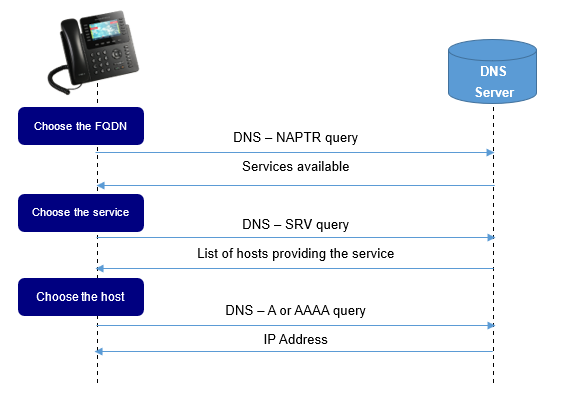
DNS-SRV
DNS-SRV Format
The format for a DNS SRV lookup is the following:
_Service._Proto.Name TTL Class SRV Priority Weight Port Target
| Field | Description |
|---|---|
Service | The name of the service to resolve (http, sip, ldap…). |
Proto | The protocol used by this service (udp or tcp). |
Name | The domain name of the wanted service |
TTL | The time interval that the resource record may be cached before the source of the information should again be consulted. |
Class | Specify the type of the Resource record it can be:
|
Priority |
|
Weight |
|
Port | The port on this target host of this service. The range is 0-65535. |
Target | The domain name of the target host. This entry should return one or more address records for this name. |
Configuring DNS-SRV On Grandstream Devices
GXP2170 is used in this guide as an example for the configuration.
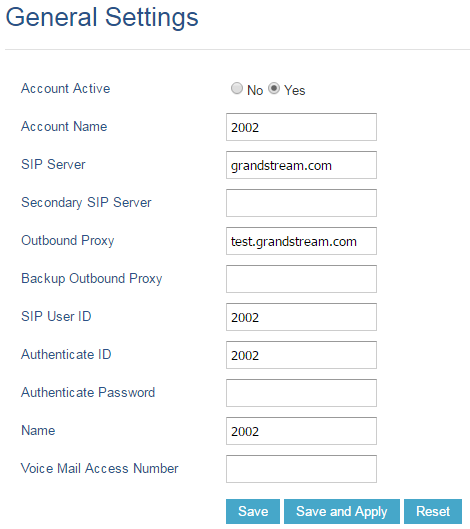
Enter account credentials under “Accounts 🡪 Account X 🡪 General Settings”.
In this example, “SIP Server” is “grandstream.com” and “Outbound proxy” is “test.grandstream.com”.
Set “DNS Mode” to “SRV” under “Accounts 🡪 Account X 🡪 Network Settings”
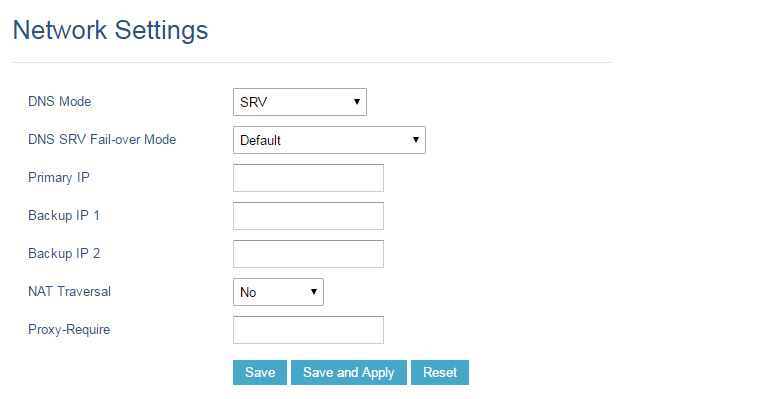
The table below explains available options related to DNS configuration:
| Field | Description |
|---|---|
DNS Mode |
|
DNS SRV Fail-over Mode |
|
DNS-SRV Lookup
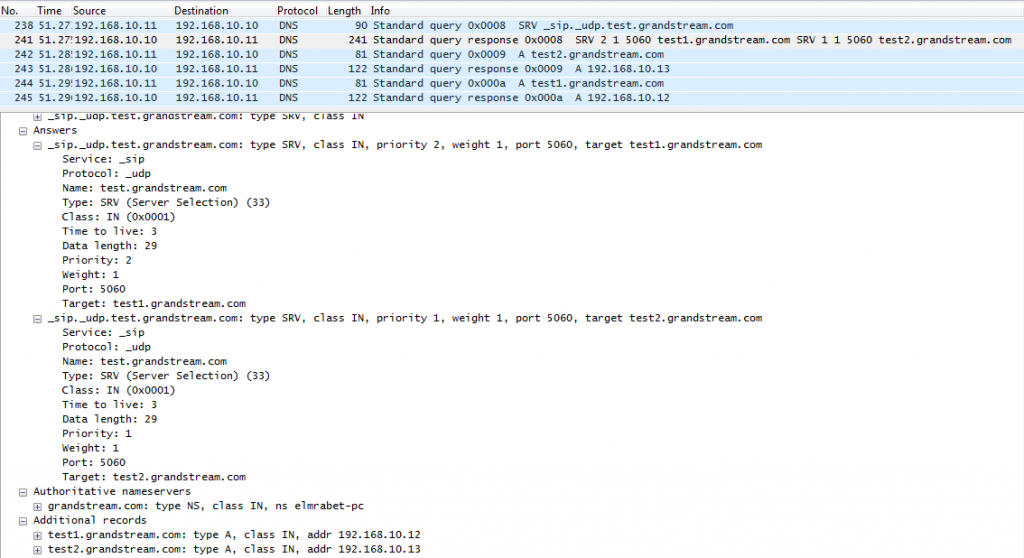
To register an account in the above example, the phone will try to resolve the domain “test.grandstream.com”, therefore:
- The phone will send an SRV lookup for “test.grandstream.com”.
- The DNS server will reply with a list of FQDNs with different weights and priorities.
- The phone will issue an A record query for all the FQDNs (Fully Qualified Domain Names) starting from the one with the lowest priority number.
- The DNS server will send back the IP addresses associated with those FQDNs.
- The phone will then send a SIP REGISTER request to the IP address associated with the lowest priority number returned by the SRV lookup.
Registration Process
If the primary SIP server where the phone is registered (192.168.10.13) fails, the phone acts as follows:
- After the register expiration, the phone will send 3 SIP REGISTER requests to the primary server, and won’t get a reply.
- The phone will consider the server not available and then send a REGISTER request to the backup server (192.168.10.12).

Once the primary server returns to normal, after the register expiration, the phone will send another REGISTER request to the primary server.
DNS NAPTR/SRV
DNS NAPTR/SRV Format
NAPTR resource records are used to replace compact, regular expressions with a replacement field that may well be a pointer to another rule; its DNS-type code is 35.
The format of an NAPTR record is as follows:
Domain TTL Class Type Order Preference Flags Service Regexp Replacement
| Field | Description |
|---|---|
Domain | The domain name to which this resource record refers |
TTL | Specify the time interval that the resource record may be cached before the source of the information should again be consulted. |
Class |
|
Type | DNS type code for NAPTR is 35 |
Order |
The “S” flag indicates that the next lookup should be an SRV lookup. The “A” flag indicates that the next step is a DNS A, AAAA, A6 record lookup. The “U” flag means that the next step is not a DNS lookup but that the output of the Regexp field is an URI that adheres to the ‘absoluteURI’. The “P” flag indicates that the remainder of the lookup are defined by the application that uses the NAPTR. |
Preference |
|
Flags |
|
Service | Specifies the services available in this domain. The replacement field is used to get to this service. It can also specify the protocol used to communicate with the server that offers this service. In SIP, three services are defined along with their resolution services (resolution services are defined after the “+” sign):
|
Regexp | Carries a substitution expression that is applied to the original domain name in order to construct a new domain name for the next lookup. |
Replacement |
and hence the flag field is set to “S”. |
DNS NAPTR/SRV Lookup
Using the GXP2170 example, the DNS settings can be found under “Accounts 🡪 Account X 🡪 Network Settings”.
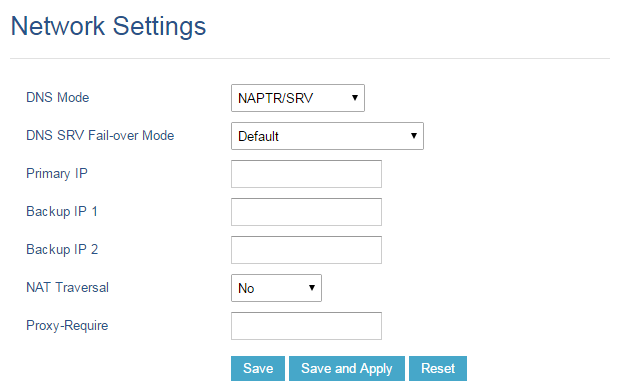
Using the example in Figure 1, to register the account, the phone will make the following lookup:
The phone will send a NAPTR lookup for the domain “test.grandstream.com”.
The server will return a NAPTR record reply that contains the next step for the lookup.
The phone will send an SRV lookup for using parameters returned on the NAPTR record.
The DNS server will reply with a list of FQDNs with different weights and priorities.
The phone will issue an A record query for all the FQDNs starting from the one with the lowest priority number.
The DNS server will send back the IP addresses associated with those FQDNs.
The phone will then send a SIP REGISTER request to the IP address associated with the lowest priority number returned by the SRV lookup.
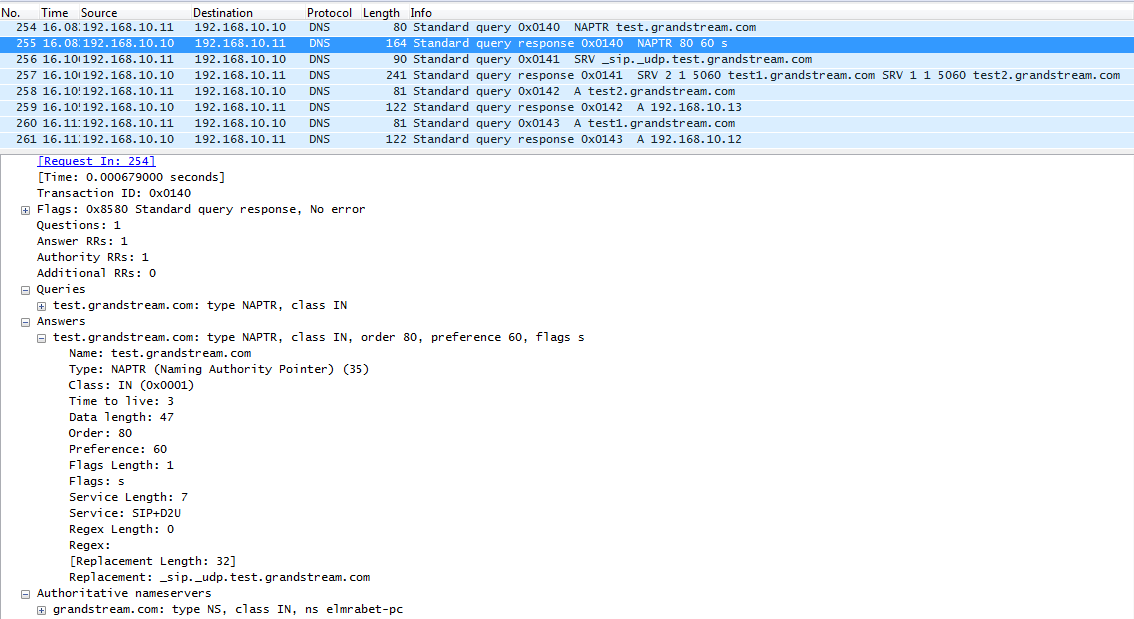
DNS SERVER CONFIGURATION
A trial Version of Simple DNS Plus is used as a DNS server in this example.
To configure Simple DNS with SRV and NAPTR records, please follow these steps:
Download and install Simple DNS Plus from this link: SimpleDNSPlus.
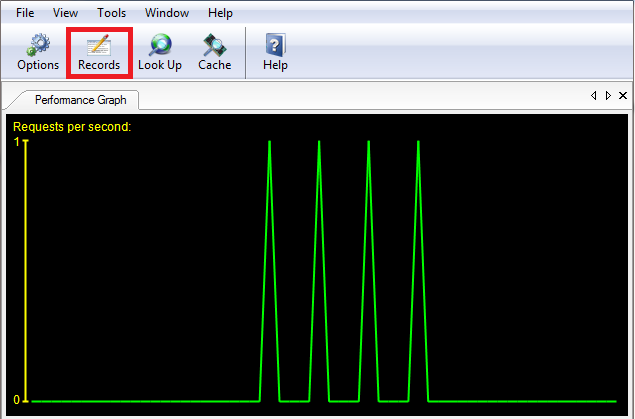
Open Simple DNS Plus and click on Records to start configuration.
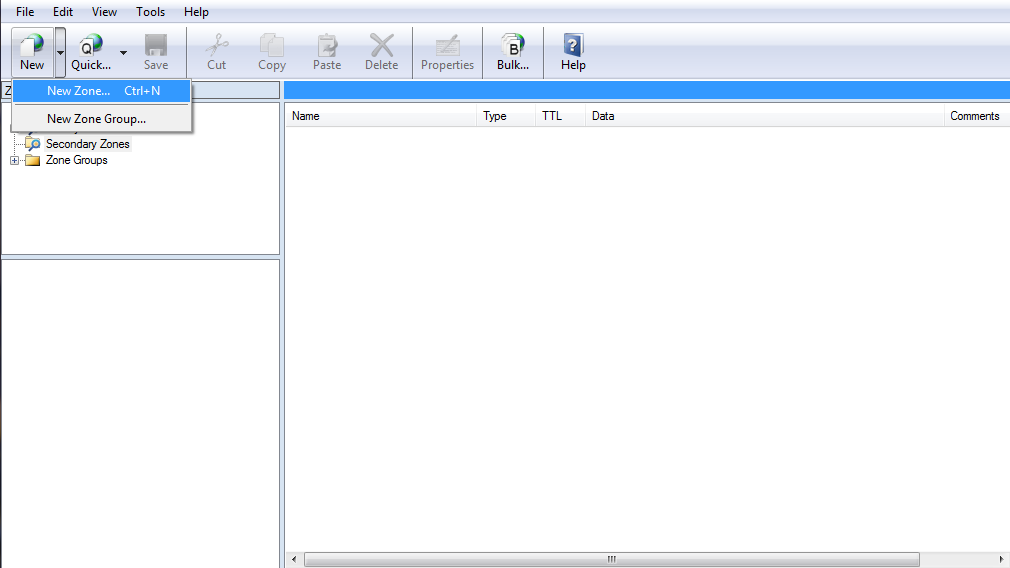
Create a new Primary Zone.
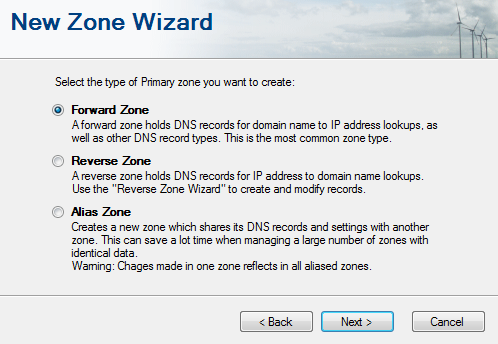
The following window will be prompted, select Forward Zone and click “Next”.
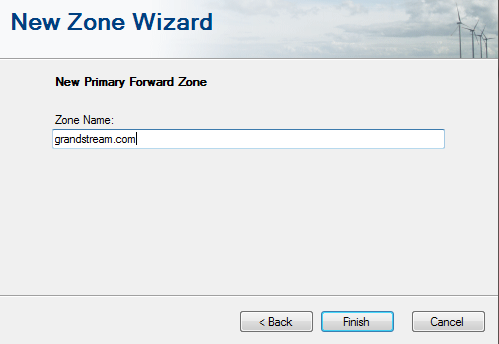
Enter the name of your zone, which is “grandstream.com” in this example, then click on “Finish”.
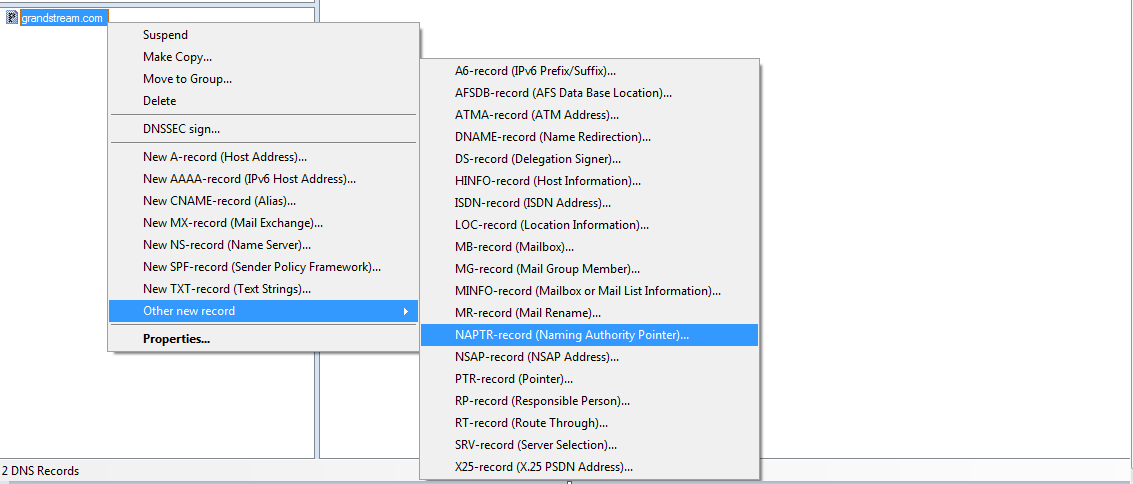
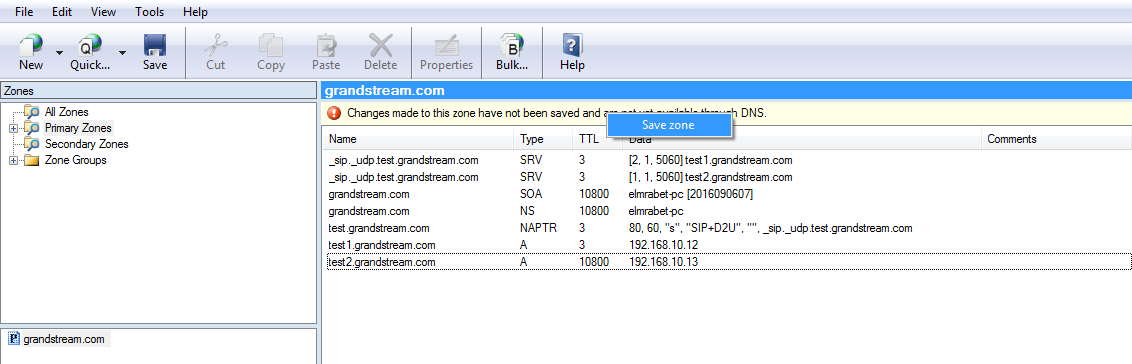
Once the zone is created successfully, start creating the records as shown in the following figure:
Right-click on the zone created, which is “grandstream.com”, then select “Other New Records” and click on “NAPTR-record”, this will create our NAPTR record.
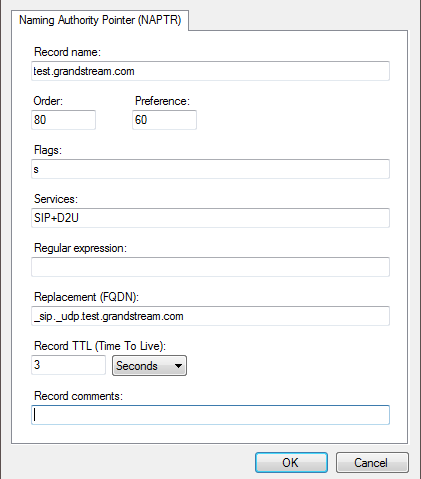
Fill in the information related to the NAPTR record and click “OK” as shown below.
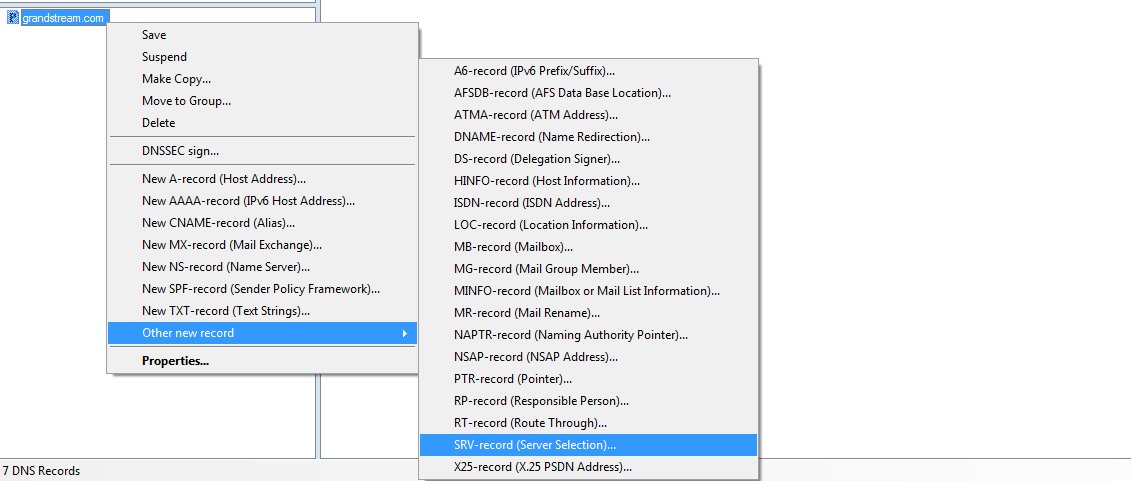
Create SRV records by clicking on “grandstream.com” zone, then select “Other New Records” and click on “SRV-record”, this will create our NAPTR record.
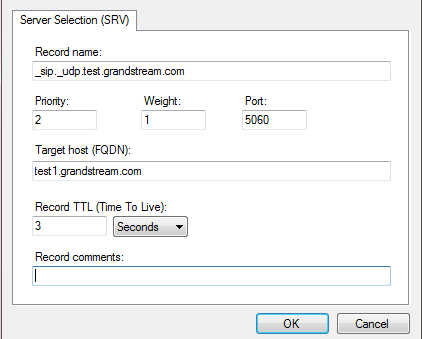
Fill in the information related to the SRV record and click “OK” as shown below.
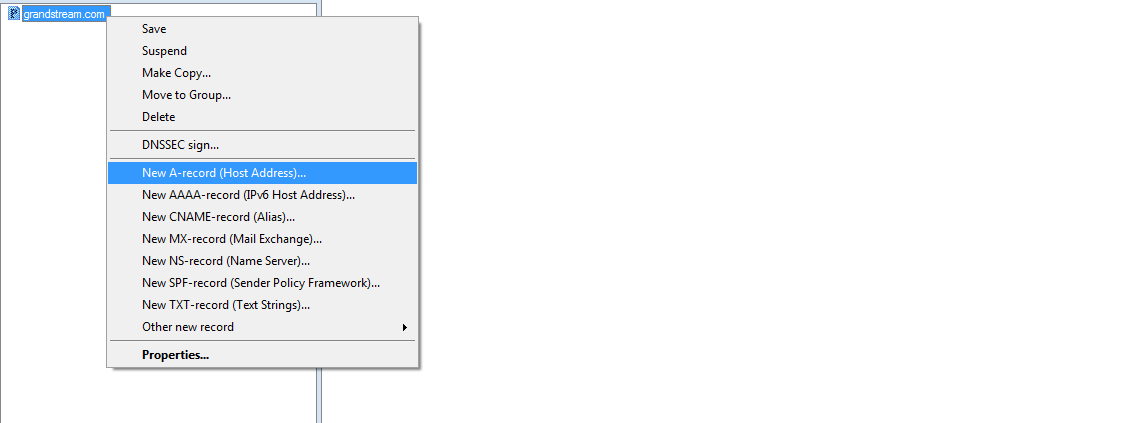
Click on “grandstream.com” zone to create SRV records, then select “Other New Records” and select “SRV-record”, this will create our NAPTR record.
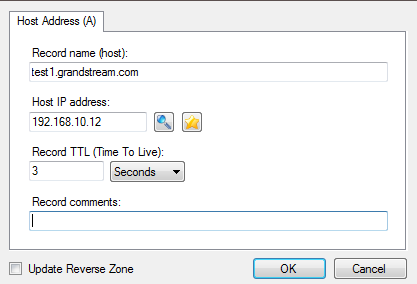
Fill in the information related to the A record and click “OK” as shown below.
Once all the Records are created, click on Save Zone as shown below to save the zone and finish the Server configuration.
SUPPORTED DEVICES
The following table shows Grandstream products supporting the DNS-SRV protocol.
| Model | Supported | Firmware |
|---|---|---|
| GXP21xx series | Yes | 1.0.7.25+ |
| GXP17xx series | Yes | 1.0.0.37+ |
| GXP16xx series | Yes | 1.0.4.6+ |
| GVC3200/GVC3202 | Yes | 1.0.1.74+ |
| GVC3210 | Yes | 1.0.1.69+ |
| GVC3220 | Yes | 1.0.1.24+ |
| GAC2500 | Yes | 1.0.1.44+ |
| GXW42xx series | Yes | 1.0.5.16+ |
| HT8xx series | Yes | 1.0.2.5+ |
| DP75x series | Yes | 1.0.1.20+ |
| GXV3380 | Yes | 1.0.3.56+ |
| GXV3370 | Yes | 1.0.3.57+ |
| GXV3350 | Yes | 1.0.3.57+ |
| GXV34xx Series | Yes | 1.0.3.33+ |