


Function Overview
Thank you for purchasing the UCM630x series IPPBX. The UCM630x series is a brand-new IP PBX based on the Asterisk* 16 open-source telephone operating system. It uses a convenient management approach to provide a powerful and easily scalable unified communications solution for businesses of all sizes. Supports up to 3,000 users, providing one-stop solutions for enterprise communication needs, integrating voice/video calls, meeting rooms, video surveillance, data tools, data analytics, mobile office, facility access, internal communication, and more.
The UCM630x series IP PBX provides a backup packet conversion tool, supporting mutual conversion between different models of Grandstream IPPBX devices, facilitating device replacement and data migration. Additionally, the tool specifically supports converting 3CX system backup packages into formats available in the UCM630x series.
This manual aims to guide users in completing the backup package conversion from 3CX to UCM630x. The main content includes version requirements, operation steps, key precautions, and configuration mapping explanations to help users quickly complete the configuration and migrate smoothly.
3CX Backup Archives are Converted Into UCM630X Backup Packages
Version Requirements
- 3CX: V18 or V20 versions.
- UCM630X: Version 1.0.31.7 and above.
Conversion Steps
Create a 3CX backup package
Before converting, you need to export a backup from your 3CX system. Follow these steps carefully:
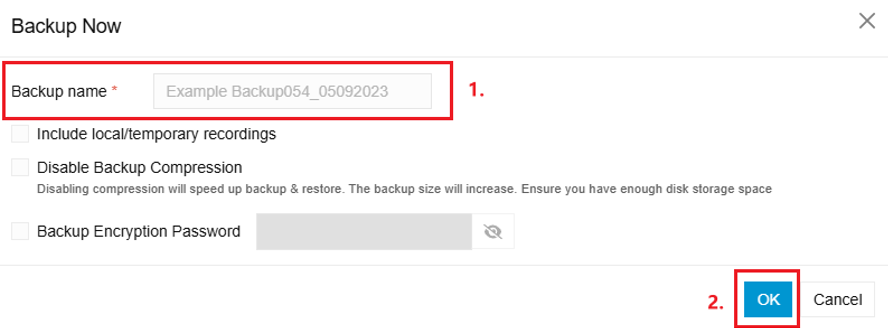
- In your 3CX admin interface, navigate to Backup and click Backup Now.
- Enter a name for the backup in the Backup name field.
- Do not check any of the following optional settings, as they are not supported when restoring to UCM630X devices:
- Include local/temporary recordings
- Disable Backup Compression
- Backup Encryption Password
- Click OK to generate the backup package.
Convert Backup Packages
There are two ways to convert 3CX backup packages to UCM format:
Method 1: GDMS Web Portal
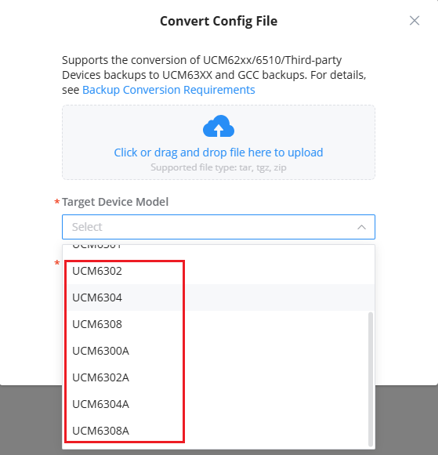
- Log in to the GDMS portal, navigate to Cloud Storage, and select the Convert Config File option.

- Upload the 3CX zip backup package by clicking or dragging the file into the upload area.
- Under Target Device Model, select the target UCM630X model from the dropdown.
- Complete the conversion.
Method 2: Windows Configuration Tool
- Download the Windows Configuration Tool from the Grandstream Support Tools page.
- Open the Windows Configuration Tool on your PC.
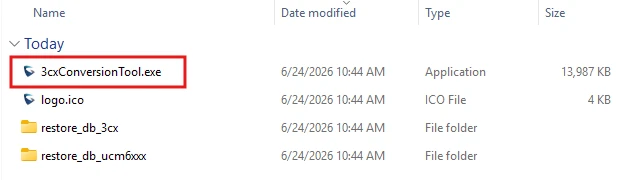
- Upload the 3CX zip backup package using the file upload option.
- Type the name of the target UCM model in the provided field.
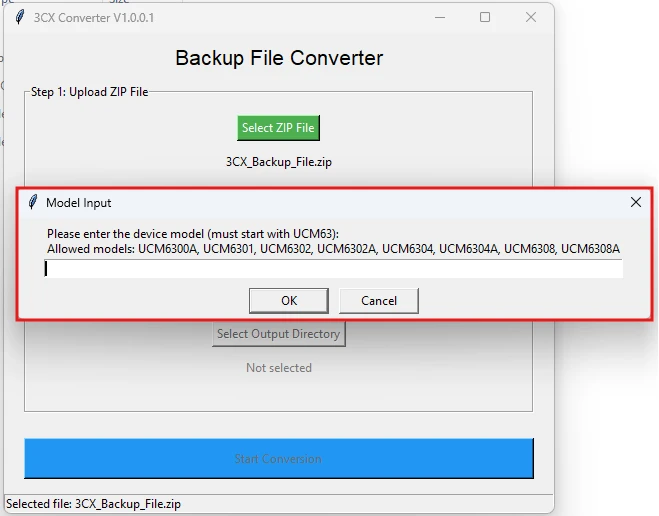
- Choose the destination folder where the converted file will be saved.
- Run the conversion and retrieve the output file from the selected folder.
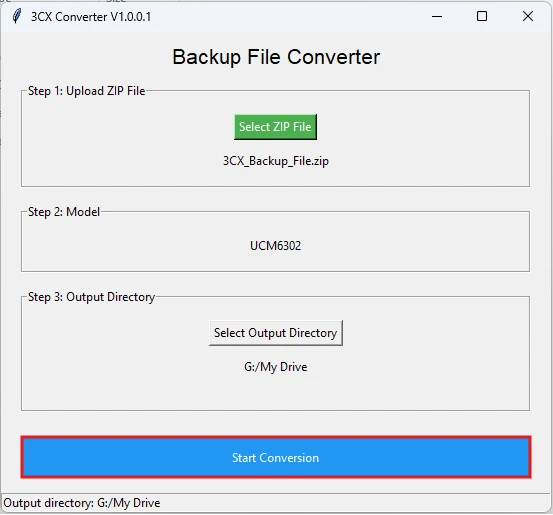
Mapping Description of the Conversion Configuration Item
Extension
Introducing the mapping settings between UCM630X and the 3CX telephone system for “Users,” corresponding to the “Extension/Relay → Extension” page on the UCM630X.
Basic Setup
UCM630X Configuration | 3CX Configuration |
Extension | Extension Number |
CallerID Number | Outbound Caller ID |
SIP/IAX Password | Random password |
AuthID | Authentication ID |
Disable This Extension | Disable Extension |
First Name | First Name |
Last Name | Last Name |
Email Address | Email Address |
User/Wave Password | Random password |
Mobile Number | Mobile Number |
Sync Contact | Hide User |
Call Strategy
Business
UCM630X Configuration | 3CX Configuration |
Ring Timeout (s) | Internal Calls – If calls are not answered within the number of configured seconds. |
Auto Record | Select if you want recording enabled and choose from the available recording options. |
Email Missed Call Log | Send email notification on missed call. |
Voicemail
UCM630X Configuration | 3CX Configuration |
Voicemail | Enable Voicemail |
Voicemail Password | PIN Number |
Skip Voicemail Password Verification | Disable Voicemail PIN Authentication |
Send Voicemail Email Notification | Email Options: No email notification / Send vmail as attachment / Send as attachment and delete from mbox / Send email notification only |
Attach Voicemail to Email | Email Options: No email notification / Send vmail as attachment / Send as attachment and delete from mbox / Send email notification only |
Keep Voicemail after Emailing | Email Options: No email notification / Send vmail as attachment / Send as attachment and delete from mbox / Send email notification only |
Extension Group
Introducing the mapping settings between UCM630X and the 3CX telephone system for “Groups,” corresponding to the “Extension/Trunk → Extension Group” page on the UCM630X.
SIP Trunk
Introducing the mapping settings for “SIP trunks” between UCM630X and 3CX telephone systems, corresponding to the “Extension/Relay → VoIP Relay” page on the UCM630X.
Basic Setup
UCM630X Configuration | 3CX Configuration |
Type | Type of Authentication |
Provider Name | Enter name for Trunk |
Host Name | Registrar/Server/Gateway Hostname or IP |
Transport | Transport Protocol |
Username | Authentication ID (aka SIP User ID) |
Password | Authentication Password |
AuthID | 3 Way Authentication Password |
Outbound Proxy Support | Outbound Proxy |
Advanced Settings
UCM630X Configuration | 3CX Configuration |
Codec Preference | Codec priority |
Max Concurrent Calls | Number of concurrent calls per trunk |
Send Diversion Header | Include diversion header support |
SRTP | SRTP Mode |
Inbound Route
Introducing the mapping settings for “Inbound Rules” between UCM630X and 3CX telephone systems, corresponding to the “Extension/Trunk → Inbound Routing” page on the UCM630X.
UCM630X Configuration | 3CX Configuration |
Inbound Rule Name | Name |
Inbound Number Matching Pattern | DID/DDI |
Source Caller ID | Caller ID |
CID Source | DID Rule: DID/DDI CID Rule: Choose a SIP Trunk for this Inbound Rule. |
Default Destination | Destination for calls during office hours. |
Time Condition | Destination for calls during office hours. Destination for calls outside of office hours. |
Excluding Holidays | Apply these office hours even if it’s global holiday. |
Outbound Route
Introduces the mapping settings for “Outbound Routes” between UCM630X and 3CX telephone systems, corresponding to the “Extension/Trunk
| UCM630X Configuration | 3CX Configuration |
|---|---|
| Outbound Rule Name | Rule Name |
| Outbound Number Matching Pattern | Calls to numbers starting with prefix Calls to numbers with a length of |
| Outbound Route CID | Outbound caller CID |
| Enable source Caller ID Allowlist Allowlisted Extensions/Extension Groups | Calls from extension(s) Calls from extension group(s) |
| Trunk | Trunk |
| Strip | Strip Digits |
| Prepend | Prepend |
IVR
Introducing the mapping settings between UCM630X and the 3CX telephone system for “Digital Receptionists”, corresponding to the “Basic Call Features → IVR” page on the UCM630X.
UCM630X Configuration | 3CX Configuration |
Name | Enter a name |
Extension | Extension |
Prompt | Prompt |
Response Timeout (s) | If no input within seconds |
Key Pressing Events | Key 0-9 and the destination If input is invalid then |
Dial Other Extensions → Extension | Allow callers to dial extensions |
Key Pressing Events → Timeout → Destination | Send call to |
Ring Group
Introducing the mapping settings for “ring groups” between UCM630X and 3CX telephone systems, corresponding to the “Basic Call Services → Ring Groups” page on the UCM630X.
Basic Setup
UCM630X Configuration | 3CX Configuration |
Extension | Virtual Extension Number |
Ring Group Name | Name |
Ring Strategy | Ring Strategy Ring All/Prioritized Hunt |
Ring Timeout for Each Member | Ring Time (Seconds) |
Local Members | Group Members |
Enable Destination Default Destination | Destination if no answer |
Call Queue
Introducing the mapping settings for “Call Queues” between UCM630X and the 3CX telephone system, corresponding to the “Basic Call Services → Call Queue” page on the UCM630X.
Basic Setup
UCM630X Configuration | 3CX Configuration |
Extension | Extension |
Name | Name |
Proficiency Routing Strategy | Polling Strategy (see the Reference Strategy Mapping Table in the Notes) |
Agent Ring Time (s) | Ring Time (seconds) |
Max Queue Length | Maximum callers in queue |
Agent Rest Time (s) | Wrap-up Time (seconds) |
Music on Hold | Music on Hold |
Custom Prompt Enable | Intro Prompt |
Custom Prompt | Intro Prompt |
Play Full Welcome Prompt | Play full intro prompt before calling agents |
Max Wait Time | Maximum Queue Wait Time (seconds) |
Destination | Destination if no answer |
Advanced Settings
UCM630X Configuration | 3CX Configuration |
Enable Virtual Queue | Enable Queue Callbacks |
Virtual Queue Mode | Configure how customers in the queue can request a callback |
Virtual Queue Period (s) | Callback timeout (seconds) |
Virtual Queue Outbound Prefix | Outbound Prefix |
Enable Position Announcement | Announce Queue position to caller |
Announcement Interval (s) | Announcement Interval (seconds) |
Enable Wait Time Announcement | Announcement Interval (seconds) |
Queue Chairman | Select queue manager extension number |
Enable SLA Time (s) | Notify Queue manager via email when SLA time has been breached |
Agents
UCM630X Configuration | 3CX Configuration |
Dynamic Agents | Call Queue Agents |
Call Policy Mapping Table
UCM630X Configuration | 3CX Configuration |
ringall | Ring All Prioritized Hunt Hunt by Threes Random Hunt by Threes Prioritized |
random | Hunt Random Start |
rrmemory | Round Robin |
leastrecent | Longest Waiting |
fewestcalls | Fewest Answered Least Talk Time |
Below, call strategy mapping and check [Strategy] | |
ringall | Skill Based Routing Ring All |
random | Skill Based Routing Hunt Random Start |
rrmemory | Skill Based Routing Round Robin |
fewestcalls | Skill Based Routing Fewest Answered |
Contact
Introducing the mapping settings between UCM630X and the 3CX phone system for “Contacts”, corresponding to the “Contacts → Contact Management → External Contact” page on the UCM630X.
UCM630x Configuration | 3CX Configuration |
Mobile Number | Mobile |
First Name | First Name |
Last Name | Last Name |
Email Address | Email Address |
Home Number | Home |
Fax | Business Fax |
Remark | — |
Time Settings
Introducing the mapping settings for “Office Hours” between UCM630X and the 3CX phone system, corresponding to the “System Settings → Time Settings” page on the UCM630X.
Office Hours
UCM630X Configuration | 3CX Configuration |
Week | Days of Week |
Time | Office Hours |
Holidays
UCM630X Configuration | 3CX Configuration |
Name | Name |
Year | Is Every Year |
Month / Day / Time | Date |
MOH
Introducing the mapping settings for “Music on Hold” between UCM630X and the 3CX phone system, corresponding to the “PBX Settings → Hold Tone” page on the UCM630X.
MOH files from 3CX’s original “Music on Hold” module will be converted and stored on the UCM630X’s “PBX Settings → Hold on Sound” page management.
Notification Sound
Introducing the mapping settings for “Intro Prompt” between UCM630X and the 3CX phone system, corresponding to the “PBX Settings → Voice Prompt Tone → Custom Prompt” page on the UCM630X.
The prompt files from the original “Intro Prompt” module in 3CX will be converted and stored on the UCM630X’s “PBX Settings → Voice Prompts → Custom Prompt” page for management.